


Blog
TowMaster Case Study:
Building a Lean Ionic Driver App That Replaces Phone Calls
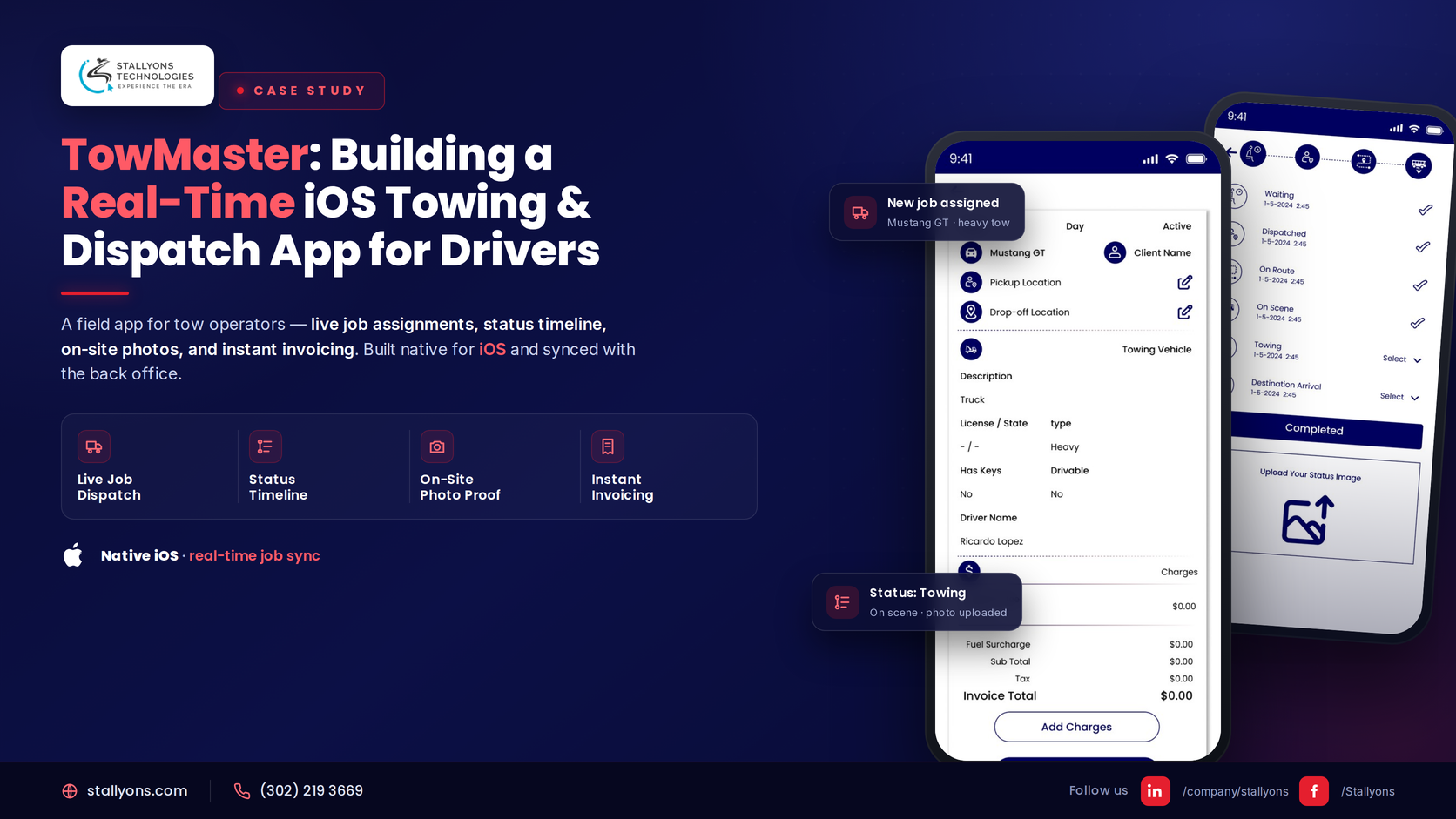
A towing company runs on timing and clear communication. When a driver is out on a job, the office and the customer need to know where things stand, and without a simple tool that answer usually comes from a phone call that pulls the driver off the road. TowMaster fixes that. It puts job status in the driver’s hand, so one tap moves a tow from in route to completed and the office sees the change at once.
This case study covers the problem, the build, and the reason a lean, purpose-built app often beats a heavy off-the-shelf platform. TowMaster is a business tool, a piece of logistics and dispatch software where efficiency, reliability, and fit with the client’s existing system are treated as the whole point.
The Problem: A Tow Company Runs on Status, and Phone Calls Break It
When a driver is out on a tow, the whole operation depends on knowing where the job stands. The usual ways of tracking that are slow and error-prone. TowMaster was built to close a clear set of gaps.
- Status updates depend on phone calls. To learn where a tow stands, someone has to call the driver, which pulls their attention off the road and ties up the office.
- Job details get lost or garbled. Passing a job by phone or text means the wrong address or vehicle type slips through, and mistakes cost time and money.
- There is no clear record of progress. Without logged statuses, no one can see a job’s history or prove when each step happened.
- Proof of condition is hard to capture. Drivers need to show a vehicle’s state before towing, and loose photos in a camera roll are easy to lose and hard to tie to a job.
- Off-the-shelf tools do too much. The big dispatch platforms are heavy and built for everything, when a small company often just needs a clean driver app that fits how it already works.
The problem was not a lack of features. It was the friction and guesswork of tracking a job by phone, and that is what TowMaster removes.
The Solution: Sign In, Get the Job, Tap to Update
TowMaster gives the driver exactly what they need and nothing they do not. The flow is short and clear, built for someone working on their feet. A driver signs in on a simple screen, which is the only account step, since the client manages drivers on their side. When a dispatcher assigns a job, the app delivers it as a push notification, so the driver knows right away. They open the job to see the description, the vehicle type, the pickup and drop-off locations, and the current status, all on one screen. As the tow moves, the driver updates the status with a tap, and each change saves to the database at once. Along the way, they can upload photos that are tied to that exact job.
| Step | What the driver does |
|---|---|
| 1 | Signs in on the sign-in screen |
| 2 | Receives a new job as a push notification |
| 3 | Opens the job to view description, vehicle type, locations, and status |
| 4 | Taps to set the status to In Route as they head out |
| 5 | Updates to On Scene, Towing, and Destination Arrival as the tow moves |
| 6 | Uploads photos from the job when needed |
| 7 | Marks the job Completed when the tow is done |
Sign in, get the job, tap to update, and snap the photos. The office and the customer always know exactly where the tow stands.
Status Updates That Replace Phone Calls
The status flow is the heart of TowMaster. With a single tap, a driver moves a job through clear stages, and the office sees each change instantly, with no phone call needed. Because every stage is saved the moment the driver taps it, the company also gets a clean, time-stamped record of how each job progressed.
| Status | What it means |
|---|---|
| In Route | The driver is on the way to the pickup location |
| On Scene | The driver has arrived at the pickup location |
| Towing | The vehicle is loaded and the tow is under way |
| Destination Arrival | The driver has reached the drop-off location |
| Completed | The tow is finished and the job is closed |
One feature, the tap-to-update status, saves time on every single job and keeps the driver focused on the road.
Built to Fit Your System, Not Replace It
TowMaster does not force the client to change how they work. The client keeps managing drivers and assigning jobs on their own system, and the app simply reads and writes to their MySQL database through a secure backend. Job details come from the database, and every status change and photo goes back to it, so the driver app and the client’s system stay in step at all times. This is the advantage of a purpose-built product over a rigid platform: the app fits around the business, not the other way around. A custom app can slot into the tools you already run, so you gain a driver app without disrupting your back office.
Simple on Purpose: Why Less Is a Feature
There is no admin panel and no map in this first version, and that is deliberate. By focusing only on the driver’s needs, the app stays fast, easy to learn, and reliable in the field, so a driver can pick it up and use it on their first shift. Keeping the first build lean also keeps it affordable and quick to ship, and the app was structured so future additions, such as maps, can be added later without rebuilding the core. The honest limit of that leanness is visibility between taps: with no map in the first version, the office sees the stage the driver last tapped but not the truck moving on a live map, so a status is only as current as the driver’s most recent tap, a deliberate trade for an app that ships fast and stays reliable, with maps left as a clean future addition.
The Technical Architecture Behind TowMaster
TowMaster is built with Ionic, backed by a Laravel API that reads and writes to the client’s MySQL database. The app stays light and focused on the driver, while the backend handles sign-in, job data, status updates, photos, and push notifications. The most important job of the architecture is to keep the app and the client’s database in step at all times.
The mobile app is a single Ionic codebase for iOS and Android, giving the driver a clean, fast interface. Between it and the data sits a secure Laravel API integration that handles sign-in, jobs, and updates, and reads and writes to the client’s own MySQL database, where job details, statuses, and records live. A single driver sign-in screen is all the app needs, since the client manages drivers on their side; push notifications alert the driver the moment a new job is assigned; cloud-backed storage holds job photos and ties them to the right job; and the app is published through the Apple App Store on an Apple Developer Account.
A few subsystems carry the product. The app never touches the database directly; it calls a secure Laravel API that reads from MySQL and writes every status change and photo back to it, which keeps the data safe and consistent. Job-assignment notifications push a new tow to the right driver the moment it is assigned. The status update engine sends each tap to the backend and saves it at once, giving the office a live view and a time-stamped history. Photos are uploaded through the backend and linked to the job’s record. This kind of integration-first, made-to-measure work is where a purpose-built Ionic app stands apart from a template build.
A secure API in the middle lets a lightweight Ionic app work safely against a database the client fully controls.
The Result
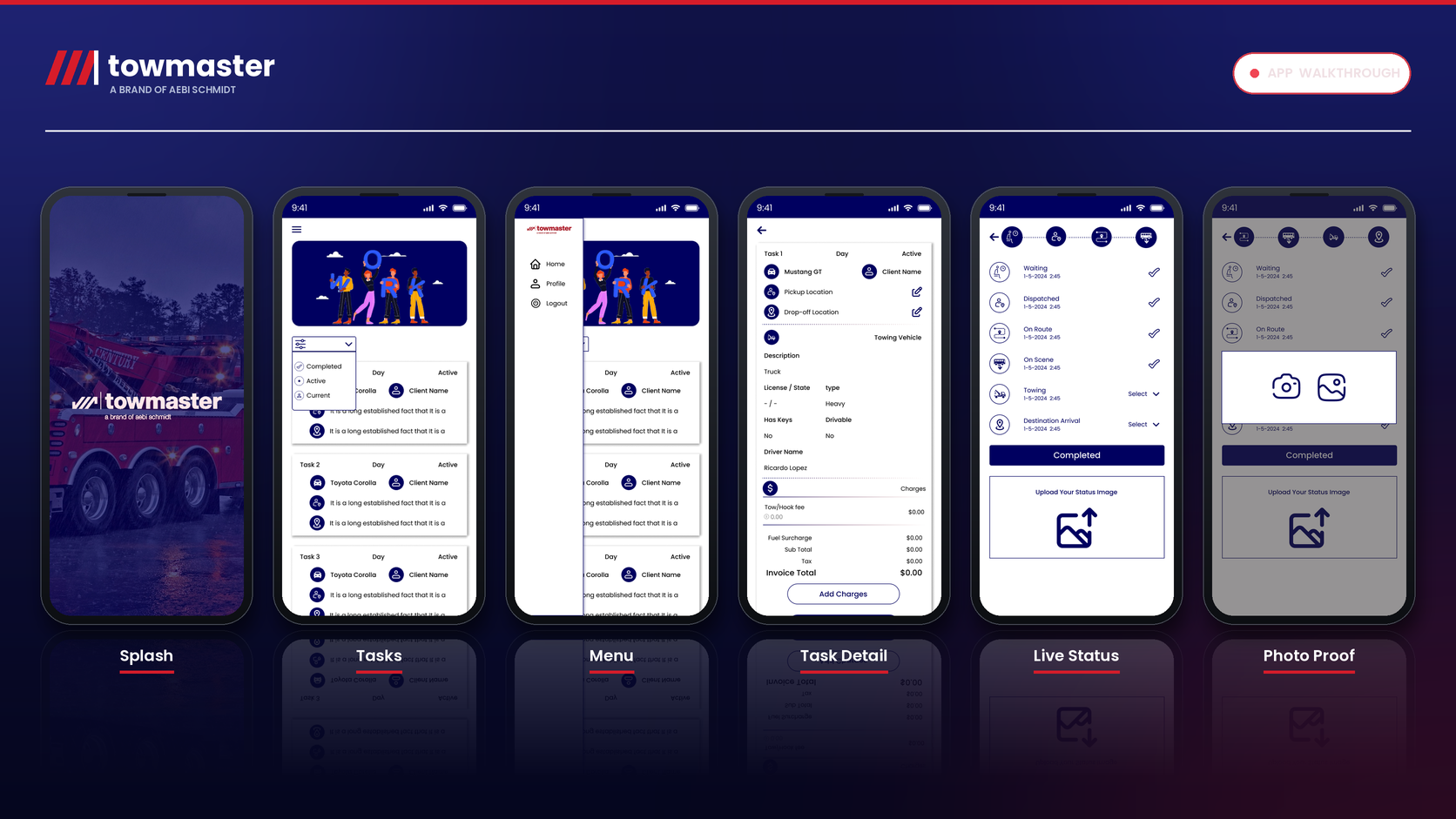
The finished product is a clean, reliable driver app built with Ionic, backed by a Laravel API over the client’s MySQL database, and published on the Apple App Store. A driver signs in, receives jobs by push notification, views the full details, updates the status through every stage, and uploads photos, all saved to the database in real time. The client keeps full control of driver management and job assignments on their own system, while TowMaster handles the field side. It replaces phone calls and guesswork with clear, tapped status updates and a complete record of every tow. The office knows where each job stands, the customer can be kept informed, and the driver has a simple tool that just works.
What This Means When You Want to Hire an Ionic Team
TowMaster shows the difference between a team that sells a heavy platform and a partner that builds exactly what a business needs. A custom operational app depends on clean integration with the systems you already run, a scope disciplined enough to ship, and an architecture that leaves room to grow. When you weigh a build partner for work like this, look for a team that will fit the app to your workflow rather than force you to change it.
If you want to build against your existing database with a partner who takes an integration-first approach, that is exactly what our Ionic app development delivers. Because Ionic ships one codebase to both platforms, it also fits neatly under our wider cross-platform app development work, whether you want a single lean build or a full team. We deliver across use cases, from field tools like TowMaster to consumer products like our SNKR on-demand cleaning app and network-driven apps like our Reflyca referral platform, both also built on Ionic.
Frequently Asked Questions
Can an Ionic app integrate with our existing database?
Yes. TowMaster reads and writes to the client’s own MySQL database through a secure Laravel API, so the app fits around the systems you already run rather than replacing them.
Is Ionic a good choice for a field or driver app?
It is. Ionic delivers one codebase for iOS and Android with a clean, simple interface, which suits an app that has to be fast, reliable, and easy to learn on the job.
Can we start with a lean app and add features like maps later?
Yes. TowMaster launched without an admin panel or map on purpose, and it was structured so additions like maps can be built later without rebuilding the core.
How long does an app like TowMaster take to build?
A focused first version like this is quick to deliver because the scope is deliberately tight. A single sign-in, job notifications, status updates, and photo uploads make for an efficient build on one Ionic codebase.
Can Stallyons build a custom app that fits our workflow?
Yes. Stallyons delivers full Ionic app development, from product scoping and design to a secure backend and integration with your existing database, for custom business and field applications.
Start Your Ionic App With Stallyons
TowMaster proves a simple point. When you build exactly what a business needs, integrate with what it already runs, and resist the urge to overbuild, you get a tool people trust from the first shift. If you are planning a custom business app, a field or driver tool, or any integration-first product, our Ionic app development services can turn the idea into a fast, dependable, cross-platform app. Book a discovery call with the Stallyons team, and let us build something that fits the way you already work.