


Blog
WooCommerce Variable Price
Display
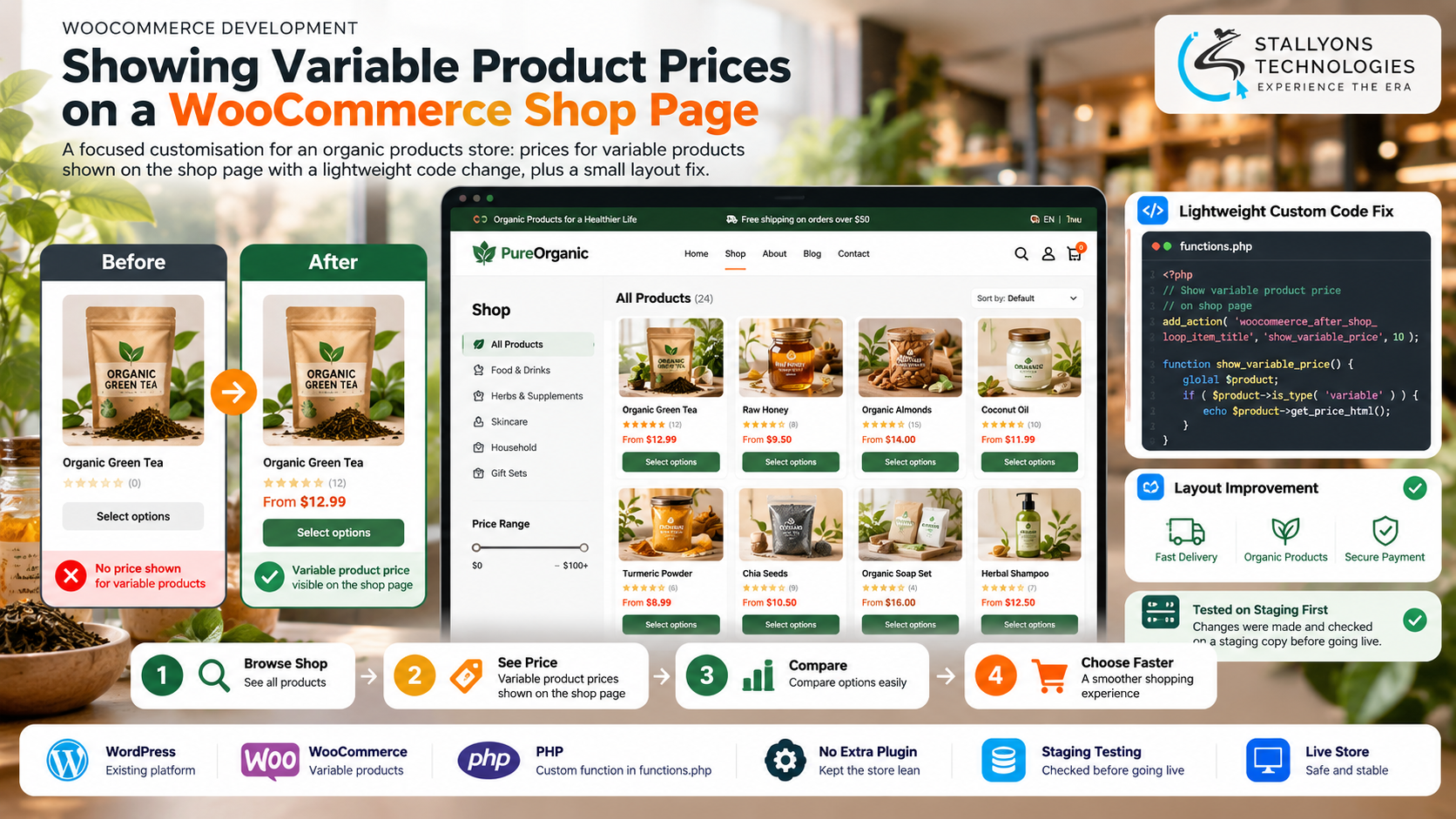
Think about how you shop on a store’s main grid. You scan prices, compare a few products, and only click into the ones worth a closer look. Now take the price away. On an organic products store built on WooCommerce, every variable product, the ones with size or pack options, showed up on the shop page with no price at all. Shoppers had to open each product just to find out what it cost, then back out and open the next one to compare.
Variable Price Display is a focused customisation that put those prices back on the shop page. The store runs on WordPress and WooCommerce, and many of its products are standard WooCommerce variable products set up in the admin with options like size or pack. The owner wanted the prices shown directly on the shop grid, done cleanly, with no side effects on the rest of the store and no extra plugin to maintain. We found the cause in the first conversation, agreed a fixed scope, and delivered the change the same day.
Put simply, a shopper can now see the price of every product on the shop page at a glance, without clicking into each one, thanks to a small, contained code change tested before it went anywhere near customers.
The Starting Point: A Small Fix With Clear Boundaries
Small does not mean casual. The owner had sensible conditions, and each one shaped how the work was done. The point was to fix one visible problem without introducing three invisible ones.
- Show hidden prices. Variable products appeared on the shop page with no price, unlike simple products, so the grid looked inconsistent and incomplete.
- Remove the extra clicks. Shoppers had to open each product just to compare prices, which slowed down the browse-and-choose path the shop page exists to serve.
- Keep the store light. The owner preferred not to add another plugin for one small behaviour, so the fix had to live in a few lines of code.
- Protect the live store. The change could not risk the rest of the shop, so it had to be tested before it reached customers.
- Stay easy to find later. Whatever was added had to sit somewhere obvious, so a future developer would know exactly where the behaviour comes from.
The Build: Diagnose First, Then a Few Lines of Code
The first job was not writing code; it was confirming the cause. Once we verified the products were standard WooCommerce variable products set up correctly in the admin, the fix was a short custom function rather than a plugin. Choosing a contained function over another add-on is the kind of judgement a WooCommerce development team makes to keep a store lean, because a plugin would have added weight and update overhead for one small display behaviour. The work ran in a clear order:
- We diagnosed why variable prices were not showing, in conversation, before any code was written.
- We confirmed the products were standard WooCommerce variable products configured in the admin.
- We added a small custom function to the theme’s functions file so the shop page displays the price for each variable product.
- We made and checked the change on the client’s staging copy of the store first, not the live site.
- During review, the client asked for a group of three icons to sit on a single line, so we fixed that layout detail as an extra.
- The client checked the staging shop page, approved the result, and the change went live.
Putting the function in the theme’s functions file, rather than a plugin, keeps the store lean and the change easy to find later. The small icon-alignment request had not been part of the original task, but handling it as a quick extra kept the shop page tidy alongside the new prices without reopening the whole project. For stores that need this kind of targeted, low-risk change, treating it as proper web development work on a staging copy is what keeps a live shop safe.
Also readA CS-Cart subscription platform that gives dental clinics ready-made social posts in one click
Technical Architecture
There is no new platform here and nothing heavy. The whole point was to change one behaviour with the lightest possible footprint on an existing store. Each piece has a clear role.
- Platform. WordPress runs the client’s existing organic products store, untouched beyond the one change.
- Store. WooCommerce holds the variable products, already set up in the admin with their size and pack options.
- Customisation. A short PHP function in the theme’s functions file displays the variable price on the shop page, with no extra plugin to maintain.
- Layout. A small theme fix keeps the group of three icons aligned on one line.
- Environment. A staging copy of the store carried the change first, so it was checked before going live.
- Handover. The client was told exactly where the code lives, so the behaviour is never a mystery later.
The care in a job like this is not in volume of code; it is in containment. Keeping the change inside one function means the behaviour can be found, read, and reversed in seconds, and nothing else in the store depends on it in a way that could surprise someone months from now. A plugin, by contrast, would have brought its own settings screens, update cycle, and compatibility quirks into a store the owner wanted kept simple. For a single display behaviour tied to products that already exist in the admin, that trade was never worth making.
Challenges Solved
The main concern was making sure the change affected nothing else. On a live store, even a small edit can ripple into templates and queries you did not intend to touch. We kept the work in one contained function and checked it on the staging copy before sign-off, so the owner could be confident the rest of the shop behaved exactly as before. The second decision was plugin or code: a plugin would have added weight and ongoing updates for one small behaviour, so a few lines in the functions file were the cleaner, lighter choice.
The third was scope that grows during review, which happens on almost every project. The icon-alignment request arrived while the client was checking the result. It had nothing to do with prices, but it sat right next to the new prices on the same page, so leaving it crooked would have undercut the tidy result the owner was signing off on. Rather than let it balloon into a second round or a second invoice, we handled it as a quick extra, keeping the page consistent without reopening the engagement. The change was delivered the same day the project started, within the few hours estimated, and the client released payment, left a review, and came back later to ask about further homepage work.
The Result
Every product on the shop page now shows its price, including variable products, so shoppers can compare at a glance without opening each item. The store gained no new plugin, the change sits in one findable function, and the icon row is tidy alongside the prices. Because the work was staged and contained, the owner got the fix on the same day with no disruption to the live shop, and enough confidence in the result to return for more.
If one small thing on your store is quietly costing you clarity, you can hire WooCommerce developers who diagnose first and fix lean rather than reaching for another plugin, or tell us what your shop page is hiding and we will scope the smallest safe change. It suits any online retail store that needs a precise WooCommerce tweak without bloat.
Frequently Asked Questions
What did the Variable Price Display project do?
It added a small custom function to a WooCommerce store so variable products show their price directly on the shop page, instead of appearing with no price. A minor layout fix to align three icons on one line was handled as an extra during review.
Why use a code change instead of a plugin?
A plugin would have added weight and ongoing updates for one small display behaviour. A short function in the theme’s functions file is lighter, easier to maintain, and simple to find later, which matched the owner’s preference to keep the store lean.
Was the live store at any risk?
No. The change was made and checked on the client’s staging copy of the store first, kept inside one contained function, and only moved to the live site after the client reviewed the staging shop page and approved it.
How quickly was it delivered?
The change was delivered the same day the project started, within the few hours estimated. Diagnosing the cause in the first conversation meant the actual code was short and the turnaround was fast.
Does the client know where the change lives?
Yes. The client was told exactly where the function sits in the theme’s functions file, so the behaviour is documented and any future developer can find, read, or adjust it without guesswork.