


Blog
B2B & B2C
Wholesale Garment Store: A Multi-Role BigCommerce Build
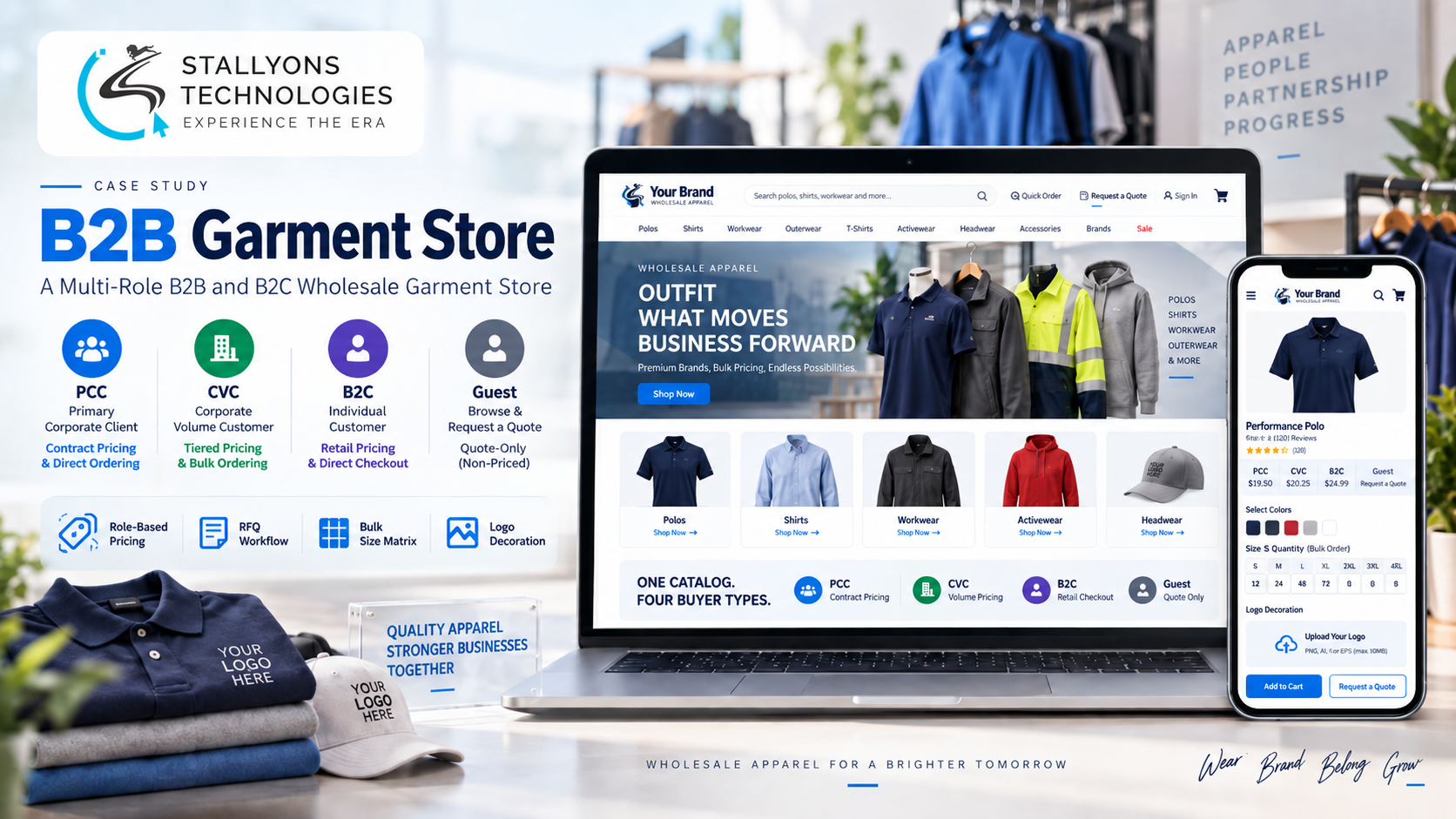
Four different people land on the same garment store on the same morning. A procurement manager at a corporate client wants a price for 500 embroidered polos. A supplier already under contract needs to reorder a run of workwear in a full spread of sizes. An employee at one of those companies just wants a single shirt for themselves. And a stranger is browsing, curious what a polo costs. One catalogue has to greet all four correctly, and none of them should see the wrong price or the wrong way to buy.
That is the problem this project set out to solve. It is a single BigCommerce B2B and B2C wholesale garment store that carries around 60 base garments, polos, shirts, workwear and the like, in colour, size, fabric-blend and gender variations, and quietly serves four audiences from that one catalogue.
Put simply, the store sorts every visitor by their email domain into one of four roles, then shows each role its own pricing and its own way to order, from a request-for-quote with a size matrix to a normal one-item checkout. No separate stores, no manual tagging on every visit.
The Starting Point: One Catalogue, Four Very Different Buyers
Selling to potential corporate clients, contracted corporate clients, self-paying employees and the public from a single catalogue means one store has to behave four different ways. The same polo is a tiered-price quote item for a prospect, a cart item with a minimum order for a contracted supplier, a fixed-price single purchase for an employee, and a “from” price for a guest who has to register before going further.
The brief was originally written around WooCommerce, using B2BKing Pro for the roles and the Porto theme for the look. The job here was to deliver that same B2B model on BigCommerce instead, and to build the pieces the platform does not ship out of the box. In practice the hard parts were five:
- Four audiences, one catalogue. The same garments must show different pricing and different ordering rules by who is looking, without maintaining four separate sites.
- Recognise the buyer automatically. The correct view has to be chosen from the buyer’s email domain, so corporate clients get their pricing and rules with no manual setup on every visit.
- Quote for some, cart for others. Prospects go through a request-for-quote process with no cart, while contracted and B2C buyers order directly.
- Bulk ordering by size. Corporate buyers order many sizes at once, so a size and quantity matrix, not one-size-at-a-time selection, is essential.
- Decorated garments. Orders usually carry a logo with a placement and an embroidery or print choice, mandatory for prospects and optional for contracted clients.
The Build: Roles by Email Domain, Pricing by Price List
The store is one BigCommerce catalogue that changes its behaviour per audience using the platform’s B2B Edition, customer groups and price lists in place of the WooCommerce plugins the brief named. When a buyer signs in, their email domain places them into a customer group, potential corporate, contracted corporate, or B2C employee, with everyone else treated as a guest. Admins maintain three domain lists rather than tagging users one at a time.
Each group then sees pricing built for it. Price lists give the two corporate groups volume-tiered pricing, give B2C employees a flat fixed price, and show guests only a starting-from lowest-tier price until they register. Because the roles are handled with native customer groups, this is exactly the kind of B2B ecommerce development work that keeps a wholesale catalogue clean instead of splitting it into copies.
The ordering path also changes by role. Potential corporate clients cannot add to cart at all; instead they build a request for quote and submit it for review. That flow is sequential, and it was built to run in order:
- Open a garment and enter quantities for every size in a single grid, the size and quantity matrix.
- Upload a logo and choose its placement and an embroidery or print finish. For prospects this step is mandatory.
- Submit the request for quote through B2B Edition’s quoting, with no cart and no checkout.
- An admin reviews the request and turns it into a formal quote for the client.
Contracted corporate clients use the same size matrix, but they add the full size breakdown to the cart as a single line item, attach a logo if they want one, and check out with a minimum-order quantity enforced. B2C employees simply pick a colour and size and buy single pieces at the flat price through a normal checkout. Guests see the “from” price and are prompted to register.
Technical Architecture
Under the hood this is a BigCommerce build that reproduces a WooCommerce brief with native platform features plus targeted custom development, on a custom theme rather than a prebuilt one. The architecture centres on a handful of subsystems, each mapped to a specific requirement.
- Roles by email domain. Custom domain assignment places buyers into BigCommerce customer groups, replacing B2BKing’s domain roles, so every visitor sees the right pricing and ordering path automatically.
- Pricing by role. Price lists drive volume-tiered pricing for the corporate groups, a flat fixed price for B2C, and a starting-from price for guests.
- RFQ versus cart. B2B Edition quoting handles the no-cart request-for-quote path for prospects; the standard cart and checkout, with minimum-order enforcement, handle contracted and B2C buyers.
- Size and quantity matrix. A custom matrix lets corporate buyers enter quantities across all sizes at once and add them as one line item, the way garment orders are really placed.
- Logo upload and decoration. A custom upload captures a logo, its placement and an embroidery or print choice, so decorated orders and quotes never lose their finishing detail.
- Catalogue, import and email. Around 60 base garments, with gender as separate products and colour, size and fabric-blend variations, are loaded by CSV from a reusable template; product tabs hold size-chart and care placeholders; and BigCommerce sends the transactional emails natively.
The custom size matrix and logo uploader were the two pieces worth building by hand, because they are where a generic store would have failed a real garment buyer. If you are weighing platforms for a build like this, our BigCommerce development team scopes exactly which behaviours are native, which need custom work, and which are better left off.
Challenges Solved
The hardest problems clustered around serving four audiences without fragmenting the store. Customer groups and price lists let one catalogue show tiered, flat or starting-from pricing and different rules by role, with no four separate sites to maintain. Email-domain assignment removed the manual step of tagging buyers, so corporate clients arrive already in the right group. Holding prospects in a reviewed request-for-quote, rather than letting them buy at unconfirmed terms, matched how those relationships actually work. The size matrix made bulk ordering usable instead of a size-at-a-time chore. And the logo uploader captured decoration cleanly on every order and quote.
The through-line was delivering a WooCommerce brief on BigCommerce: B2B Edition, customer groups, price lists and quoting stood in for B2BKing Pro, a custom theme replaced Porto, and the matrix and uploader were built as bespoke work, so the model shipped on the chosen platform rather than the original one. This is workwear and apparel commerce with a manufacturing supply chain behind it, and it maps naturally onto the needs of manufacturing and industrial suppliers who sell to corporate accounts and the public at once.
The Result
The outcome is a single store that treats every visitor as who they actually are. A prospect is guided into a reviewed quote with a full size breakdown and a mandatory logo. A contracted supplier reorders in bulk through the cart with a minimum order enforced. An employee buys one shirt at a fixed price. A guest sees a fair starting price and a clear reason to register. All four run from around 60 garments in one CSV-loaded catalogue, with pricing, ordering rules and decoration captured automatically and the platform sending the emails.
The store fits the business precisely because the bulk-ordering and decoration flows were built for how garment buyers really work, not bolted onto a generic template. If you are planning a wholesale or mixed B2B/B2C garment store, you can hire BigCommerce developers who have built exactly this multi-role model, or tell us about your catalogue and we will map your buyer roles to the right pricing and ordering paths.
Frequently Asked Questions
Can BigCommerce serve both B2B wholesale and B2C retail from one store?
Yes. Using BigCommerce B2B Edition with customer groups and price lists, a single catalogue can show volume-tiered wholesale pricing to corporate buyers and a flat retail price to individual shoppers at the same time, so you never need separate B2B and B2C stores.
How does the store know which pricing to show each buyer?
Buyers are sorted into customer groups by their email domain. A corporate client’s domain places them into their group automatically, so they see their tiered pricing and ordering rules on every visit with no manual setup, while guests see a starting-from price and are asked to register.
Can customers place a bulk order across many sizes at once?
Yes. A custom size and quantity matrix lets buyers enter quantities for every size in a single grid and add the whole breakdown as one line item, which is how corporate garment orders are really placed, rather than adding one size at a time.
How do you handle logo and decoration options on garments?
A custom logo upload captures the artwork along with its placement and an embroidery or print choice. It is mandatory for prospects requesting a quote and optional for contracted clients ordering directly, so every decorated order or quote keeps its finishing details.
Can you rebuild a WooCommerce or B2BKing brief on BigCommerce?
Yes. Here a brief written for WooCommerce with B2BKing Pro and the Porto theme was delivered on BigCommerce using B2B Edition, customer groups, price lists and quoting, plus custom development for the size matrix and logo upload, so every feature the brief called for shipped on BigCommerce instead.