


Blog
WorkshopDesk: Custom Vehicle
Booking System
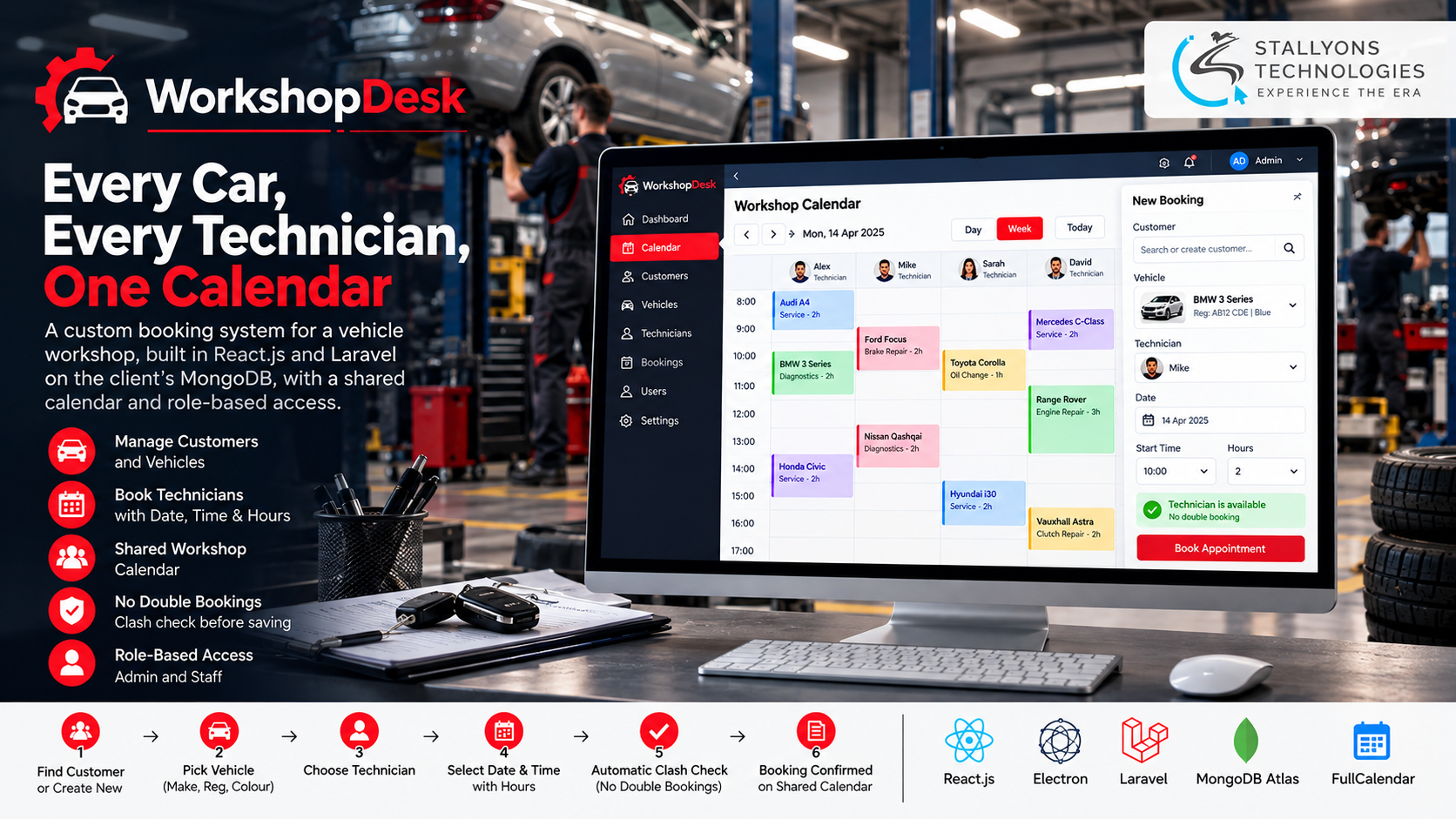
Most small car workshops run their bookings on a paper diary, a whiteboard, or a spreadsheet. It works fine until a busy morning, when two cars get booked to the same technician, a customer’s phone number cannot be found, and nobody is quite sure which vehicle is due in next. The fix is not a bigger whiteboard. It is one shared view of who is working on which car and when.
WorkshopDesk is the desktop application we built to give a vehicle workshop exactly that. Front-desk staff register customers and their vehicles, then book each vehicle to a technician for a set number of hours, and everyone on every computer sees the same calendar. Rather than force the workshop into a generic booking tool built for salons or clinics, the system was designed around its real way of working: customers with several cars, bookings measured in technician hours, and admin-only control of staff accounts.
Put simply, a staff member finds the customer, picks the car, chooses a free technician and a time, and the booking appears on a shared calendar straight away. If the technician is already busy for any of those hours, the app refuses the booking before it saves, so the same hours can never go to two cars.
The Starting Point: One Shared Calendar, No Double Bookings
For the workshop to trust software with its day, a digital diary was not enough. The system had to prevent the specific mistakes that cost a busy workshop time and customers. That set a clear list of requirements.
- Stop double bookings outright. With no shared view of technician time, the same hours could be handed to two vehicles; the system had to make that impossible.
- Keep customer and vehicle details in one place. Names, ID numbers, contact details, and vehicle records were scattered across notes and files and hard to find on a call.
- Handle one customer with many cars. Families and small businesses bring in several vehicles, each needing its own make, registration number, and colour.
- Control who can do what. The owner needed to decide who uses the system, register technicians, and switch off accounts when staff leave.
- Show the same data everywhere. The front desk and the workshop floor had to see the same bookings at the same moment, not separate copies.
- Avoid per-user subscriptions. Generic booking apps charge monthly for every user and know nothing about vehicles or technician hours.
The Build: Find the Customer, Pick the Car, Book a Technician
The whole booking process lives in one desktop app. A user logs in, searches for a customer or creates one, chooses one of their vehicles or adds a new one, and then picks a technician, a date, a start time, and the number of hours the job needs. Making that flow fast while guaranteeing it can never clash is the real work of this bespoke software development company project, and the engine behind it is a clean REST API development effort that every screen talks to. A booking runs in a set order:
- The user logs in to the desktop app with their own account.
- They search for the customer by name or registration, or create a new customer record with contact and ID details.
- They pick one of the customer’s vehicles or add a new one with its make, registration number, and colour.
- They choose a technician, a date, a start time, and how many hours the job will take.
- The server checks that technician’s existing bookings and refuses the new one if any hours overlap.
- Once saved, the booking appears on the shared calendar straight away, for every computer in the workshop.
The calendar shows bookings by day or week, coloured by technician and filterable to one person, so staff can see at a glance who is free and who is full. On the admin side, the owner creates user accounts, resets passwords, disables accounts that are no longer needed, and registers technicians with their employee ID. All of it reads and writes through one API to the client’s own MongoDB cloud database, which is why every computer always shows the same information.
Technical Architecture
WorkshopDesk is a desktop client, a small API, and a cloud database. The challenge was not the number of screens. It was using a cloud database safely from desktop computers, making sure technician time can never be double-booked, and keeping a busy schedule readable on one calendar. Each layer has a single job.
- Desktop app. React.js screens packaged with Electron install and run like a normal program on Windows or macOS, for both regular users and admins.
- Calendar. FullCalendar provides day and week views with a per-technician filter, so a crowded schedule stays clear.
- Laravel REST API. A PHP REST API holds the business rules, validation, and the technician-hours clash check, and is the only route to the database.
- MongoDB Atlas. The client’s existing cloud instance stores customers, vehicles, technicians, and bookings, shared across every computer.
- Security. Laravel Sanctum handles token login and role-based access, and Bcrypt stores passwords as secure hashes.
- Packaging. electron-builder produces simple installers, so adding another workshop computer is just a matter of installing the app.
The decision worth calling out is that the desktop app never touches the database directly. If it did, the MongoDB connection details would sit on every staff computer. Instead every request goes through the API, which checks who the user is and what their role allows, and the clash check runs there too, so two people booking at the same instant still cannot create a conflict.
Challenges Solved
Stopping double bookings reliably was the headline problem. Checking for clashes on each computer is not enough, because two people can book the same technician at the same moment, so the check runs on the server: it looks for any existing booking for that technician whose hours overlap the new one, and only saves when there are none. Keeping the database safe was the next: routing everything through the Laravel API means database credentials never leave the server, while each request still confirms the user’s login and role.
Two more challenges shaped the data model. Customers with several vehicles are handled by storing each vehicle as its own record linked to an owner, so a customer shows all their cars and a registration search finds the owner instantly. And a busy week that could become a wall of blocks stays readable because the calendar colours bookings by technician and lets staff filter to one at a time.
The Result
The workshop now runs its whole diary in one app. Customer and vehicle details are a single search away, bookings land on a shared calendar that every computer sees, and the server-side check means the same technician hours are never sold twice. The owner controls who has access and who is registered as a technician, the data lives in the workshop’s own MongoDB instance, and there is no monthly per-user fee because the workshop owns the full source code.
It works because it was built around the workshop’s real process instead of a generic appointment template. If you have an operation that needs its own booking or scheduling tool, you can hire full-stack developers from a team that has shipped React, Laravel, and MongoDB together, or tell us how your bookings work today and we will map them to an app your team actually enjoys using. The same custom software development approach fits any operations and logistics team juggling people, time, and assets.
Frequently Asked Questions
What is WorkshopDesk?
It is a custom desktop application that manages vehicle bookings for a car workshop. Staff register customers and their vehicles, book each vehicle to a technician for a set number of hours, and see every booking on one shared calendar across all the workshop’s computers.
How does it prevent double bookings?
Every booking is checked on the server before it saves. The API looks for any existing booking for the chosen technician whose hours overlap the new time and refuses the booking if it finds one. Because the check runs on the server rather than each computer, two people booking at once still cannot clash.
Why a desktop app with a cloud database?
Staff get a fast, installed program on Windows or macOS, while the data lives in the client’s MongoDB Atlas cloud instance. Every computer sees the same customers, vehicles, and bookings, the data is backed up in the cloud, and adding another computer is just installing the app.
Is the database exposed to staff computers?
No. The desktop app only talks to the Laravel API, and the MongoDB connection details stay on the server. Every request is authenticated with a token and checked against the user’s role, so database credentials never sit on staff machines.
Who can manage users and technicians?
Only an admin. The admin creates user accounts, resets passwords, disables accounts when staff leave, and registers technicians with their employee ID. Regular users can manage customers, vehicles, and bookings, but nothing to do with accounts or access.