


Blog
Analog Lines to
UniFi Talk: SIP Gateway
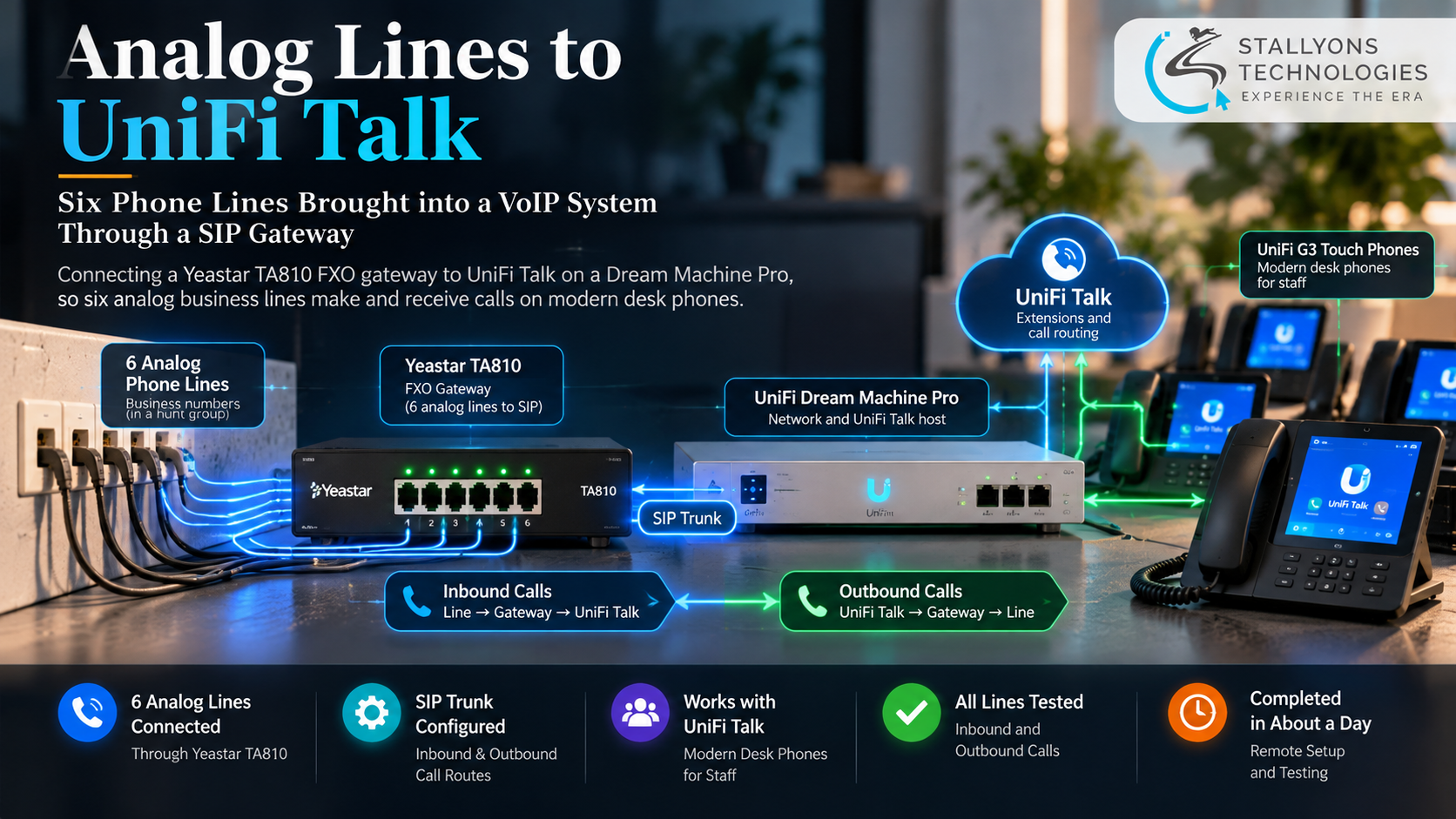
A small business had just moved its office phones onto UniFi Talk, with UniFi G3 Touch handsets on every desk, and on paper the job was done. Staff could call each other inside the building, and the gateway that was meant to carry the outside lines showed up as reachable in the admin panel. Then they tried to use it for real. Outbound calls failed the instant anyone dialled, and calls coming in rang and rang without reaching a single desk.
The company keeps six analog phone lines from its provider, set up as a hunt group so callers roll onto whichever line is free. The plan, run by a US IT contractor on the client’s behalf, was to connect those six lines to UniFi Talk through a Yeastar TA810 FXO gateway, so the business could keep its numbers and answer them on modern phones. We were brought in to finish the part that was not working: the actual call paths between the analog lines and the new phone system.
Put simply, a gateway that shows as reachable only proves the two devices can see each other. It does not mean a call has anywhere to go. We completed the SIP trunk between the Yeastar gateway and UniFi Talk, then built the routes that carry calls in and out, and tested every one of the six lines before handing it back.
The Starting Point: Reachable, But Not a Single Call Getting Through
Picking up a half-finished telephony setup means separating what looks finished from what actually works. The gateway was online and the desk phones worked internally, yet no outside call connected in either direction. That set a short, exact list of what the work had to deliver, and all of it had to happen without taking the company’s phones offline.
- Reachable but silent. The gateway registered with UniFi Talk, which looked like success, yet nothing passed in or out because the call routes were missing.
- Live business lines. The company needed its phones working through the job, so the lines could not be pulled and left dead while things were configured.
- Six lines, shared like a hunt group. Calls had to spread across all six ports the way the provider’s hunt group does, not pile onto one line.
- A remote job. The work was done off site, with the client handling the physical cabling on our instructions.
- Proven, not assumed. Every line had to be tested for both inbound and outbound calls before anyone trusted it.
The Build: Completing the Trunk, Then the Routes
Getting analog lines to talk to a modern VoIP system through a gateway is an integration job, and finishing it correctly is exactly the kind of work API development services cover, because the devices only cooperate once the connections and routing between them are set up properly. The gateway turns each analog line into SIP calls and registers with UniFi Talk as a third-party SIP trunk. From there the work ran in order:
- We completed the SIP trunk settings on both the Yeastar gateway and the UniFi Talk side, so the two no longer just saw each other but could actually pass calls.
- We built an inbound route that sends calls arriving on the analog lines through the gateway and into UniFi Talk, ringing the desk phones.
- We built an outbound route that sends calls from the desk phones back out through the gateway’s lines, shared across all six ports.
- The whole configuration was first assembled with no lines connected, so nothing the business relied on was touched while it was being set up.
- The client then cabled two lines, and we tested inbound and outbound on those, confirming the routing before scaling up.
- With two lines proven, the client connected all six, a test number called each line in turn to confirm it rang through, and six outbound calls were placed back to back.
- Once every line passed, the lines were returned to the old system, ready to be plugged into the gateway at the final cut-over.
Because the whole job was done remotely, the client was guided through the cabling with short, clear steps at each stage. The routing and integration between the gateway and UniFi Talk is bespoke to this phone setup, the kind of custom integration work that no default configuration ships with, since every business numbers its lines and shares its hunt group differently.
Also readHow a PHP worker bridges dealer software to a bank’s SOAP web service for floorplan finance
Technical Architecture
The setup is a chain of hardware and routing, and a call only completes when every link in it is configured. The hard part is not registering the gateway, which is the easy and misleading bit. It is building the inbound and outbound routes on top of that trunk and proving each line carries a call both ways. Each piece has one job.
- Yeastar TA810 gateway. Six FXO ports turn the analog business lines into SIP calls the VoIP system can understand.
- UniFi Dream Machine Pro. The on-site device that hosts UniFi Talk and the network it runs on.
- UniFi Talk. The phone system itself, holding the extensions and the third-party SIP trunk that the gateway registers against.
- UniFi G3 Touch handsets. The desk phones staff use to take and place every call.
- SIP trunk and call routes. The trunk links the gateway and UniFi Talk, while separate inbound and outbound routes carry calls in each direction, shared across the six lines.
- Remote access. Remote desktop and the web admin panels let the whole configuration be built and tested without a site visit.
The detail worth calling out is that a trunk showing as reachable is not the finish line, it is the start. Registration only confirms the gateway and UniFi Talk can see each other. The calls needed explicit routes, and building those routes, then proving them line by line, is what turned a silent gateway into six working lines.
Challenges Solved
The first challenge was the misleading status itself. Because the gateway registered cleanly, the earlier setup looked complete, and it was easy to assume the fault lay somewhere harder to reach. The real gap was that no call routes existed on top of the trunk, so once those inbound and outbound paths were built, calls connected in both directions.
The second challenge was doing all of this without interrupting a working business. Building the configuration with no lines attached, then testing on two before committing all six, meant the company kept its phones throughout and only switched at a moment it chose. The third was working through someone else’s hands: with the cabling done on site by the client while everything else was configured remotely, each step had to be explained clearly and in the right order so nothing was miswired. All six lines passed their inbound tests, six outbound calls in a row connected, and the lines went back to the old system ready for cut-over.
The Result
The job ended with every one of the six lines proven to carry calls both ways through the gateway into UniFi Talk, the business keeping its existing numbers, and staff able to answer and dial from the G3 Touch desk phones. Because the work was staged, the company’s phones never went dark during the job, and the lines were left back on the old system so the final cut-over is a simple matter of plugging them into the gateway. The client paid in full and came back for further help with the system.
The work succeeded because the real problem, the missing routes behind a reachable-looking trunk, was found and fixed rather than papered over. If you are stuck between old phone lines and a new VoIP system, you can hire DevOps developers who have wired this gateway-to-UniFi-Talk path end to end, or tell us how your phone lines are set up today and our US-registered team will map your trunk, routes, and testing. It suits any business that runs its day through its phones and cannot afford them to go quiet, including operations and field teams that depend on every call connecting.
Frequently Asked Questions
What was actually wrong with the phone setup?
The Yeastar gateway registered with UniFi Talk and showed as reachable, so it looked finished, but there were no call routes built on top of the trunk. Outbound calls failed immediately and inbound calls rang without reaching a desk, because a reachable trunk only proves the devices can see each other, not that a call has a path to follow.
How do analog lines work on UniFi Talk?
The Yeastar TA810 gateway sits between them. Its FXO ports turn each analog line into SIP calls, and the gateway registers with UniFi Talk as a third-party SIP trunk. Inbound and outbound routes then carry calls between the analog lines and the UniFi G3 Touch desk phones, shared across all six ports like the provider’s hunt group.
Was the business able to keep using its phones during the work?
Yes. The configuration was built first with no lines connected, then tested on two lines, and only then on all six. That staged approach meant the company’s phones kept working until the final test, and the lines were returned to the old system afterwards, ready for a clean cut-over whenever the business chooses.
Can a job like this really be done remotely?
It can. The trunk, routes, and testing were all configured off site through remote desktop and the web admin panels, with the client handling the physical cabling on site following short, step-by-step instructions. Each of the six lines was then verified inbound and outbound before handover.
Do the original phone numbers stay the same?
Yes. The point of routing the analog lines through the gateway is that the business keeps its existing numbers and hunt-group behaviour while moving to modern desk phones. Nothing about the external numbers changes; only the equipment answering them does.