


Blog
ProvisionPanel: Custom Server
Provisioning Platform
Plenty of online businesses sell access to something that runs on their own servers: a VPN login, a game-server slot, a software licence, a hosting plan. Every sale is really three jobs stitched together. Create the account, set the date it expires, and write it into the right server’s configuration. Do that by hand and it holds up for the first handful of customers, then falls apart the moment sales, servers, and plans start to multiply.
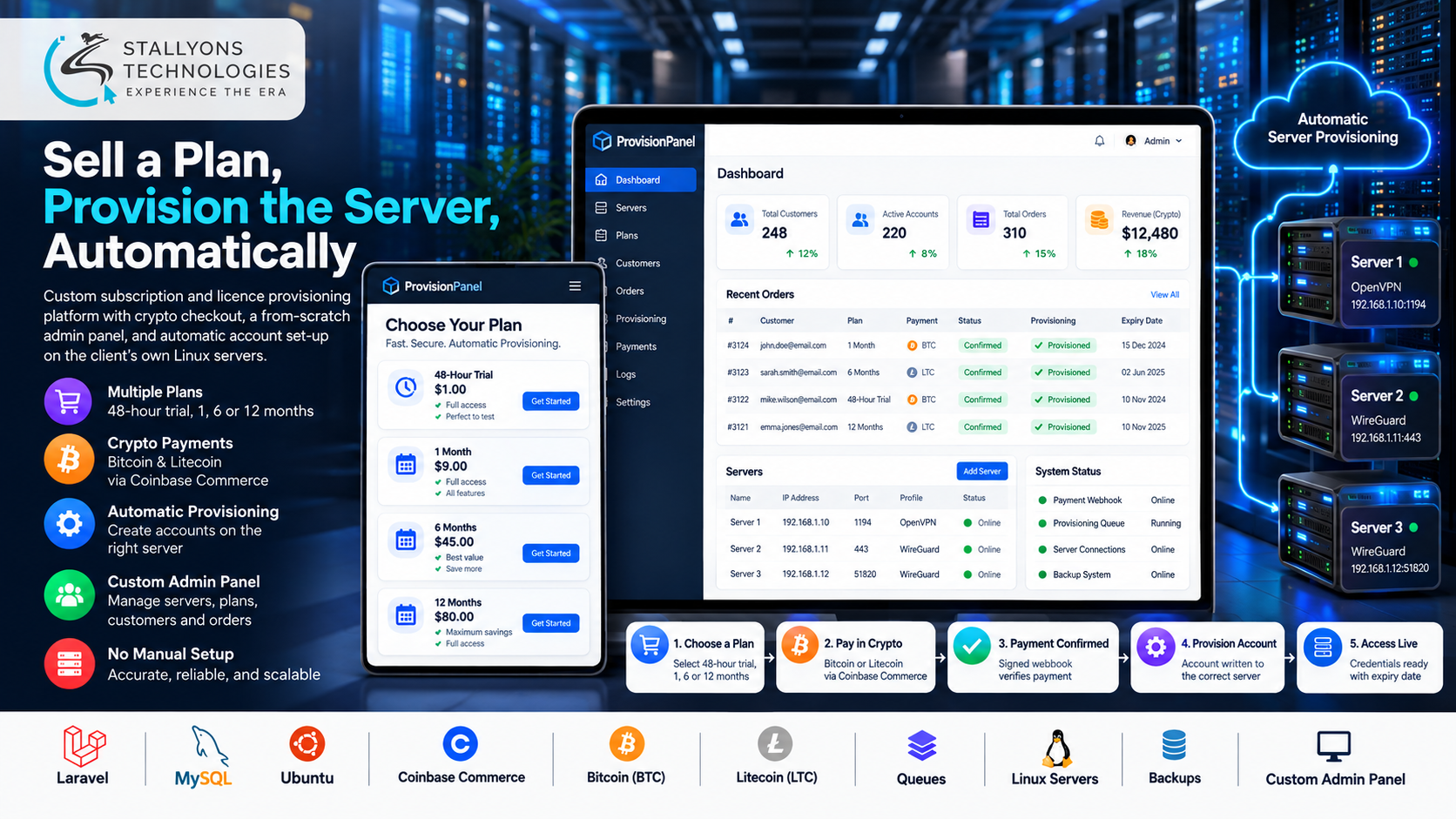
ProvisionPanel is our blueprint for turning that whole loop into custom software. It is a subscription and licence provisioning platform where a customer registers, picks a plan such as a 48-hour trial or a 1, 6, or 12-month term, and pays in cryptocurrency. The moment the payment clears, the platform generates the credentials and writes them to the correct server with the right ports and settings. This is a solution blueprint rather than a single delivered project, so what follows describes how we design the platform and why, not figures from one client’s live system.
Put simply, a buyer chooses a plan, pays in crypto, and their access goes live on the right server without anyone logging into a terminal. Renewals only push the expiry date forward, admins run everything from a panel built from scratch rather than a shop plug-in, and new servers can be added whenever the business grows. No manual set-up, no account written to the wrong machine, no missed expiries.
The Starting Point: Sell Access and Provision It in One Flow
For a provisioning platform to replace the spreadsheet-and-SSH routine, taking the payment is not enough. It has to finish the job by creating working access on the correct server. That set a clear list of requirements, and each one had to survive a business running many servers with different settings.
- Sell plans from a simple storefront. A visitor needed to land on a home page, see the plans the admin chose to show, and register or log in from a pop-up before buying.
- Take crypto without a card processor. Some businesses want Bitcoin and Litecoin, which meant a checkout that waits for a confirmed, signed payment before anything is provisioned.
- Write access to the right server, automatically. Every plan is tied to one server and access type, so an order always knows which configuration file it belongs in.
- Handle expiry and renewals cleanly. Access had to stop on time and restart the instant a customer renews, with renewals extending the date rather than creating a duplicate account.
- Let admins add servers themselves. New servers, with their own paths, ports, and profiles, had to be added from the panel without a developer touching code.
- Edit live config files safely. Writes happen to files that running services read, so every change needed a backup, a lock, and validation before it saved.
The Build: A Paid Order, Turned Into Live Access
A purchase runs as one unbroken flow from the storefront to a working account. Designing that flow, where a crypto payment quietly becomes a validated change on a specific Linux server, is the kind of problem a custom software development company is built to solve, because no off-the-shelf shop plug-in can talk to a business’s own server configs. An order moves in a set order:
- The customer opens the home page, sees the available plans, and registers or logs in from a pop-up.
- They choose a plan and access type, then pay with BTC or LTC through Coinbase Commerce.
- The order stays pending until a signed webhook confirms the payment, so nothing is provisioned on trust.
- A queued job generates unique credentials and writes them to the server the plan points to, with its correct ports and settings.
- The customer returns to their account, where the new credentials, server details, and expiry date are already waiting.
- When they renew, the platform moves the expiry date forward on the same account rather than creating a new one.
Behind the storefront, the admin panel holds a registry of servers. For each one the admin records its name, config-file locations, ports, and available profiles, then builds plans by combining a server, an access type, a validity period, and a price, and ticks which plans appear on the home page. Because provisioning runs as a queued job, a slow server never blocks the website, failed writes are retried and logged, and the business can accept crypto from international buyers as a subscription with one-click renewals. Treating the recurring-plan side as proper SaaS development is what turns one-off buyers into renewing customers.
Technical Architecture
ProvisionPanel is designed as a Laravel application running on the client’s own Ubuntu server, next to the services it provisions. The hard part is not the shop. It is turning a paid order into a correct, safe change on the right server, across many servers with different settings, while keeping expiries and renewals exact. Each layer has one job.
- Customer portal. A Laravel and Blade front end where buyers register, purchase, and renew, with a pop-up login and a responsive layout.
- Admin panel. A from-scratch Laravel panel, with no CMS underneath, for managing servers, plans, users, orders, and payments.
- Crypto checkout. Coinbase Commerce handles BTC and LTC, and confirms each payment through a signed webhook before provisioning starts.
- Provisioning queue. Laravel queues plus a file-writer service generate credentials and write them to the chosen server, with retries on failure.
- Server registry and data. MySQL stores users, orders, plans, and servers, while per-server config files hold the live access lists the services actually read.
- Safety and languages. Every file write is backed up, locked, and validated first, and Laravel language files let the client translate the interface without touching code.
The part worth engineering with real care is the join between a confirmed payment and the live config file. Waiting for a signed webhook, ignoring duplicate or replayed ones, and backing up and validating each write is what keeps a single bad order from corrupting the access list that every other customer depends on.
Challenges Solved
The hardest problems are the ones that quietly break a hand-run operation. Manual provisioning is removed by generating credentials and writing files automatically. Writing to the wrong server is prevented by tying every plan to one server in the registry, so an order can only land where it belongs. Expiries and renewals stay exact because each account line carries its own end date, and a renewal updates only that date instead of spawning a duplicate.
Trusting a crypto payment is handled by keeping the order pending until Coinbase Commerce sends a signed confirmation, then provisioning as a queued job. Editing live config files is made safe with a backup, a file lock, and validation on every write. One more challenge is human rather than technical: some clients expect custom software to mean no CMS at all, while others want WordPress for easy editing, so we confirm the stack in writing before any build starts.
The Result
The design adds up to a platform where a buyer picks a plan, pays in crypto, and has working access on the right server a moment later, with no one touching a terminal. Admins add servers and plans themselves, renewals extend access without duplicates, expiries land on time, and the business owns the full codebase rather than renting a plug-in. Because provisioning is automatic, sales can grow without adding staff to run them.
The blueprint works because it was designed around the risky step, the safe write to a live server, rather than around a generic shopping cart. If you are planning a platform like this, you can hire back-end developers who have scoped this crypto-to-provisioning pipeline, or tell us how you sell server access and our US-registered custom software development company will map your servers, plans, and payment flow to an automated panel. It suits any subscription and SaaS business selling time-limited access.
Frequently Asked Questions
What is ProvisionPanel?
It is our solution blueprint for a custom subscription and licence provisioning platform. Built on Laravel, it lets a business sell plans, take cryptocurrency payment, and automatically create the customer’s access on the correct server, all from a panel built from scratch rather than a shop plug-in.
How does it provision access automatically?
Every plan is tied to one server and access type in a server registry. When a payment is confirmed, a queued job generates unique credentials and writes them to that server’s config file with the right ports and settings, so access goes live without anyone logging in by hand.
Why pay in cryptocurrency, and is it safe?
BTC and LTC through Coinbase Commerce suit international buyers and avoid card chargebacks. Nothing is provisioned until a signed webhook confirms the payment, and duplicate or replayed webhooks are ignored, so access is only ever created against a genuine, confirmed order.
Can the business add its own servers and plans?
Yes. Admins add servers from the panel by entering their paths, ports, and profiles, then build plans by combining a server, an access type, a validity period such as 48 hours or 1, 6, or 12 months, and a price. No developer or code change is needed to grow.
What happens when a customer renews or a plan expires?
Each account line carries its own end date, so access stops on time. A renewal moves that expiry date forward on the same account rather than creating a duplicate, which keeps the access list clean and the customer’s service uninterrupted.