


Blog
Woodworking Studio: Webflow
Gallery Site
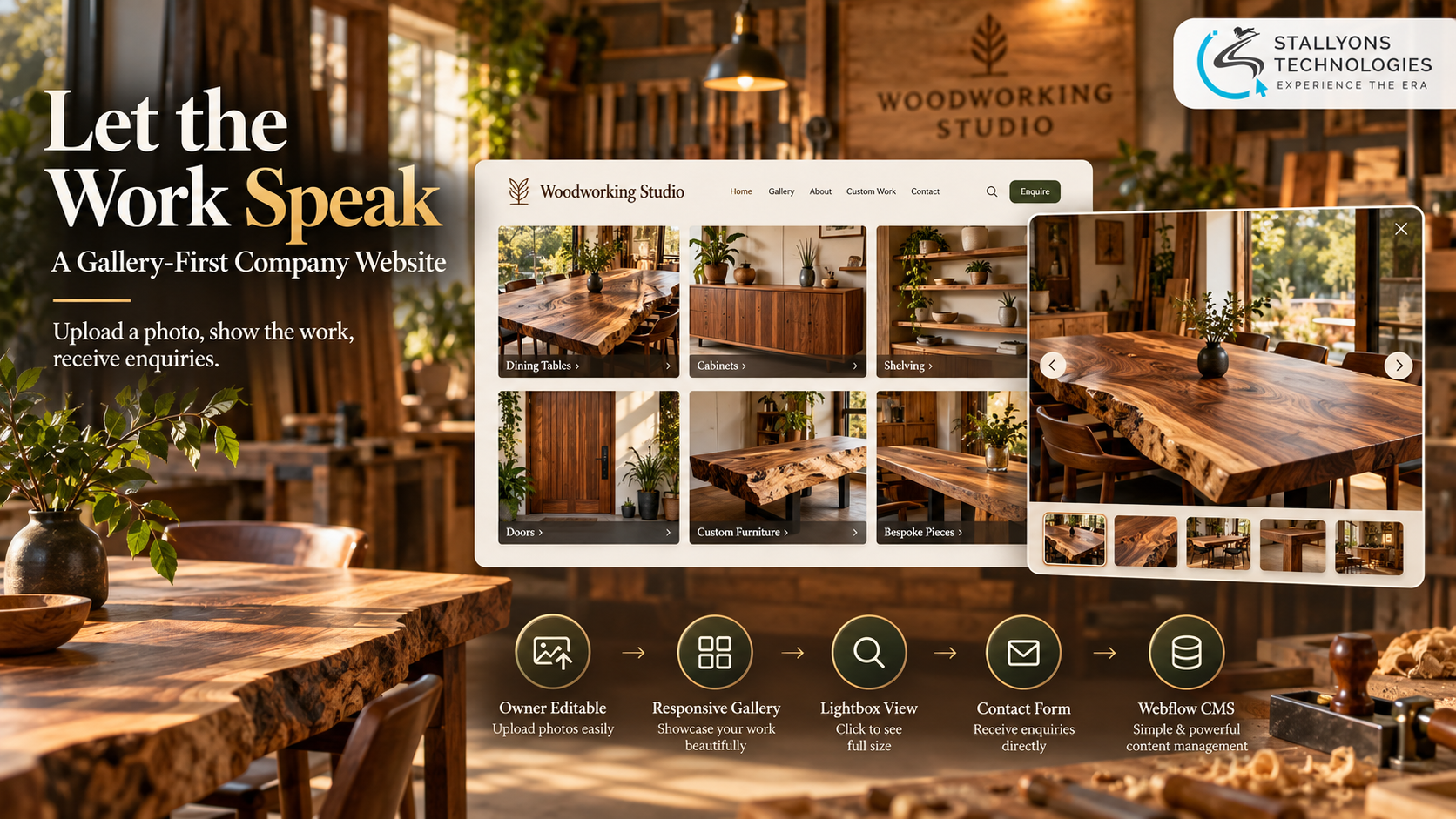
For a craftsman, the website is the portfolio, and a visitor decides in a few seconds whether the work is what they want. A woodworker had the work but not the window to show it. His first site dated back to 2006 and looked every bit its age, and the new design he had started himself sat half-finished, with placeholder stock photos of people where pictures of his actual pieces should have been. He could not finish it or keep it updated without help.
Woodworking Studio is the home page we finished for him in Webflow, keeping the design he had already begun. The placeholder section was replaced with a responsive photo gallery that has hover effects and click-to-enlarge, built so he can add a new picture himself in about a minute from the Webflow Editor. An about section carries over the story from his old site, and a contact section sends each enquiry straight to his inbox. Everything matches his own fonts, colours, and spacing, works on phones, and needs no code to update.
Put simply, the owner uploads a photo of a finished piece as a new gallery item, and it appears on the site with the same styling and lightbox as the rest, on every screen size. Visitors browse the work, read the story, and send an enquiry from the same page.
The Starting Point: Put the Work on Show, and Keep It Easy to Update
The brief was less about adding features and more about getting the craftsmanship in front of people and keeping the site current without a developer on call. That set a clear list of requirements, each one tied to how the owner works day to day.
- Lead with the work. The home page had to put photos of finished pieces front and centre, where the placeholder people and text had been.
- Updates the owner can do himself. He wanted to add new photos on his own, without calling a developer each time.
- No code for everyday changes. He works in a code editor only occasionally, so changing photos and text had to need no code at all.
- Fit the design he started. New sections had to match the fonts, colours, and spacing already in his draft, so the page read as one piece.
- Fully responsive. Customers look on their phones, so the gallery and every section had to stay clear from desktop down to mobile.
The Build: A Gallery Anyone Can Update
The home page now leads with the work and ends with a way to get in touch. Finishing a design someone else started, and handing control back so the owner never needs a developer for a photo swap, is the kind of practical work a Webflow website development team handles well, because the gallery, the styling, and the editing experience all have to line up. The finished flow runs in order.
- We reviewed the old site and the design he had started, and agreed on the gallery, about, and contact sections.
- The design was rebuilt in Webflow with his own fonts, colours, and spacing, and the placeholder section was replaced by a gallery that reads from a CMS Collection.
- Mobile and tablet layouts were added, along with hover effects and click-to-enlarge, so the grid reflows into fewer columns on small screens.
- A native Webflow contact form was wired to e-mail each enquiry to the owner, then tested end to end on the preview site.
- The about section brought over the story and photo from his previous website.
- The site was handed over in the owner’s own Webflow account, ready for his domain, with the gallery editable by him.
Because the gallery photos live in a CMS Collection, adding a picture is an upload in the Editor, not an edit to layout code. The same discipline that makes a custom site easy to maintain is what good web development is about: structure the content so the owner can run it, rather than leaving every change dependent on the person who built it.
Technical Architecture
The site is built and hosted on Webflow, with the gallery in the Webflow CMS and a native Webflow form. The challenge was not adding a gallery. It was making one the owner can update without coding, carrying a design someone else had started into Webflow faithfully, keeping it fast with many large photos, and making sure every enquiry reaches him. Each layer has one job.
- Webflow platform. The visual build, hosting, and SSL, with no plugins to update and no server to look after.
- Gallery Collection. Photos held as CMS items, so a new picture is an upload that inherits the gallery styling automatically.
- Lightbox. A click opens any photo full size over the page, and one click closes it, so the detail in each piece is visible.
- Responsive grid. A Collection List that shows several columns on desktop and fewer on phones, with evenly sized thumbnails.
- Contact form. A native Webflow form with required fields checked, e-mailing each enquiry to the owner and keeping a copy in the dashboard.
- About section. The business story and photo carried over from the original site, rebuilt in the owner’s own design.
The part worth engineering with care is keeping the page quick when it is full of large photos. Webflow serves resized, compressed images and loads them as a visitor scrolls, with the full-size version opening only in the lightbox. That is what lets a gallery-heavy home page stay fast on a phone, which matters because most of his customers look there first.
Challenges Solved
The owner is not a developer, so the biggest problem was making updates genuinely easy. With the gallery in a CMS Collection, he adds a photo by uploading it in the Editor, and it takes on the gallery styling and lightbox on its own, with no layout to touch. The next challenge was inheriting a half-built design. His draft was rebuilt in Webflow with the same styles, fonts, and spacing, so the finished page feels like his own work rather than a template dropped on top of it.
Many large photos can slow a page to a crawl, so Webflow’s resized, lazy-loaded images keep it quick while the full-size files open only on click. The last piece was making sure no enquiry slips through. The Webflow form sends each one to the owner’s address and keeps a copy in the dashboard, and it was tested on the preview site before handover so he could trust it from day one. The structure and styles were also organised so he can add further pages step by step as his budget allows.
The Result
The owner can now show new work on his own site, himself, in about a minute, and it looks right on every device. The home page leads with a gallery of real pieces, the about section tells his story in his own design, and the contact form puts enquiries straight in his inbox with no middleman. There is nothing to maintain, no plugins to update, and no developer needed for everyday changes, which is exactly what a one-person craft business needs.
If you want a site you can run yourself, you can work with front-end developers who build clean, owner-editable sites, or tell us about the work you want to show and our US-registered team will finish or rebuild your design in Webflow so you keep full control. It suits any maker or small manufacturing business whose work sells on how it looks.
Frequently Asked Questions
What is Woodworking Studio?
It is a gallery-first home page built in Webflow for a small woodworking business. It leads with a responsive photo gallery of finished pieces, has an about section and a contact form, and is set up so the owner can add new photos himself without any code.
How does the owner add new photos?
Gallery photos are items in a Webflow CMS Collection, so he uploads a new picture in the Webflow Editor and it appears in the grid with the same styling and lightbox as the rest. It takes about a minute and needs no developer and no layout changes.
Was this a new site or a finished version of his own design?
It was finished from the design he had already started. His draft was rebuilt in Webflow with his own fonts, colours, and spacing, and the placeholder section was replaced by the gallery, so the page reads as one consistent piece rather than a template.
Does the gallery stay fast with lots of large photos?
Yes. Webflow serves resized, compressed images and loads them as the visitor scrolls, with full-size versions opening only in the lightbox. That keeps a photo-heavy home page quick on phones, where most of his customers look first.
Where do contact enquiries go?
The native Webflow form e-mails each enquiry straight to the owner and keeps a copy in the Webflow dashboard. Required fields are checked, and the form was tested end to end on the preview site before handover, so no enquiry is lost.