


Blog
Wix Bookings: A
Two-Path Payment Customization
Most booking flows assume you are paying today. That works until a business wants to let some customers reserve now and settle later, hold a slot before a deposit clears, or book a service that is invoiced afterwards. The standard Wix Bookings flow does not branch that way on its own, so this customer needed it to.
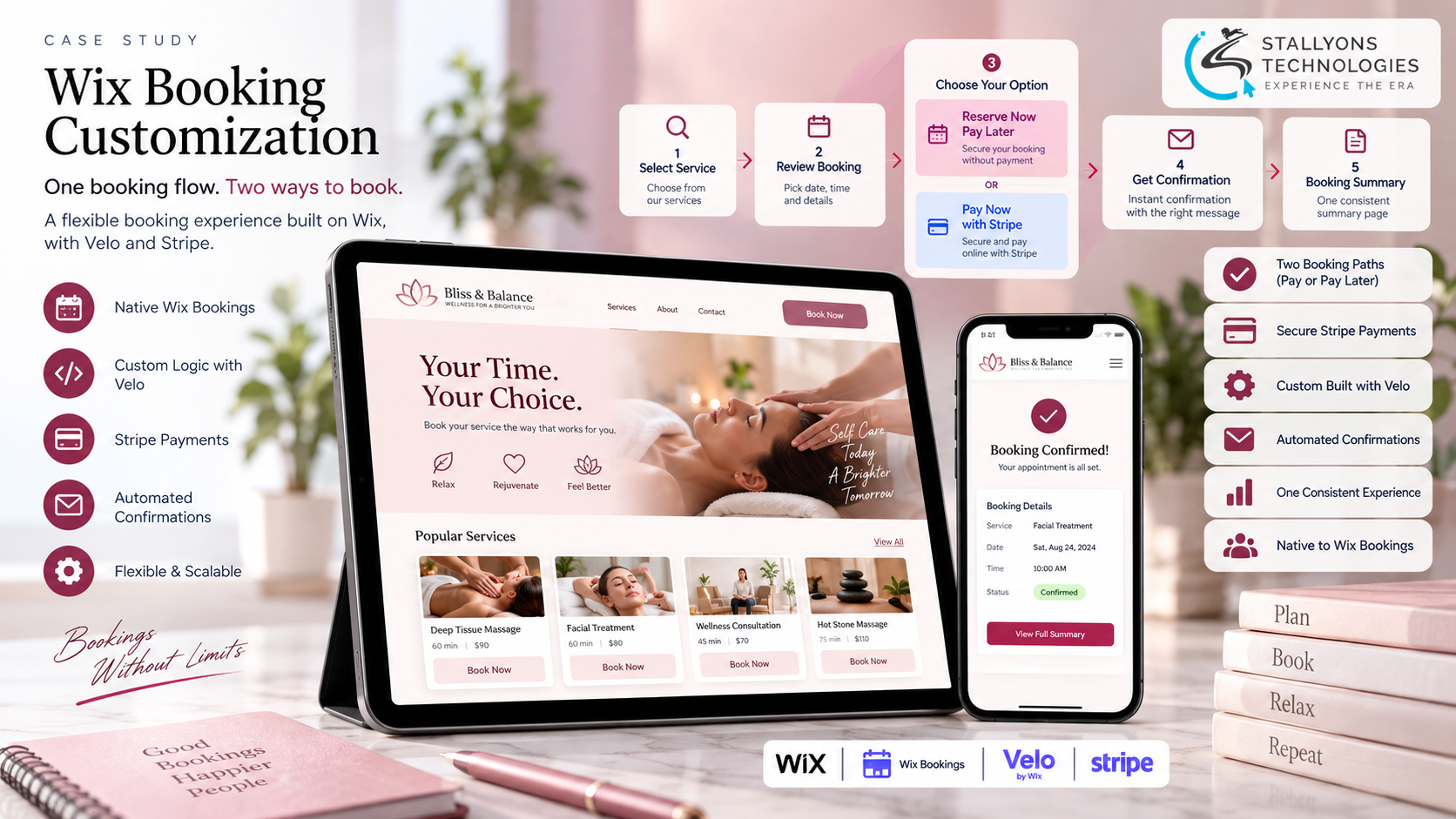
This project is a Wix Bookings customization that gives one booking flow two payment paths. A customer books a service or item and, after reviewing the details, chooses to pay through Stripe or to secure the booking without paying now. Each choice sends the confirmation that fits it, and both meet again on one consistent booking summary page.
Put simply, the flow branches cleanly after the review step, keeps both routes native to Wix Bookings, and ends in the same place either way, so the experience feels like one journey rather than two.
The Starting Point: One Flow, Two Ways to Pay
Standard booking flows expect a payment, so the work was to add a clean second route without bolting on a separate system. Six requirements shaped the customization:
- Two paths from one flow. After reviewing a booking, a customer must be able to pay or to secure it without paying, so the flow has to branch rather than assume a single route.
- A secure card payment. The paid path needs a Stripe payment built into the booking flow, not handled off to the side.
- A real unpaid booking. The unpaid path has to create a genuine, secured booking and flag it for follow-up, not simply skip the payment step.
- The right confirmation each time. Each path needs its own message: follow-up instructions for an unpaid booking, a receipt and details for a paid one.
- One consistent ending. Whichever route a customer takes, they should land on the same clear booking summary page.
- Native to Wix Bookings. All of it has to be a customization of the Wix Bookings flow, not a parallel system running alongside it.
The Build: Branch After the Review Step
A customer browses the available services, selects one, and reviews the booking details such as date and time. At that point, and only that point, the flow offers the two options. Keeping the split to a single, clear moment means the journey stays simple up to the choice and then divides cleanly. The customization was built by our Wix website development team on top of the platform’s own booking engine, so it stays part of Wix rather than a bolt-on.
If the customer chooses to book without paying, the booking is secured and flagged for follow-up, and they receive a confirmation with the relevant instructions. If they choose to pay, they are taken to the Stripe interface, enter their card details and confirm, the payment is processed and confirmed, and they receive a confirmation with a receipt and their booking details. Building a dependable two-way payment path is close to the checkout-flow work our team does for fintech and payments clients, where the branch a customer takes has to be correct every time.
Technical Architecture
The whole thing is a customization of Wix Bookings, with Velo code for the two-path logic and the Stripe integration and Wix automations for the confirmations, which keeps it firmly inside low-code development on the platform. The parts worth calling out:
- The branch point. After the customer reviews the booking, the flow presents two options and splits: one secures the booking without payment, the other takes payment through Stripe.
- The unpaid path. Booking without payment creates a real, secured booking and flags it for follow-up, so it is a first-class option rather than a gap in the flow.
- The Stripe path. The customer enters card details in the Stripe interface and confirms; the payment is processed and confirmed, integrated into the Wix flow with Velo.
- Matched confirmations. Wix automations send each path its own confirmation: follow-up instructions for an unpaid booking, a receipt and booking details for a paid one.
- One summary page. Whichever option is chosen, the customer is redirected to a single booking summary page, so every journey ends the same way.
From the customer’s side, the journey is a short, ordered sequence that only forks once:
- The customer browses the available services and selects one.
- They review the booking details, such as the date and time.
- They choose one of two options: pay through Stripe, or secure the booking without paying now.
- On the paid path they enter card details and confirm; on the unpaid path the booking is secured and flagged for follow-up.
- They receive the matching confirmation and are redirected to the single booking summary page.
Challenges Solved
Branching the flow was the central problem, solved by splitting it after the review step into a paid and an unpaid route, so both options run from one clean flow. Taking secure payment meant integrating Stripe into the Wix flow with Velo, so customers pay by card and have it confirmed. Making the unpaid route a real booking, not a skipped step, meant securing it and flagging it for follow-up, so a customer can reserve now and settle later. Fitting the message to the booking meant each path sends its own confirmation, a receipt or follow-up instructions. Keeping the experience consistent meant both paths redirect to a single booking summary. And keeping it native meant building the whole thing as a customization of Wix Bookings rather than a separate system, so it stays simple to maintain.
The Result
The business ends up with a flexible booking experience on Wix. A customer can reserve now and pay later, or pay upfront through Stripe, and either way gets the right confirmation and lands on one clear summary. The booking records carry the correct status, paid or secured without payment, so follow-ups and receipts are handled properly, and because it is all a customization of Wix Bookings, there is no second system to keep in step.
If you need a booking flow that does more than the default allows, you can hire JavaScript developers who work in Velo and Stripe every day, or tell us how you want customers to book and we will shape the flow around it.
Frequently Asked Questions
Can a Wix Bookings flow let customers pay now or book without paying?
Yes. This customization branches the flow after the review step into two routes: one takes payment through Stripe, the other secures the booking without immediate payment and flags it for follow-up, so a customer chooses how they want to book.
Is the Stripe payment built into the Wix booking flow?
Yes. On the paid path the customer enters card details in the Stripe interface and confirms, and the payment is processed inside the Wix Bookings flow using Velo, rather than being handled by a separate system off to the side.
What happens when someone books without paying?
The unpaid path creates a real, secured booking and flags it for follow-up, then sends a confirmation with the relevant instructions. It is a first-class booking, not a skipped payment step, so the business can settle it afterwards.
Do the two paths send different confirmations?
Yes. Wix automations match each confirmation to the path: an unpaid booking gets follow-up instructions, and a paid booking gets a receipt with its details, so the message always fits how the customer chose to book.
Is this a separate booking system or part of Wix?
It is a customization of the native Wix Bookings flow, built with Velo and a Stripe integration, so it stays part of Wix. There is no parallel system to maintain, and both paths end on one shared booking summary page.