


Blog
Squarespace Law Firm
Website Design
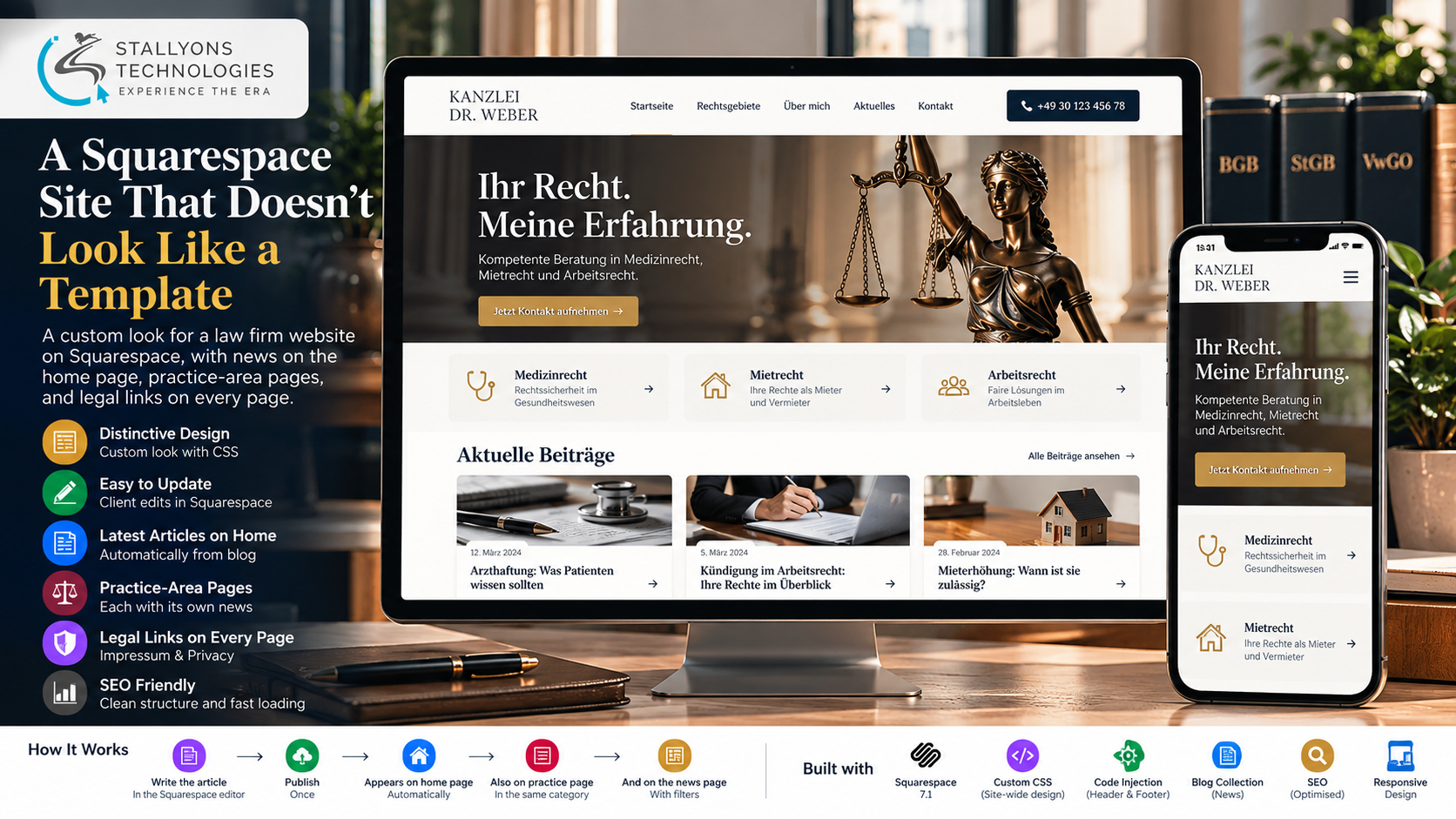
A small law firm usually starts with a website the owner built himself on Squarespace. It goes up quickly and he can edit it whenever he likes, but it looks like every other Squarespace site, the blog is plain, and the articles that prove the firm knows its field sit on a separate page almost no visitor ever reaches.
This is how we turn that kind of site into a clean, distinctive, German-language law firm website without leaving Squarespace. The owner keeps hosting and editing in his own account. We add a design layer in custom CSS, one header and one footer that carry the office phone number and the legal links every German site must show, the latest articles on the home page, a page per practice area with its own news, a separate lawyer profile, and a contact form. The result looks custom, reads well on a phone, and stays something the owner can keep current himself.
Put simply, the firm writes an article, publishes it, and it appears everywhere it should: on the home page, on the matching practice-area page, and in the filtered news list. The site stops reading like a template, the Impressum and privacy notice are reachable from every page, and no developer is needed for daily edits. This is our approach to Squarespace website design for a professional firm that has to look trustworthy and stay easy to own.
The Starting Point: A Firm That Looks Like Everyone Else
A lawyer’s website has to build trust fast, show expertise, and meet German legal rules. A default Squarespace setup struggles with all three. The redesign had to clear a short list of requirements, and each one mattered on its own.
- Stop looking like a template. Standard sections and fonts make a firm look like every other site built on the same platform, so the design had to feel its own.
- Bring the articles forward. The built-in blog page is plain, and new articles never reach the home page where visitors actually land.
- Meet German legal rules. The Impressum and the privacy notice have to be reachable from every page, and copying a footer block onto each page by hand is easy to get wrong.
- Get found on Google. Articles should rank, so pages need clean headings, good titles and descriptions, readable text, and fast-loading images.
- Keep the owner in control. He wants to write articles and change text himself, without calling a developer for every small edit.
The Build: Write Once, Shown Everywhere
The redesigned site stays on Squarespace but gets its own look, and the parts a visitor sees are driven by what the owner publishes. A booking for a consultation starts with a phone number in the header and a short form; the rest of the site exists to get the right person to that point. The build runs in a clear order:
- A site-wide CSS layer sets the colours, typography, spacing, and section styles, so the pages no longer read as a template.
- One global header carries the logo, the main pages, and the office phone number, and one global footer carries the Impressum, the privacy link, the contact details, and the social link.
- The home page opens with a short headline where the practice areas, such as medical law, tenancy law, and employment law, fade in and out one after another.
- Below it, three practice-area icons each link to their own page, and the latest articles appear as cards.
- A News page lists every article with category filters, and each practice-area page shows only the articles in its own category.
- The owner writes an article, picks its practice-area category, and publishes; it then appears on the home page and on the right practice page on its own.
The calm, fading headline was a deliberate choice over a busy typewriter effect, so the text stays easy to read. Every article is a real blog post with its own address, title, and description, and summary blocks reuse it in several places, which helps both visitors and search engines find it. The owner reviews the work on an unpublished staging copy, so the live site is never disturbed while colours and layout are agreed.
Technical Architecture
The site runs entirely on Squarespace, with a design layer and a few small scripts on top. Nothing here invents a backend; the whole point is a custom look on the platform the owner already knows. Each layer does one job.
- Platform. Squarespace 7.1, on the owner’s own hosting, domain, and editor, so he keeps full control after handover.
- Design layer. One site-wide custom CSS layer sets colours, type, spacing, and section styles. That distinct, non-template feel is the UI/UX design work that makes the firm look like itself.
- Scripts. A little header and footer code injection drives the fading headline and small layout tweaks that Squarespace cannot do on its own.
- News engine. A blog collection sorted into practice-area categories, with summary blocks that pull the newest articles onto the home and practice pages.
- Contact. A Squarespace form block sends enquiries straight to the firm’s email, next to the phone number in the header.
- SEO. Squarespace SEO settings plus clean headings, titles, descriptions, and correctly sized images.
The part worth engineering carefully is making Squarespace look custom while keeping every change editable in the normal editor. We agree up front what the platform can and cannot do, build on a staging copy so the live site is never touched, and tune font sizes, spacing, and images so the pages stay fast and readable on a phone.
Challenges Solved
Three problems decide whether a Squarespace redesign succeeds. The first is agreeing what the platform can do before the work starts: some effects, such as a shape that follows the visitor or a fully custom blog layout, need custom code or are not realistic, and saying so early avoids a late surprise. The second is never working on the live site, because a lawyer often sends clients to the website mid-redesign, so every test article and colour option lives on an unpublished staging copy until sign-off. The third is consistency: the header, footer, fonts, and colours are defined once and checked on every page, so a change in one place is never missed somewhere else.
Underneath all of it is a simple business point. For a small firm, every article is a chance to be found on Google by someone with a legal question, and a phone number plus a short form turns that reader into a client. It is the same local, trust-led lead generation that real estate and other appointment-driven firms depend on, where being found and being easy to contact is most of the work.
The Result
The outcome is a site that no longer reads as a template, carries the legal links on every page, and puts the firm’s articles where visitors actually see them. The owner publishes one article and it shows up on the home page, on its practice-area page, and in the news list, with no developer involved. The design stays consistent across every page, the pages load well on a phone, and the live site stayed untouched until the owner signed off.
The build works because the design lives in CSS while the content stays in Squarespace, so the owner keeps control and a future template change will not wipe out his work. If you are planning a site like this, you can hire UI/UX designers who have made Squarespace look custom without leaving the platform, or tell us about your firm and we will map your practice areas and legal pages to a site you can run yourself.
Frequently Asked Questions
Can a Squarespace site be made to not look like a template?
Yes. A site-wide custom CSS layer sets the colours, typography, spacing, and section styles, and a little header and footer code handles effects Squarespace cannot do on its own, such as a fading headline. The result looks custom while the owner still edits everything in the normal Squarespace editor.
How do new articles reach the home page automatically?
Each article is a real blog post sorted into a practice-area category. Summary blocks on the home page and the practice pages pull in the newest posts, so when the owner publishes an article and picks its category, it appears on the home page and on the matching practice page on its own, with no manual copying.
Does this meet German legal requirements like the Impressum?
Yes. The Impressum and the privacy notice sit in one global footer that shows on every page, set once rather than copied by hand, so the legal links are reachable site-wide and are updated in a single place.
Can the owner keep editing the site after handover?
Yes. The design lives in CSS while the content stays in Squarespace, so the owner writes articles, swaps images, and changes text in his own account without a developer. Handover includes short tutorial videos for posting and editing.
Do you offer Squarespace web development services beyond law firms?
Yes. The same approach covers professional-services sites, content and news sites, member areas, and squarespace ecommerce development, all built on Squarespace with a custom CSS design layer and clean, search-friendly structure.