


Blog
RecycleHub: A HarmonyOS
Waste and Recycling App
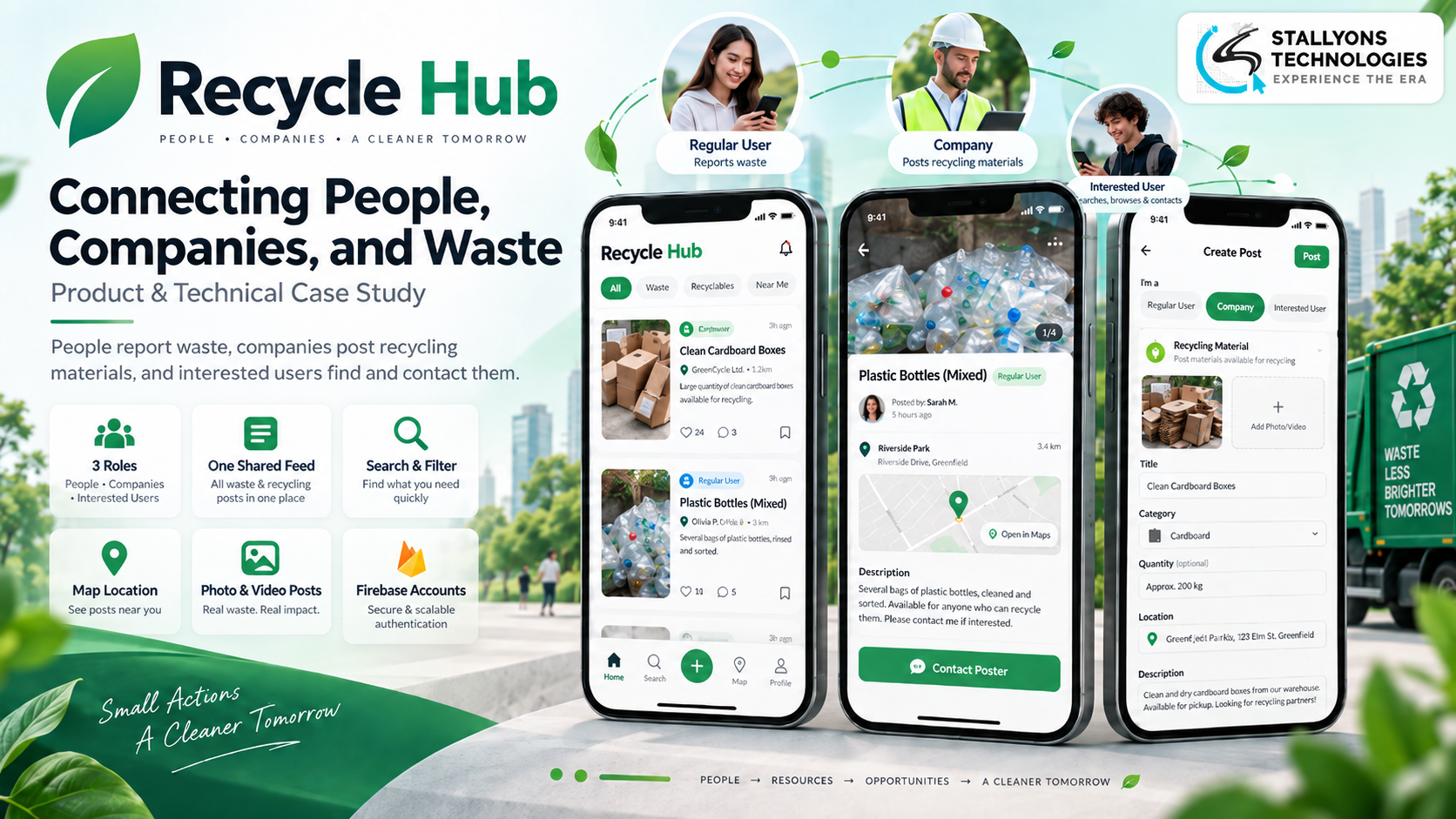
A resident walks past a pile of rubbish dumped on the corner and has no way to flag it. Across town, a recycling company has a yard full of usable material it cannot shift. And somewhere in between, a small workshop is hunting for exactly that material and cannot find it. Three people, one shared problem, and no single place where any of them can see each other.
That gap is what this project set out to close. RecycleHub is a HarmonyOS mobile app that puts recycling and waste management onto one platform, so people can report waste they see, companies can post recycling materials they have, and interested users can search, browse and contact whoever is behind a listing.
Put simply, everyone shares one feed, one search and one way to post. A waste report from a resident and a material listing from a company sit side by side, found by the same search, opened the same way, and answered with the same contact button. The app was designed in full in Figma, then built on HarmonyOS with Firebase handling accounts and posts, and no custom backend or payment system in the way.
The Starting Point: Three Roles, One Scattered Process
Recycling should be simple, but in practice the right people never meet. Waste ends up in landfill while usable material goes unnoticed, because reports, listings and contacts live across phone calls, group chats and noticeboards with nothing tying them together. The brief was to fold all of that into a single app that could serve three different kinds of user at once.
Those three roles do not want the same thing, which is where the design work began. In practice the app had to satisfy each of them from one shared set of screens:
- The regular user. An ordinary person who spots waste in their area and wants to report it, with a location, a description and photos, so it gets seen and dealt with.
- The company representative. A business that has recycling materials to offer and needs to list them with details and media, then field inquiries from anyone interested.
- The interested user. Someone searching for materials or wanting to help, who needs to browse every post, open the full details, and reach the poster directly.
The trick was to give each role exactly what it needs without splitting the product into three separate apps. One feed, one search and one post format had to carry two very different things, a waste report and a material listing, and still feel natural to all three audiences.
The Build: Design First, Then a HarmonyOS Front End
The project ran in two clear phases. First, a complete design in Figma covering every screen for all three roles, settled and approved before a line of code was written. That design-first approach is the UI/UX design discipline that keeps a multi-role app coherent, because every screen is reasoned through before it is built rather than patched together during development.
The second phase was the front-end build on HarmonyOS using ArkTS and ArkUI, turning those exact screens into a working app and wiring them together. Accounts and data run on Firebase, so there is no server to build or maintain. Everyone moves through the same simple flow, which was built to run in this order:
- Sign up or log in by email or social account, with password recovery handled by Firebase.
- Land on the home feed of recycling materials and waste locations, with a search bar at the top.
- Search and filter posts by material type and location to narrow down to what matters.
- Open a post for the full picture: title, description, images, video and a map location.
- Contact the poster directly, or share the post, to start the conversation.
Around that spine sit the pieces each role manages for itself. A regular user creates waste posts and tracks responses. A company posts materials and handles inquiries. An interested user saves posts and follows replies. Every user has a profile with their own posts, a notifications screen, and shared utility screens for settings, help and support, plus a splash screen on launch.
Technical Architecture
Under the hood, RecycleHub is a focused front-end app with a managed backend service behind it, which is the whole point. The design phase produced the screens, the HarmonyOS build produced the app, and Firebase covers the parts that would otherwise need a custom server. This is exactly the kind of native HarmonyOS app development that suits a community product: light to ship, cheap to run, and quick to change. The architecture rests on a few subsystems, each mapped to a specific need.
- Design system in Figma. A full, detailed set of screens for all three roles, approved before development, so the build had a clear and settled target.
- HarmonyOS front end. The app is built and runs natively on HarmonyOS with ArkTS and ArkUI, using the platform’s own UI system rather than a wrapper.
- Firebase accounts. Sign-up, login, social login and password recovery all run on Firebase’s free tier, with no custom authentication server to build.
- Firebase data and post CRUD. Users and posts are stored in Firebase, which powers the create, read, update and delete actions the app is built around.
- Media on every post. Posts carry photos and video so a viewer can see the material or the waste clearly before making contact.
- Shared screens, role-aware content. All three roles move through one screen flow, but the feed, posts and notifications show the content that fits each role.
The two pieces worth calling out are the flexible post format and the role-aware feed. A post had to hold both a waste report and a material listing without feeling wrong for either, and the feed had to surface the right mix for each role while still coming from one shared source. Getting those two right is what let a single app do the work of three.
Challenges Solved
The hardest problems all clustered around serving three audiences without fragmenting the product. One shared set of screens, driven by role-aware content, meant regular users, companies and interested users each got what they needed without three separate builds to maintain. A single flexible post format let a waste report and a material listing live in the same feed and the same search, so users could find and act on either from one place.
Leaving out a custom backend was a deliberate constraint, not a shortcut. The app still needed real accounts and stored posts, and Firebase’s free tier covered both, handling sign-in, social login, password recovery and the full create, read, update and delete cycle with no server to run. Because the whole app is a front-end build over a managed service, it stayed something a small front-end development team could own end to end, which is what a community-minded product needs.
The Result
The outcome is a single, focused recycling and waste app that brings three kinds of user onto one platform. A resident reports the rubbish they see. A company lists the materials it can offer. An interested user searches, opens the full details and contacts the poster. They all share one feed, one search and one simple way to post and connect, with profiles, notifications and shared utility screens filling out the rest.
What was a scattered, frustrating process, where waste and usable material rarely met the right person, becomes one shared space where they do. If you are planning a HarmonyOS app with a design-led, backend-light build like this one, tell us what you are building and we will map your screens, roles and data to the right stack before development starts.
Frequently Asked Questions
What is the RecycleHub app?
RecycleHub is a HarmonyOS mobile app that puts recycling and waste management onto one platform. Residents report waste they see, companies post recycling materials they have available, and interested users search, browse and contact whoever is behind a listing, all from one shared feed.
What technology is RecycleHub built on?
The app was designed in full in Figma, then built natively on HarmonyOS using ArkTS and ArkUI. Firebase handles accounts and data on its free tier, covering sign-up, login, social login, password recovery and the create, read, update and delete of posts, so there is no custom backend.
How does the app work without a custom backend?
Firebase provides the two things the app needs from a server: authentication and data storage. Accounts and posts live in Firebase, which powers the full create, read, update and delete cycle, so the team could focus on the HarmonyOS front end and user experience with no server to build or maintain.
How can one app serve three different types of user?
All three roles, regular users, company representatives and interested users, share one set of screens and one flow. The feed, posts and notifications show role-aware content, so each user sees what fits their needs while a single flexible post format holds both waste reports and material listings in the same feed.
Does RecycleHub handle payments?
No. Payment gateways and a custom backend were deliberately left out of scope to keep the app light and focused. RecycleHub is about connecting people, so its core is posting, searching, viewing and contacting, with Firebase handling accounts behind the scenes.