


Blog
DeepSkyCamera Case Study:
An Android Astrophotography App, Faithfully Rebuilt on HarmonyOS Next
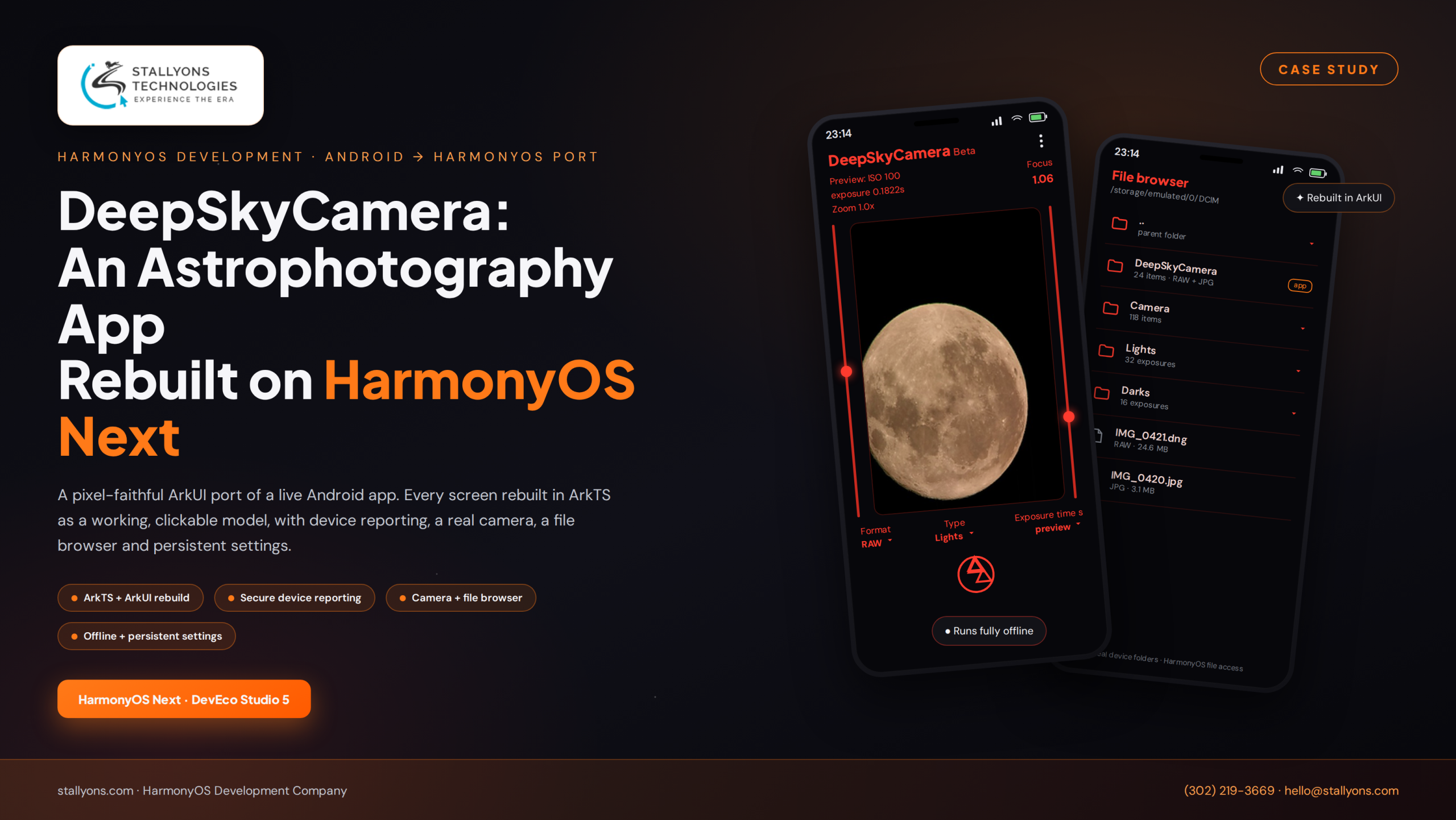
It is 2 a.m. on a cold hillside, far from any streetlight. An astrophotographer is crouched over a phone that glows a soft red, because red light is the only light that will not ruin their night vision. On the screen is a live preview of the moon, the exposure ticking along at 0.1822 seconds, the ISO pinned to 100, focus nudged to 1.06. This is DeepSkyCamera, a real astrophotography app already loved by night-sky shooters on Android. The question that started this project was simple to ask and hard to answer: could that exact experience live, screen for screen, on a phone that has never run a single Android app?
That phone runs HarmonyOS Next, Huawei’s newest operating system. And the honest truth about HarmonyOS Next is that it does not run Android apps at all. There is no shortcut, no wrapper, no compatibility layer to hide behind. If you want your app on the millions of HarmonyOS devices flowing through Huawei’s AppGallery, the app has to be rebuilt in Huawei’s own language and UI system. That makes a HarmonyOS port a very particular kind of mobile app development: you are not inventing new features, you are re-expressing a finished product in a new platform’s native materials. For a business with a proven Android product, that is either a wall or a door, depending on who you hire to open it.
The Opportunity Hiding Inside a New Platform
Most owners of a successful Android app feel a small jolt of anxiety when they first hear about HarmonyOS Next. Their instinct is that a port means starting from zero, throwing away years of design decisions, and gambling on an unfamiliar toolchain. That instinct is understandable, and it is also wrong. A well-run port does not discard the work that made the app good. It preserves every screen, every control, and every pixel of polish, and simply re-expresses them in the new platform’s native materials.
DeepSkyCamera was the perfect app to prove this. Its interface was already finished, already tested by real photographers in real fields, and did not need a single design change. The brief was refreshingly clear. Keep the look identical. Rebuild it properly on HarmonyOS Next as a fully clickable model. Then make a short list of features genuinely work: sending device feedback, a basic camera, a file browser, and settings that survive a restart. The heavy image-processing engine, written in C++ by the app’s owner, would be connected by them later into the finished shell we handed over.
In plain business terms, this is how you reach a brand new audience without betting the company on a rewrite. You protect the interface your users already trust, you answer the tricky platform questions once, and you arrive on HarmonyOS with something that feels like home rather than a rushed copy.
What We Actually Built
The work split cleanly into two parts, and keeping them separate is exactly what made the project safe and predictable.
Part one was the interface port. Every screen of the Android app was rebuilt from scratch in ArkUI, Huawei’s declarative UI system, written in ArkTS, an enhanced and strongly typed form of TypeScript. Because HarmonyOS cannot reuse Android layouts, none of the original layout code carried across. What did carry across were the graphics. The client handed us the Android source, so all of the vector and PNG assets were reused directly, which is why the icons and images are identical rather than redrawn approximations. The outcome is a click dummy in the best sense of the phrase: every button reacts, every slider moves, every value updates on screen, so the app feels complete to anyone holding it. The only thing deliberately left out is the deep capture processing, which lives in the client’s own code and drops neatly into the finished shell.
Part two was the working features. On top of the clickable model, four pieces were built to truly function rather than merely look the part: a Report your phone feedback sender, a basic camera with a live viewfinder and shutter, an internal file browser that walks the device’s real folders, and persistent storage so the app remembers its settings between sessions. Each of these had to be re-engineered for HarmonyOS, and each is covered below.
The honest caveat in that split is what the shell cannot yet do. The deep astrophotography capture, the engine that is the whole reason the app exists, is the client’s own C++ code and is deliberately left out, so until they wire it into the seam we handed over, the HarmonyOS build looks and behaves complete but cannot take a real deep-sky exposure. The port is only ever as finished as that final handoff, which is exactly why the seam was kept clean and predictable.
Technical Architecture: Mapping One Platform Onto Another
Porting an app is really an exercise in translation. Every Android building block needs a precise HarmonyOS equivalent, and the value a serious HarmonyOS app development team brings is knowing those equivalents cold, so the client is never left guessing which API replaces which.
The one-to-one mapping is where a port either flows or stalls. Java or Kotlin with XML layouts became ArkTS with ArkUI declarative screens. Android Studio became DevEco Studio 5. SharedPreferences became HarmonyOS Preferences. The Android camera APIs became HarmonyOS camera APIs, and Android file access became HarmonyOS file access for the browser. The Android vector and PNG drawables were reused as ArkUI assets. Finding and proving each of these matches, then wiring them together into a single coherent app, is the quiet engineering that makes a port feel effortless from the outside.
Report Your Phone: Feedback That Still Reaches the Owner
Every good app needs a way for users to say something is off. On Android, DeepSkyCamera’s Report your phone feature collected a name, an email, and a comment, then called a script on the owner’s web server, which emailed the owner. Losing that channel in the port would have quietly cut off the owner from their users, so we rebuilt it faithfully on HarmonyOS.
The HarmonyOS version presents the same three fields. When the user presses Send, the app makes a secure HTTPS call to the client’s server, protected by a username and password, and passes the three values under the exact names the server script expects. It also attaches one extra piece of information the owner relies on: a device string built automatically from the phone’s maker, its model, and its HarmonyOS version. That mirrors how the Android app built its own device string, so the owner can tell at a glance exactly what hardware a given piece of feedback came from. The result is invisible to the user and identical to the owner, which is precisely the goal.
Camera and File Browser: Real Features, Not Placeholders
Two features had to reach past the clickable model and genuinely work. The first is a basic camera. It gives the user a live viewfinder and the ability to take a shot, and it is basic on purpose, because the deep astrophotography capture is the client’s domain. Where the client had earlier camera work to draw on, that was reused and built in, so the camera really opens, previews, and saves a picture. The app therefore has a functioning camera at its core, with the heavy processing left as a clean handoff.
The second is an internal file browser. Next to the shutter sits a folder icon, and tapping it opens a browser that moves through the device’s real directories rather than a faked list. The user can navigate folders exactly as they would expect, which lets the app show and manage the images it works with, using the real file system underneath. Small features like these are often where a rushed port falls apart, so getting them solid is a signal of the discipline a serious port demands.

Remembering Settings, Fully Offline
An app has to remember a user’s choices between sessions. On Android, DeepSkyCamera used SharedPreferences, a simple and fast store for small values. The HarmonyOS match is HarmonyOS Preferences, which works the same way: quick, lightweight, and made for saving named settings on the device. The port uses it to keep the app’s settings between sessions, so the HarmonyOS build behaves like the Android one in this respect too.
This detail matters more than it looks, because DeepSkyCamera runs completely offline. Out in a dark field there may be no signal at all, and the app is designed never to need one. Storing settings on the device rather than in the cloud fits that reality perfectly. There is no server to reach, no login to wait on, and nothing to fail when the sky is clear but the bars are not.
The Harder Problems We Solved
A few challenges shaped the whole engagement. Rebuilding the interface on a platform that cannot run Android apps meant every screen was recreated from the ground up in ArkUI, matched closely to the original by reusing its graphics and following its layout, so the new version feels identical even though none of the original layout code survived. Building a faithful click dummy meant making every control respond and every value update while leaving a clean seam for the client’s C++ processing, so the shell is both convincing to use and easy to extend. Finding the right HarmonyOS equivalents meant proving, one by one, that settings, camera, file access, and secure networking each had a solid native counterpart. And sending feedback securely meant getting the authentication and the exact field names right, so the owner keeps receiving reports just as they always did.
The Result and Why It Pays Off
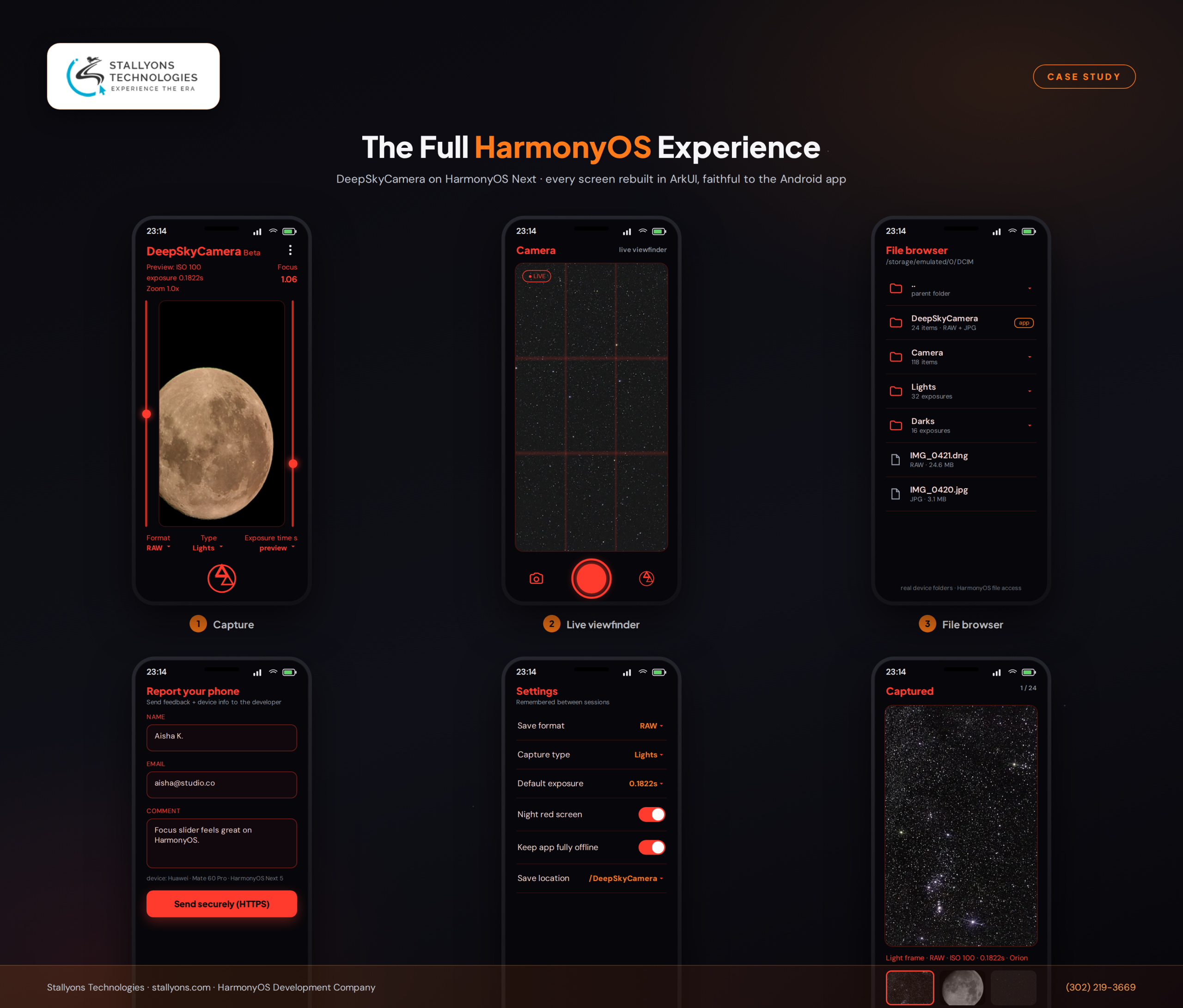
The finished product is a HarmonyOS Next version of DeepSkyCamera that mirrors the Android app screen for screen. Built in ArkTS and ArkUI inside DevEco Studio 5, every screen was rebuilt to match the original using the same graphics, delivered as a fully clickable model. Device reporting sends feedback and a device string to the client’s server over a secure, authenticated connection. The camera offers a live viewfinder and a shutter. The file browser walks the device’s real folders. Settings persist through HarmonyOS Preferences, and the whole app runs offline. The deep image processing is left out by design, ready for the client to connect their own C++ logic into a finished, working shell.
Read as a business outcome, this is the low-risk path onto a new platform that most teams wish existed. The interface your users already trust is preserved exactly. The platform’s trickiest questions, around storage, camera, files, and secure calls, are answered once and proven. And the client walks away free to focus on the one thing only they can do, their processing engine, knowing everything around it is already in place. That is the difference between a line item on a quote and a partner who leaves you with something you can actually ship.
Bring Your App to HarmonyOS the Right Way
If you already have a strong Android or native iOS app, HarmonyOS Next is not a threat to it. It is a fresh audience waiting on the other side of a careful rebuild. The trick is to preserve what works, translate it into the platform’s native tools with real rigor, and de-risk every unknown before it becomes a delay.
Stallyons Technologies plans, ports, and ships HarmonyOS apps end to end, from a faithful ArkUI interface to the working features and secure integrations underneath. If you are weighing a port or a fresh build, our HarmonyOS development services are built to get you onto HarmonyOS Next without gambling on the interface your users already love. For a HarmonyOS build that began as a fresh idea rather than a port, see how we shipped the Sak Soti entertainment app from scratch. When you are ready, book a discovery call and let us map your route to Huawei’s AppGallery.