


Blog
Mobility Care CRM:
HubSpot CRM Setup
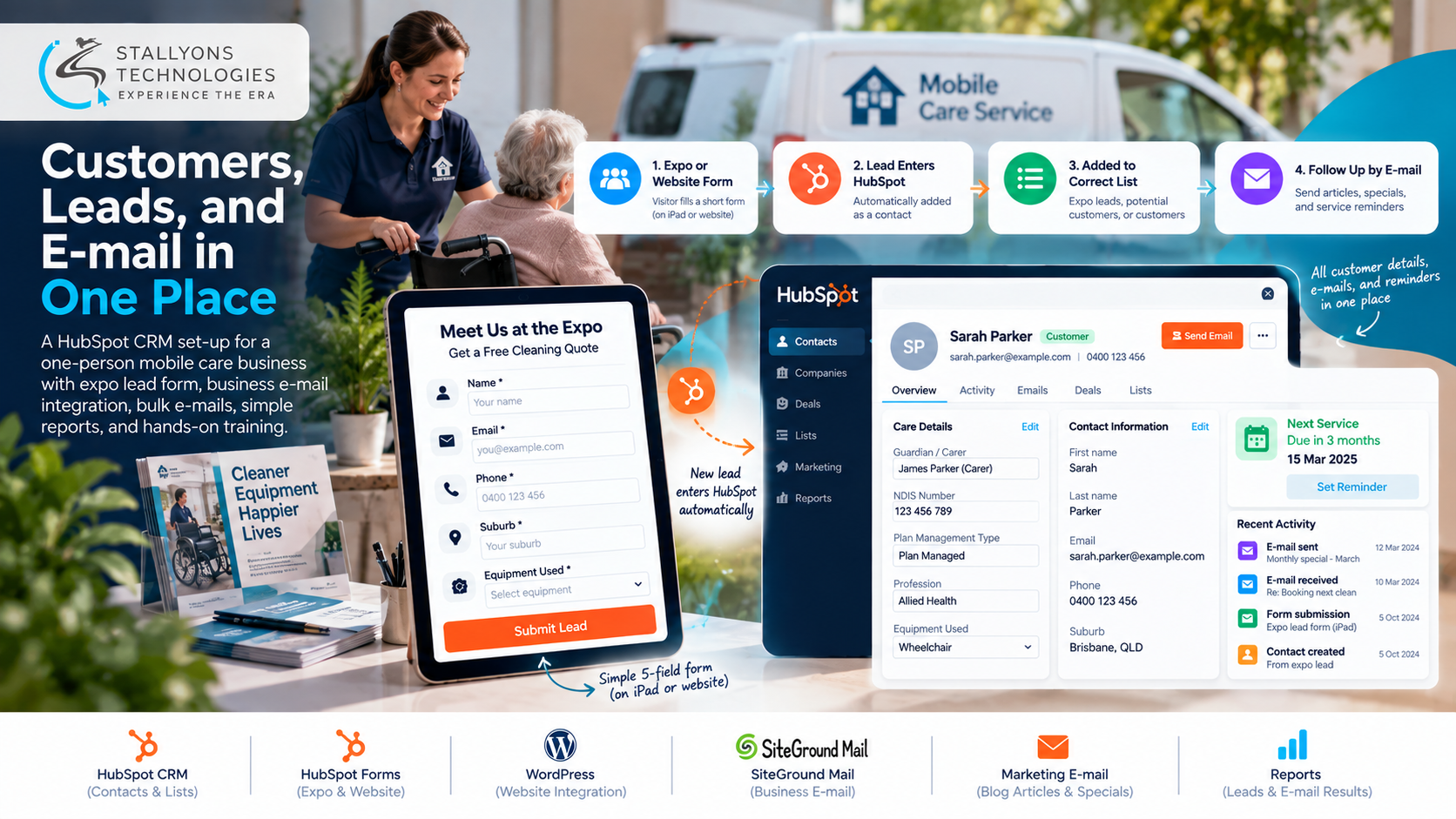
A mobile care business in Australia visits people at home to deep clean their wheelchairs and medical equipment. It is run by one person. After a day of visits, the owner’s evening went on cross-checking: customer details sat in a spreadsheet, conversations sat in a SiteGround webmail inbox, and bookings sat in a separate tool. Nothing talked to anything else, and an earlier attempt at a CRM had already failed when the customer import dropped fields and jumbled the data.
Mobility Care CRM is the HubSpot set-up we built to end that routine. It is a configured HubSpot CRM, not custom code, that gives a one-person care business a single home for customers, leads, and e-mail. Contacts carry care-specific fields, the business mailbox is connected so conversations log against the right person, a short lead form captures visitors at an expo and on the website, and lists feed bulk e-mails with articles and monthly specials. The system went live in October 2024, before the owner’s expo, and she left a top-quality review.
Put simply, a visitor fills in a short form, lands in the CRM in the right list, and can be e-mailed later, while the owner runs the whole thing from one account on a laptop or an iPad.
The Starting Point: One Place Instead of Three
Taking the scattered records and pointing them at a single platform was the easy way to describe the job. Making it fit a care business run by one non-technical owner was the real brief, and each requirement had to hold up under a deadline.
- An import that would not fail again. The previous CRM attempt had lost fields and mixed up rows, so the customer spreadsheet had to come in clean, with every column landing in the right place.
- Fields built for care, not sales. Each customer needed details a standard CRM does not ship with: guardian or carer, NDIS number, and whether the plan is self, plan, or NDIA managed.
- A business mailbox that actually connects. Linking the SiteGround inbox to the CRM had failed before, and e-mails needed to sit on the contact they belonged to.
- A form ready for a fixed expo date. A two-day expo in October meant a quick capture form had to be live and tested before the stand opened, so no visitor was lost.
- Training the owner could follow. With no technical help on hand, she needed plain-language guidance to add contacts, send e-mails, and read reports on her own.
The Build: From a Messy Spreadsheet to a Working CRM
The work ran as a set-up and configuration job inside the client’s own account, the kind of build our HubSpot setup and configuration team handles without writing a line of custom code. Each phase was signed off before the next began:
- We wrote a short requirements document and a visual plan of the fields, lists, and forms, and the owner approved it before anything was built.
- We cleaned the customer spreadsheet, removed duplicates, and mapped every column to a HubSpot property, including the new care-specific fields, then imported the records.
- We connected the SiteGround business mailbox over IMAP and SMTP, so e-mails with customers now log on the matching contact.
- We built the five-field lead form and placed it on an iPad for the expo stand and on the website’s contact page through the HubSpot plugin.
- We set up the lists, customers, potential customers, allied health contacts, and expo leads, with e-mail templates for bulk sends and simple dashboards.
- We trained the owner with short tutorial videos and live screen-share calls, then cleared the test entries so she started with clean data.
Because everything sits in one account, there is no separate e-mail marketing tool and no extra add-ons to manage. Keeping the whole set-up inside HubSpot is a deliberate no-code and low-code approach: the owner changes contacts, sends e-mails, and runs reports from the editor, and the business never pays for several apps to do the basics.
Technical Architecture
The system is a configured HubSpot account rather than a piece of software. The challenge was never turning features on. It was mapping a messy spreadsheet into clean fields, connecting a mailbox that had refused to link, getting a reliable form live before a fixed date, and keeping all of it simple enough for a non-technical owner to run alone. Each part has one job.
- Contacts. One HubSpot record per customer and lead, so the owner stops cross-checking a spreadsheet against an inbox.
- Care-specific properties. Carer or guardian, NDIS number set to accept the full nine digits and kept optional, plan management type, profession such as allied health, phone, suburb, and equipment used.
- Forms. HubSpot Forms power the five-field expo form, with only name and e-mail required, and the same capture on the website.
- Website link. WordPress with the HubSpot plugin, so a contact-page submission becomes a contact in the right list.
- E-mail. The SiteGround mailbox connected over IMAP and SMTP, so business e-mails are logged on the contact they relate to.
- Marketing and reports. HubSpot marketing e-mail and lists for articles and monthly specials, with dashboards for leads by source and e-mail results.
The part worth the most care was the NDIS number field and the mailbox connection. The number accepts nine digits and stays optional, because people rarely know it by heart, and the mailbox had to link cleanly so a reply from a customer never gets stranded outside the record it belongs to.
Challenges Solved
The hardest problem was the one that had already sunk an earlier attempt: a customer import that lost data. This time the spreadsheet was cleaned, duplicates were removed, and every column was mapped to a property before import. HubSpot matches contacts by e-mail, so re-adding someone updates their record instead of creating a duplicate or an error. The first draft of the expo form asked for too much, so following the owner’s feedback it was cut to five fields, with NDIS and the other details moved onto the contact record to be filled in once a lead becomes a customer.
Expo halls often have poor Wi-Fi, and the form needs a connection to submit, so a phone hotspot was recommended and every submission also sends a notification to the owner’s inbox. If a lead ever fails to reach the CRM, it can still be found and added by hand. The whole set-up was built directly in the owner’s own HubSpot account rather than a test copy, which meant data entered early never had to be moved, and test entries were cleared before go-live for a fresh start.
The Result
The owner now works from one place. A visitor at the expo stand or on the website fills in a short form, lands in the CRM in the right list, and can be followed up with a bulk e-mail of articles or a monthly special. Customer details, conversations, and leads sit together, so the evening cross-checking is gone, and she can see who is due for their next clean, send one e-mail to a whole list, and read simple reports on where leads come from. The CRM and form went live before the October 2024 expo, all milestones were released, and the client left a top-quality review.
If you run a small service business and want the same single-platform set-up, you can hire dedicated developers who configure HubSpot around how you actually work, or tell us how you keep track of your customers today and our US-registered team will map your records, mailbox, and forms into one account. It suits any home care and health service business that keeps customers on a regular visit cycle.
Frequently Asked Questions
What is Mobility Care CRM?
It is a configured HubSpot CRM we set up for a one-person mobile care business in Australia. It brings customers, leads, and e-mail into one account, with care-specific contact fields, a connected business mailbox, a lead form, and lists for bulk e-mail, all run by the owner without custom code.
Did you build custom software for this?
No. This was a set-up and configuration job inside HubSpot, not a coded application. The work was mapping a clean customer import, adding care-specific properties, connecting the SiteGround mailbox, building the forms and lists, and training the owner to run it.
How does the care business capture leads at an expo?
A short five-field form runs on an iPad at the stand and on the website’s contact page through the HubSpot plugin. Only name and e-mail are required, so a visitor finishes it in under a minute, and every submission lands in HubSpot as a contact in the expo leads list.
Why were custom contact properties needed?
A standard CRM is built around sales fields. A care business needs different details: carer or guardian, NDIS number, plan management type, profession, suburb, and equipment used. These were added as properties so each record fits the way the business works, with the NDIS number kept optional.
Can the owner run the CRM without a developer?
Yes. Everything was set up in her own account and explained with short videos and live calls, so she adds contacts, sends bulk e-mails to a list, and reads simple reports on her own. Because it all sits in HubSpot, there are no extra add-ons to manage.