


Blog
ArcheoGuide: Offline Flutter
Audio Guide App
A visitor stands in front of a stone ruin in a Sardinian archaeological park. The printed sign beside it is short, half-faded by the sun, and says almost nothing about what they are looking at. The next guided tour is hours away. Without help, the ruin stays a pile of stones, and the story behind it is lost on almost everyone who walks past.
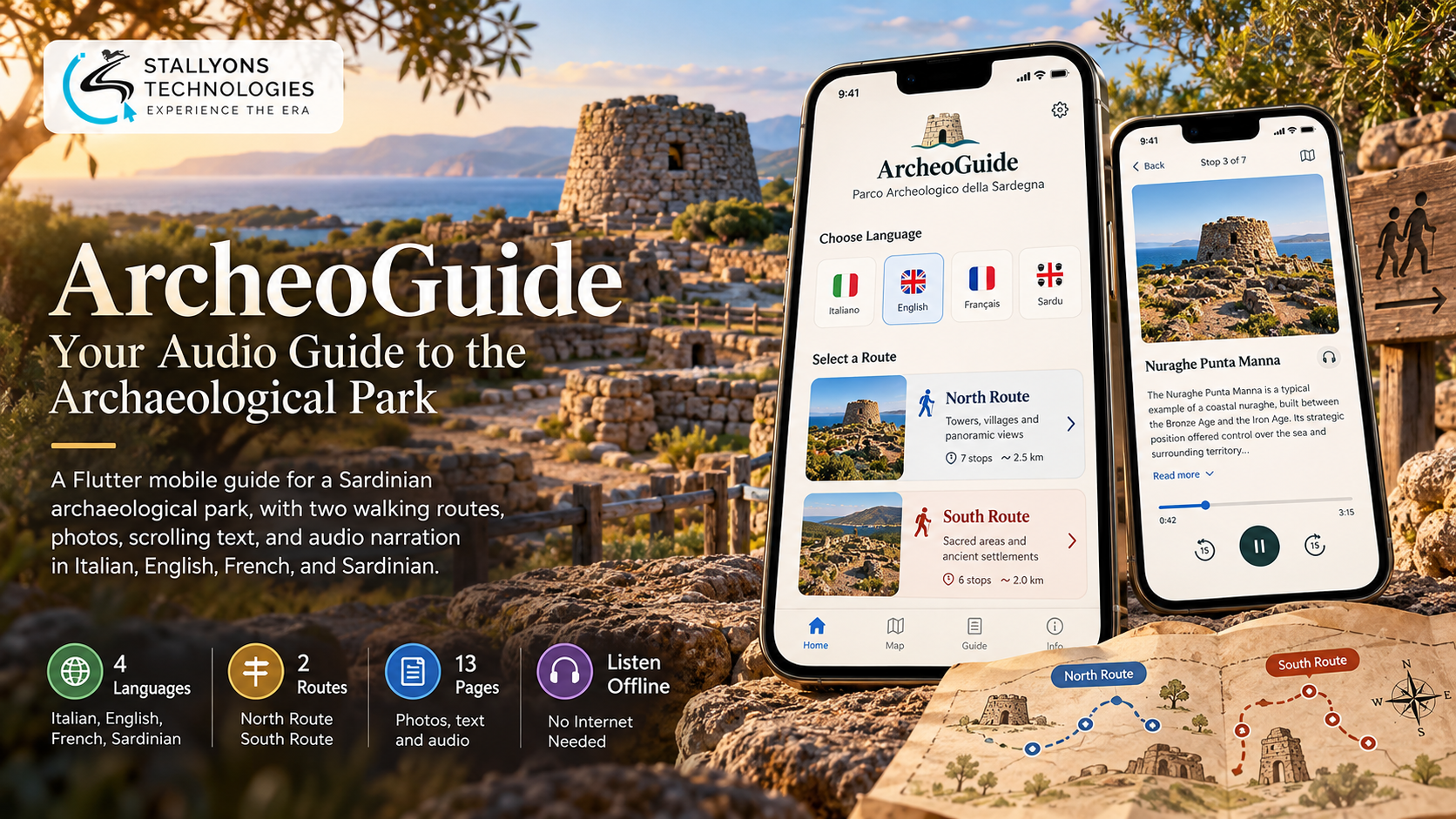
ArcheoGuide is the answer to that moment. It is a mobile audio guide for an archaeological park, built in Flutter for iOS and Android. The visitor opens the app, chooses a language, picks one of two walking routes through the park, and at each stop sees a photo, reads a scrolling description, and listens to a narration. It works like a personal tour guide in the visitor’s pocket, and it keeps working even where there is no mobile signal.
Put simply, the app carries the whole park inside it. Thirteen content pages, one introduction and six stops on each of the North and South routes, are each available in Italian, English, French, and Sardinian, with every photo, text, and audio file bundled into the download. Once the app is installed, nothing needs to load from the internet, so pages open at once and audio plays without buffering anywhere in the park.
The Starting Point: Telling the Park’s Story to Every Visitor, Offline
For an app to replace signs, rented devices, and the wait for a guided tour, it has to do more than list stops. It has to narrate the park to anyone who opens it, in their own language, without depending on a connection the park cannot guarantee. That set a clear list of requirements.
- Tell the story at every stop. Each site needed a photo, a readable description, and a spoken narration, so the history is explained rather than left to a faded sign.
- Four languages, including Sardinian. The park welcomes Italian, English, and French speaking tourists, plus local visitors who value hearing their heritage in Sardinian, which phones do not offer as a system language.
- Guide people along two routes. The park splits into a North and a South area, so visitors needed a clear choice of route and a set order of stops rather than guesswork.
- Work with weak signal or none. Mobile coverage in a rural park is patchy, so a guide that streams pages or audio would fail exactly where it is needed.
- Stay affordable to build and run. A small park cannot carry a costly custom project or a system that needs constant technical upkeep after launch.
The Build: One App, Two Routes, Four Languages
The visit follows one simple path from the first tap. Building that path so it feels effortless, loads instantly, and reads the same in four languages is the substance of the Flutter app development company work behind the guide. A visit runs in a set order:
- The visitor opens the app and sees the park’s splash icon.
- They choose their language: Italian, English, French, or Sardinian. The choice is remembered for next time.
- An introduction page tells the story of the park and offers the North route or the South route.
- They pick a route and walk its six stops in order.
- At each stop they see a large photo, scroll the description, and play the narration while they look around.
- They can switch route or language at any point without losing their place.
On the park’s side, the work is content, not code. The team supplies a photo, a text, and an audio recording for each stop in each language, and every page follows the same layout because the app reuses the structure of an audio guide built earlier for the Gesturi Museum. Each stop is described in a simple data file, so one page template displays them all. Adding or editing a stop means adding content, not writing a new screen, which keeps future updates cheap.
Technical Architecture
ArcheoGuide is a content-driven app with no server to run. The real work is not the number of screens; it is delivering thirteen pages in four languages, with good photos and clear audio, in an app that opens fast, works fully offline, and still downloads quickly at the park entrance. Each choice keeps it simple to run and easy to maintain.
- Flutter for both platforms. One codebase ships to iOS and Android, reusing the proven museum-app template rather than rebuilding the experience twice. The care that goes into that layout and audio controls is the kind of UI/UX design that lets a visitor of any age use the guide without instructions.
- Audio with just_audio. Each stop has a clear play, pause, and seek control, and the narration stops cleanly when the visitor moves on so audio never overlaps.
- In-app localization. Every label and page loads from the app’s own language files for IT, EN, FR, and Sardinian, which makes Sardinian a first-class language instead of relying on the phone’s settings.
- Offline-first packaging. Photos are resized for phone screens and audio is compressed, so the full guide in all four languages stays small enough to install on the spot.
- Local settings with shared_preferences. The chosen language and the visitor’s place are remembered between visits.
- Distribution. The app is free on the App Store and Google Play, with a QR code or poster at the park pointing people to the download.
The part worth engineering carefully was the offline bundle. Packing every photo, text, and narration inside the app, in four languages, while keeping the download light is what makes the guide reliable in a place with no signal.
Challenges Solved
The harder problems were the ones a simple brochure app never has to face. Sardinian was the clearest: because iOS and Android do not offer it as a system language, the usual translation route does not work, so the app manages languages itself and treats Sardinian exactly like the other three. Weak coverage was solved by bundling everything on-device instead of streaming, with photos and audio compressed to keep the install quick. Reuse was handled without copying screens: the museum app had a different page count and no route choice, so its pages became one data-driven template that the North and South routes fill.
Then there is the setting. People use this guide standing in the sun, often while walking, which is exactly what a travel and tourism experience lives or dies on. Large photos, readable text, and big audio buttons keep it usable outdoors, and the narration keeps playing while the visitor scrolls or looks up at the site.
The Result
The outcome is a guide that tells the park’s story to every visitor, in their own language, with no devices to rent and no server to keep running. A tourist and a local resident get the same quality of experience, the two routes are easy to follow, and the whole thing works offline from the moment it is installed. The park updates content with a new release when it wants to, and reuses the same template for other sites with only the content and routes changing.
It works because it was built to finish the job on-device, reusing a proven structure rather than starting from zero. If you are planning an offline-first guide or a multilingual mobile app like this, you can hire Flutter developers who have shipped this kind of bundled, data-driven build, or tell us about your site and visitors and we will map your stops, routes, and languages into an app that works anywhere.
Frequently Asked Questions
What is ArcheoGuide?
It is a mobile audio guide for a Sardinian archaeological park, built in Flutter for iOS and Android. Visitors choose a language, pick the North or South route, and at each of six stops see a photo, read a description, and listen to a narration, all working offline.
How does the app work without a mobile signal?
Every page, photo, text, and audio file in all four languages is bundled inside the app itself. Once it is downloaded, nothing needs to load from the internet, so pages open instantly and audio plays without buffering even in parts of the park with no coverage.
Why does it support Sardinian when phones do not?
Phones do not offer Sardinian as a system language, so the app handles language choice itself with its own files for every label and page. Sardinian works exactly like Italian, English, and French, which gives local visitors a guide in their own heritage language.
Did the app have to be built from scratch?
No. It reuses the structure and page design of an audio guide built earlier for the Gesturi Museum, adapted for an outdoor park with two routes. Reusing a proven template cut the build time and cost and lowered the risk, because the core experience was already tested with real visitors.
Can the park update the content later?
Yes. Each stop is defined in a simple data file with its photo, text, and audio for each language, displayed by one page template. Adding or changing a stop means updating content rather than writing new screens, and the park publishes the change as a new app release.