


Blog
Napiorkowski Studio: Flutter
Salon Booking App
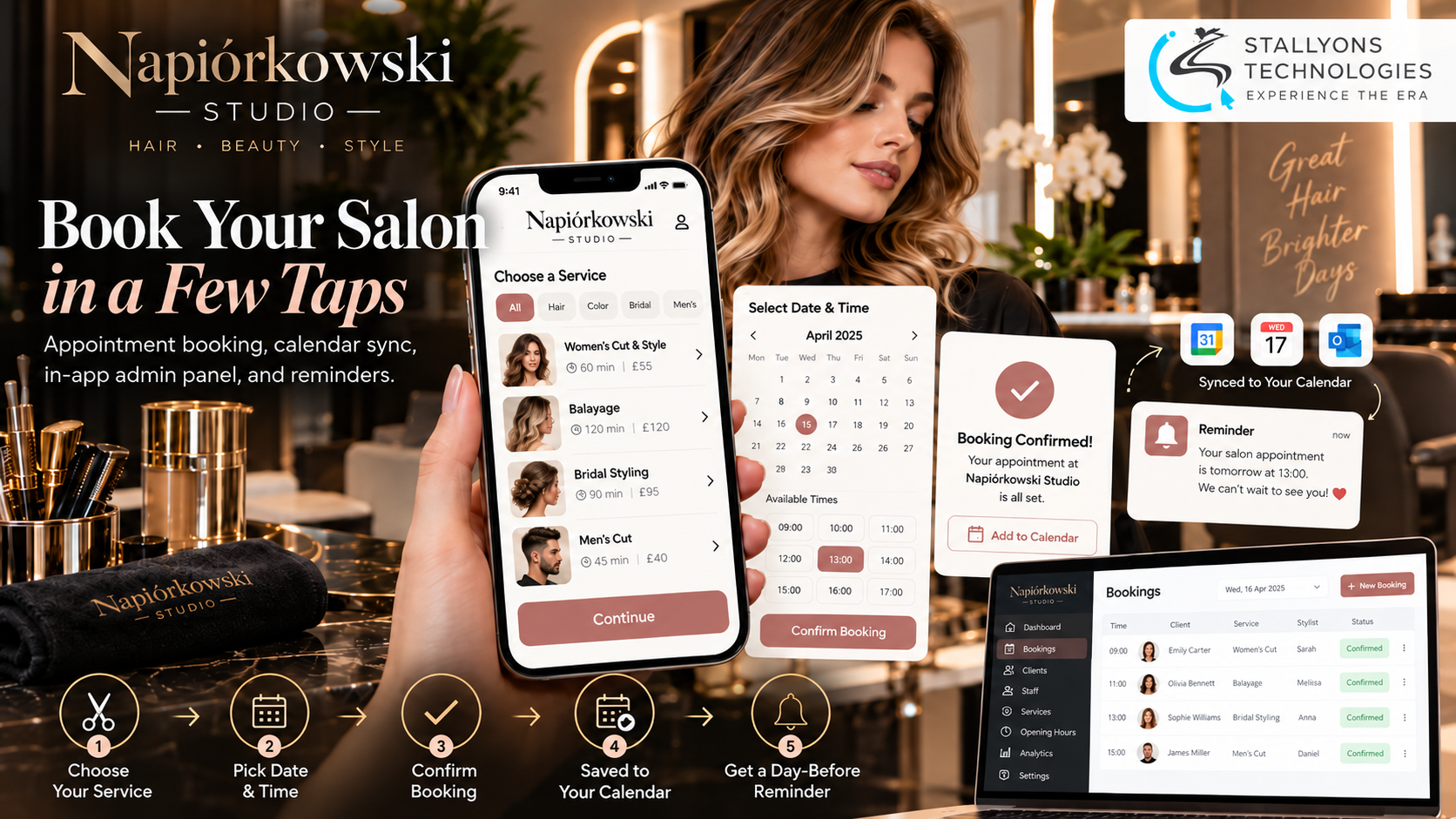
A salon phone rings mid-cut. A stylist puts down the scissors, wipes their hands, and takes the booking while a client sits waiting in the chair. It happens all day, and every one of those calls is time away from the person being served, plus the risk that a booking gets written down wrong or a visit is simply forgotten.
Napiórkowski Studio is a hair salon in Poland that wanted its own app to end that routine. The app existed and looked right, with a clean illustrated service menu, but it could not yet do the one job that mattered: take a booking and help the salon manage it. This project completed the app in Flutter for iOS and Android and connected it to the salon’s own Java and Spring backend.
Put simply, the finished app lets a client pick a service, choose a free time, and book straight from their phone. The visit is saved to the phone’s own calendar, a push notification reminds them the day before, and they can log out or reset a forgotten password. Staff use the same app with the same login, and because their account has admin rights they see a panel where they can view every booking, add employees, set opening hours, and disable accounts.
The Starting Point: Turning an Almost-Finished App Into a Booking Tool
The app was close to done but not ready for real use. The screens looked good; the features that make a salon app worth having were missing. Completing it meant working inside someone else’s codebase without changing the look the salon already liked, and building features the backend was not yet ready for. That set the requirements.
- Let clients actually book. People could browse services but could not reserve a time, so the app could not replace the phone yet.
- Stop visits being forgotten. Without a calendar entry or a reminder, clients miss appointments, and every no-show is an empty chair and lost income.
- Give the salon its own tools. Staff had no way to see all bookings, add employees, set opening hours, or block a problem account from inside the app.
- Add the basics people expect. Users could not log out or reset a forgotten password, both of which any app is expected to have.
- Build ahead of the backend. Some Java and Spring endpoints were still being finished, so each feature had to connect to them later without a rewrite.
The Build: A Booking in Under a Minute, Then the Calendar and the Reminder
The booking flow is short on purpose, and making it feel effortless on both iOS and Android is the heart of the custom Flutter app development company work on this project. A booking runs in a clear order:
- The client logs in, or resets a forgotten password by email if they need to.
- They choose a service from the illustrated menu, such as a women’s cut, balayage, bridal styling, or a men’s cut.
- They tap “Wybierz termin” to choose a date and pick from the times that are actually free.
- They confirm, and the visit is booked.
- The app saves the appointment to the phone’s own calendar with the service, date, and time.
- The day before the visit, a push notification reminds them.
The salon side lives in the same app. There is no second admin app to install: staff log in with their normal account, and because the backend tells the app their role, admins see extra screens that clients never do. From the panel they view all bookings in one list, add employees, set opening hours, and disable accounts that misuse the app. Opening hours and employees feed straight into the times clients are offered, so the booking screen always reflects how the salon actually runs.
Technical Architecture
The app is a Flutter client talking to a Java and Spring backend over REST. The challenge was not the screens, which were mostly done. It was finishing an existing codebase cleanly, adding role-based admin features to the same app, working with each phone’s calendar and notifications, and shipping features before all of the backend existed. Every choice was made to keep the app stable and easy to connect.
- Flutter for both platforms. One codebase on iOS and Android, keeping the existing app’s design intact.
- Backend-ready connection layer. Each feature talks to one repository class that matches the agreed API, running on fixed data where an endpoint was not ready. Switching to the live backend is a small, safe change rather than a rewrite, which is where clean API development earns its keep.
- Token login with roles from the backend. One login for everyone; admin screens appear only for admin accounts, and disabled users are blocked from signing in.
- Secure session storage. flutter_secure_storage holds the login token safely and clears it on log out.
- Device calendar integration. After a booking, the app asks for calendar permission once and adds the visit as an event on iOS or Android.
- Push reminders with Firebase Cloud Messaging. A day-before reminder reaches the client on both platforms.
The piece worth building carefully was that connection layer. Because each feature sits behind its own clean boundary, the screens never know whether they are reading fixed data or the real Spring endpoints, so the salon’s backend could come online without touching the app’s interface.
Challenges Solved
Finishing someone else’s app came first. The existing Flutter code was reviewed, its issues fixed, and a clear structure set up for the new features, which kept the look the salon liked while making the app stable enough to grow. Building before the backend was ready was handled with that per-feature connection layer, so real endpoints could be switched on later as a small change. Putting clients and staff in one app with one login meant reading the account’s role after sign-in and showing the admin panel only to admins, while blocking disabled users and clearing the session fully on log out.
The calendar and reminders were their own problem, because iOS and Android handle calendars and notifications differently and both ask the user for permission. The app requests it at the right moment, right after a booking, and copes when someone says no. Reminders were tested on real devices so they arrive the day before on both platforms, which is the kind of reliability any consumer storefront or local business needs when a missed appointment is money off the table.
The Result
The outcome is an app that finally does the job the salon wanted: clients book in a few taps at any hour, the visit lands in their own calendar, and a reminder arrives the day before. Staff run opening hours, employees, and user access themselves from the same app, with no developer needed for daily changes, and because the salon owns the app there is no commission paid to an outside booking marketplace. The design the salon already liked stayed intact while the app became useful day to day.
It works because the new features were built to finish an existing app cleanly and connect to a backend that was still being completed. If you have an app that is almost there and needs the features that make it real, you can hire dedicated developers who are used to finishing and stabilising existing codebases, or tell us where your app is stuck and we will map a path to a version your customers can actually use.
Frequently Asked Questions
What did this project add to the Napiórkowski Studio app?
It completed the app in Flutter for iOS and Android. The new features are appointment booking with calendar saving, log out, password reset, day-before push reminders, and an admin panel inside the same app where staff manage bookings, employees, opening hours, and user accounts.
Does the booking get saved anywhere besides the app?
Yes. After a client confirms a booking, the app asks for calendar permission once and adds the visit to the phone’s own calendar with the service, date, and time, so the appointment sits next to the rest of their plans on iOS or Android.
Is there a separate app for the salon staff?
No. Clients and staff use the same app and log in the same way. The backend tells the app what role each account has, so admin accounts see an extra panel for bookings, employees, opening hours, and disabling users, while clients never see those screens.
How could features be built before the backend was finished?
Each feature was given its own connection layer that follows the agreed API and ran on fixed data where an endpoint was not ready yet. The screens do not know the difference, so connecting the real Java and Spring backend later was a small, safe change instead of a rewrite.
How do the day-before reminders work?
Reminders are sent through Firebase Cloud Messaging as a push notification the day before each visit. Because iOS and Android handle notifications and permissions differently, the app asks for permission at the right moment and the reminders were tested on real devices to confirm they arrive on both platforms.