


Blog
Lighting Store WooCommerce
Tune-Up
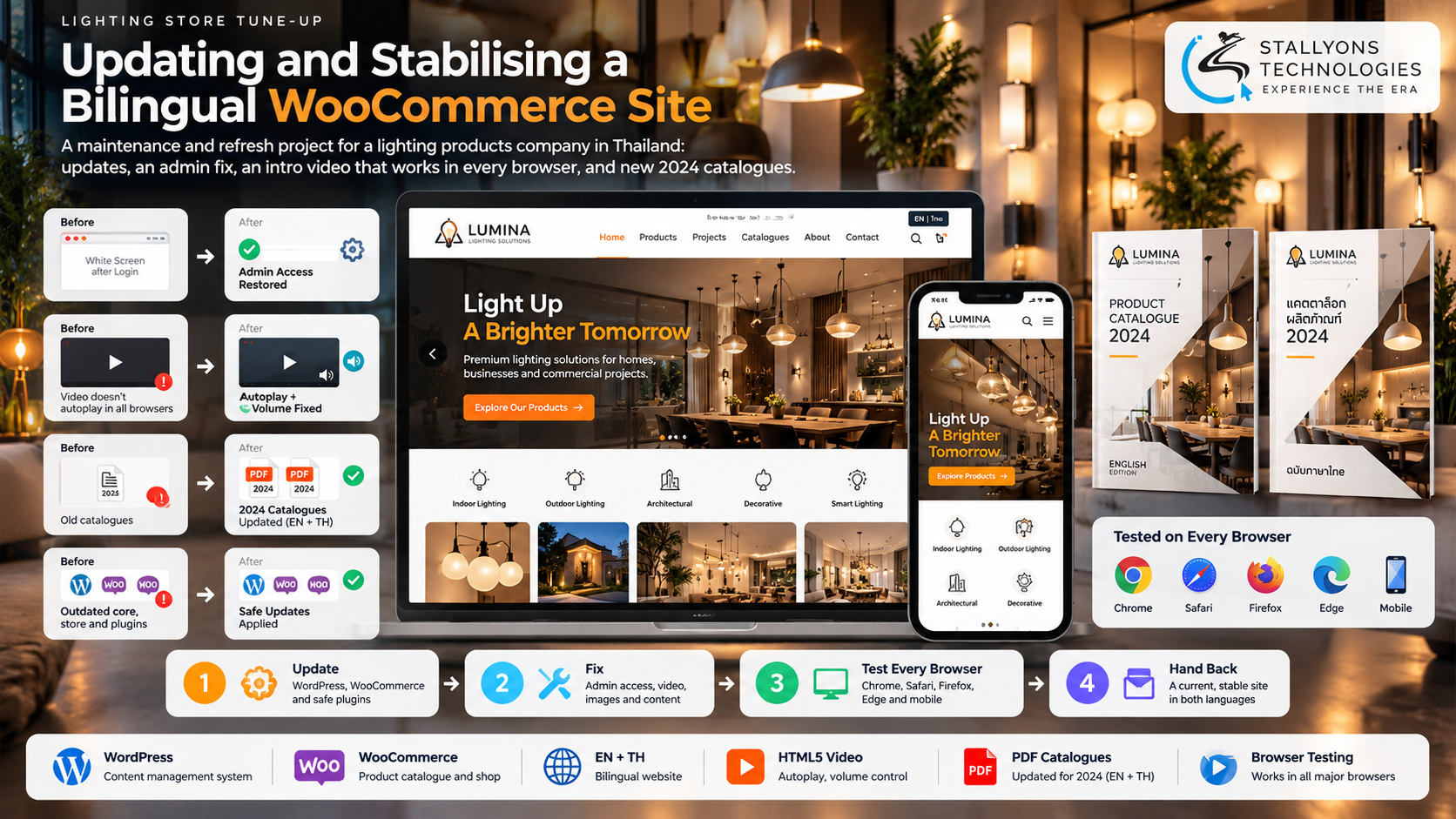
A sales season is coming, the owner of a lighting business sits down to log into his store, and the admin screen loads white and empty. He cannot reach the dashboard. The storefront is still up, but the intro video plays differently depending on the browser, some product images have jumped to the wrong size, and the downloadable catalogues still show last year on the cover. A site that ran fine for years has drifted out of shape after a stretch with no maintenance, and it needs to be current and steady before the selling starts.
This was a lighting products company in Thailand, running a bilingual English and Thai site on WordPress and WooCommerce. The site presents its products, opens with a full-screen intro video, and offers product catalogues to download in both languages. We updated the core platform, the store, and the plugins that were safe to touch, fixed the white screen so the owner could log in again, corrected the product images and text in both languages, made the intro video autoplay the same way in every major browser, and updated both catalogues to the new year inside the PDF files themselves.
Put simply, the site was brought back to current, stable, and consistent, in English and Thai, and tested so it looks and plays the same wherever a customer opens it.
The Starting Point: A Neglected Store Before a Busy Season
Maintenance work is risky in a different way to a new build. The site already has customers, a custom design, and settings that must survive, so the job is to update and repair without breaking what works. After a period without upkeep, several things needed attention at once, and each had to be handled without disturbing the rest.
- Locked out of admin. A white screen after login blocked the owner from the dashboard entirely, so nothing could be managed until it was fixed.
- Inconsistent intro video. The muted intro video did not autoplay reliably across browsers, so first impressions varied by visitor.
- Outdated content. Product images, text, and both downloadable catalogues needed updating for the new year, in both languages.
- Overdue software. WordPress, WooCommerce, and the plugins were all behind, and updating everything at once could clash with the custom build.
- Two languages. Every content change had to be made in both the English and Thai versions so the two markets stayed in step.
- A quiet inbox. After the updates, a stream of automatic notification emails started, and it needed tracing and stopping.
The Build: Update Safely, Fix, Then Test Every Browser
Refreshing a live store without downtime is careful WordPress development and maintenance, because an update that suits a stock site can break a custom one. The work ran in a deliberate order:
- We updated WordPress and WooCommerce first, then only the plugins that were safe for the custom design and features, holding the rest back on purpose.
- We fixed the admin white screen so the owner could log in again and manage the store.
- We resized and replaced product images, corrected the image sizes on the products page, and changed text in both English and Thai.
- We set the intro video to autoplay muted, at normal speed, with a working volume button, in every major browser.
- We updated both product catalogues to the new year inside the PDF files themselves, keeping the original layout and logo, and repaired the download links.
- We traced and stopped the stream of automatic notification emails that had started after the updates, then ran client review rounds before sign-off.
Because the catalogues are a core part of how this store sells, treating them and the product pages as proper WooCommerce development work, rather than quick edits, is what kept the shop consistent in both languages while the software underneath was brought up to date.
Technical Architecture
The site runs on WordPress and WooCommerce, in English and Thai, with a custom design on top. The challenge was not the stack itself but working within it safely: updating what could be updated, leaving what could not, and making browser-level behaviour consistent. Each layer had its own care.
- Platform. WordPress as the client’s existing site, updated to a current, supported version.
- Store. WooCommerce running the product catalogue and shop, updated alongside the core.
- Plugins. Only the plugins safe for the custom build were updated, with the rest held back deliberately to avoid clashing with the design and features.
- Media. An HTML5 intro video and optimised product images, corrected so sizes and playback are consistent.
- Documents. Bilingual PDF catalogues, with the year changed inside each file and the download links repaired.
- Languages. English and Thai pages kept in step, so every content change landed in both markets.
The part that needed the most judgement was browser-safe autoplay. Browsers block sound-on autoplay and treat muted video differently, so the intro was set to autoplay muted with a volume toggle the visitor controls, which plays the same way in Chrome, Safari, Firefox, and Edge, and on mobile, while staying inside each browser’s rules.
Challenges Solved
The first challenge was updating without breakage. Some plugins could clash with the custom build, so only the safe updates were applied and the rest were held back on purpose, which kept the design and features working while still bringing the platform up to date. A second challenge came from the fixes themselves: a few changes caused small regressions, such as the video running too fast or losing its volume button, and each was caught in client review and corrected before final sign-off rather than shipped and left.
The third challenge was the catalogues. They needed the year changed inside the PDF files themselves, not just on the website, while keeping the original layout and logo intact, so the documents a customer downloads match the current season. Alongside these, the white-screen lockout and the unexpected stream of notification emails were both traced to their causes and resolved, so the owner ended with a store that is current, stable, and quiet.
The Result
The store came out of the tune-up current and consistent. The owner can reach the admin area again, the intro video plays the same way in every major browser and on mobile, both catalogues carry the right year and download cleanly, and the English and Thai versions stayed in step throughout. The client approved the work, released payment, left a review, and went on to discuss a further website project for later in the year. Just as useful, the store was left on current, supported software, so the next round of updates starts from a healthy base rather than years of backlog, and the custom design and features were preserved intact through all of it.
If a neglected store needs updating without breaking its custom build, you can hire WooCommerce developers who update selectively and test across browsers, or tell us what has drifted on your store and we will bring it back to current and stable before your next season. It suits any retail and ecommerce business running a custom WooCommerce shop that has gone too long without upkeep.
Frequently Asked Questions
What did the lighting store tune-up involve?
Updating WordPress, WooCommerce, and the safe plugins, fixing an admin white screen, correcting product images and text in both languages, making the intro video autoplay consistently across browsers, updating both PDF catalogues to the new year, and stopping a stream of automatic notification emails.
Why were only some plugins updated?
The site has a custom design and features, and updating every plugin at once could clash with them. We updated the core, the store, and the plugins that were safe for the custom build, and held the rest back deliberately to keep the design and features working.
How was the intro video made to work in every browser?
Browsers block sound-on autoplay and handle muted video differently. The intro was set to autoplay muted, at normal speed, with a volume button the visitor controls, so it plays the same way in Chrome, Safari, Firefox, and Edge, and on mobile, within each browser’s rules.
Why did the catalogues need editing inside the PDF files?
The downloadable catalogues are PDFs, so the year on the cover lives inside each file, not just on the website. We updated both the English and Thai catalogues inside the PDFs, kept the original layout and logo, and repaired the download links so customers get the current documents.
Can a bilingual store be kept in step during maintenance?
Yes. Every content change was made in both the English and Thai versions, so the two markets stayed consistent. Testing then confirmed the storefront looked and played the same across browsers in both languages before the work was handed back.