


Blog
PUSH2TALK: Native iOS
Voice Messaging App
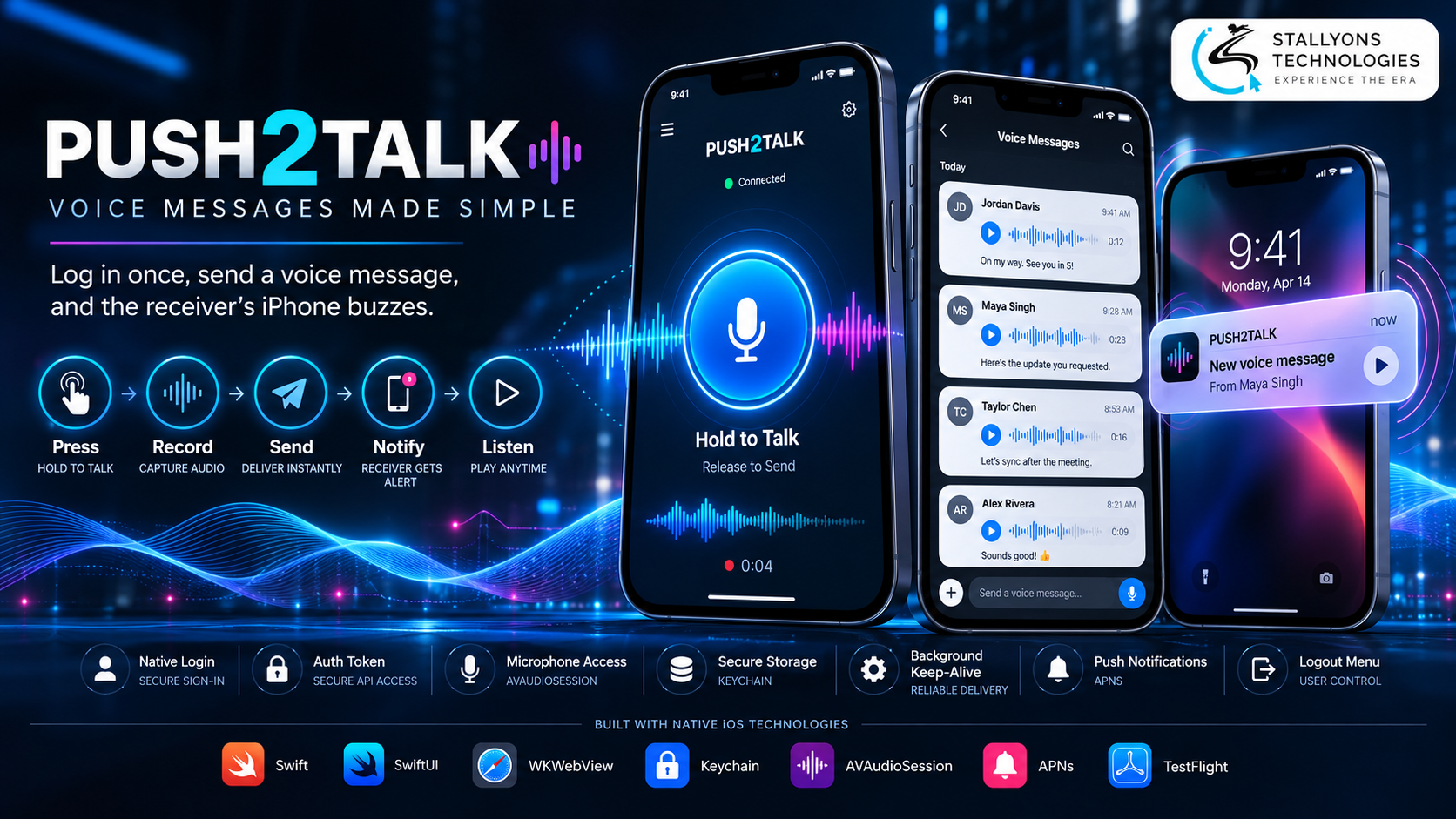
Someone sends you a voice message and you never know. The web app that would have played it is closed, the phone is locked, and the site cannot tap you on the shoulder. For a push-to-talk service, that gap is the whole problem: a message that is not heard might as well not have been sent.
PUSH2TALK is a voice messaging service where customers record a short message and send it straight to another customer, like a walkie-talkie that works over the internet. The web app was already built and working. What was missing was a proper iPhone app that people could keep with them, stay signed in to, and be notified on the instant a new message arrived. This project built that app natively in Swift, showing the existing web app inside a secure web view so every feature works on the phone with no rebuild, and wrapping it in the native layer a website cannot provide on its own.
Put simply, the user logs in natively, the app exchanges their details for a token and stores it securely, and the web app opens already signed in. Around it sit the things only native code can do: microphone access for recording, a background mode that keeps voice audio alive, a Logout option in a hamburger menu, and a push notification API the client can call to alert a user the moment a message arrives. The web app is reused as it is; only the native shell was built.
The Starting Point: Reuse the Web App, Add What Only Native Can Do
The client had a web app that already handled users, contacts, and voice messages well. They did not want a second product to build and maintain; they wanted the mobile experience the browser could not give. That framed a focused set of requirements, all of which had to work without touching the web app itself.
- A real app on the iPhone. Customers needed an App Store presence and an app icon, not a bookmarked website they had to go and find.
- Stay signed in securely. The app had to know who the user was on the phone without asking them to log in again and again.
- Keep working in the background. Once the browser closed or the phone locked, the service stopped, so users missed messages. That had to end.
- A way to notify users. The web app had no route to send a push to an iPhone when a new voice message arrived, and it needed one.
- No rebuild of the web app. The existing product worked, so it had to be reused in full, with native code added only where the phone demanded it.
The Build: Log In Once, Send a Message, the Receiver’s Phone Buzzes
The app starts with a native login screen, and from there the familiar web app takes over inside a web view. Passing a token safely into that web view and giving the web page the iPhone’s microphone is the kind of problem a custom iOS app development company handles so the user never sees the join. The flow runs in a set order:
- The user opens PUSH2TALK and enters their details on the native login screen.
- The app sends them to the authentication API, which returns a token.
- The token is stored in the iPhone’s Keychain and used to open the existing web app already signed in.
- The customer records a voice message with the microphone and sends it to another customer, using every feature they know from the web.
- When a message arrives, the receiver’s device is woken by a push notification, and tapping it opens the app on the right screen.
- A Logout option in the top-right hamburger menu clears the token and web session and returns to the native login screen.
In the background, the app stays available for voice audio and is reopened by push when a new message arrives. For those alerts, a push notification API was built and handed to the client: the app registers each device, and the client’s own web app calls one endpoint to send a push to any user. Because the web app is reused in full, any update to it appears in the iPhone app at once, with no new App Store release.
Technical Architecture
PUSH2TALK for iOS is a native Swift shell around the existing web app, plus a small push notification service. Each layer is chosen to keep the app light, secure, and approvable, so it does what a website cannot while leaving the working product untouched.
- Language and UI. Swift with SwiftUI builds the native login, the menu, and the app shell.
- Web app. A WKWebView runs the existing web app with full modern web support, so nothing has to be rebuilt.
- Authentication and storage. One native login returns a token from the auth API, and the Keychain keeps it safely between launches.
- Voice. Microphone permission plus AVAudioSession let the web page record and play voice messages inside the web view, even with headphones connected.
- Background and push. An audio background mode and push notifications are the iOS way of keeping the app alive, and the push notification endpoint, delivered as its own piece of API development, is built on APNs with a token-based .p8 key so the client’s web app sends a notification with one call.
- Release. Xcode, TestFlight, and App Store Connect cover beta testing and submission.
The part worth engineering carefully was the hand-off of the token into the web view. The token returned by the auth API is passed in when the page loads, so the user arrives already signed in, and when it expires the app sends them back to the native login screen instead of showing a broken page. Getting that right is what makes a web view feel like a real app rather than a browser in disguise.
Challenges Solved
The hardest problems came from the gap between what the brief asked for and what iOS allows. A “foreground service” to keep the app alive is an Android idea with no direct equivalent, so the same goal was met the iOS way, with an audio background mode and push notifications that reopen the app, staying inside Apple’s rules. Signing the web view in with a token was solved by passing it at load time and falling back to the native login when it expires. Recording inside a web view, which browsers block by default, was solved by configuring the view for media capture and setting up the audio session so recording and playback are reliable.
Logging out had to be complete, not cosmetic, so the Logout option clears the token from the Keychain, wipes the web view’s cookies and data, and removes the device from push, leaving nothing of the last user. This pattern of reusing a web product and adding a thin native layer is a practical route for SaaS and startup products that already work on the web and need a real iPhone presence fast.
The Result
The outcome is a dependable native iOS app around an unchanged web product: native login with token authentication, secure Keychain storage, microphone support for recording, a clean Logout menu, background keep-alive, and a documented push notification API ready for the client to connect. The web app is reused in full, so the client maintains one product, and web changes reach iPhone users instantly without a new release.
The build works because it adds only what native can do and leaves the rest alone, which keeps both the build cost and the ongoing maintenance low. If you have a web app that needs a real iPhone presence, you can hire iPhone app developers who have shipped this web-view-plus-native pattern, or tell us about your web app and we will map it to a native app with push.
Frequently Asked Questions
Is PUSH2TALK a rebuilt app or the existing web app in a shell?
It is the existing web app shown inside a secure WKWebView, wrapped in native Swift code. The web app is reused in full with no rebuild, so every feature works on the phone, while native code handles login, secure storage, the microphone, background behaviour, logout, and push.
How does the app keep users signed in?
The user logs in on a native screen, the auth API returns a token, and the token is stored in the iPhone’s Keychain. The app opens the web app already signed in with that token, so users stay logged in between launches, and logging out fully clears the token and the web session.
How are users notified of new voice messages?
A push notification API was built and handed to the client. The app registers each device, and the client’s web app calls one endpoint to send a push, which is delivered through Apple’s service to every device the receiver has registered. Tapping the notification opens the app on the right screen.
How does the app stay alive in the background on iOS?
iOS has no direct equivalent of Android’s foreground service, so the app uses an audio background mode to keep voice audio running and push notifications to alert the user and reopen the app when a message arrives. This keeps the service dependable while staying within Apple’s App Store rules.
Can you wrap my existing web app in a native iPhone app like this?
Yes. This project shows the full pattern: a WKWebView running the web product, native token login, microphone access, background keep-alive, a clean logout, and a push API the client controls. Tell us about your web app and we can map the same native layer to it.