


Blog
Takavi Tutors: Native
iOS Tutoring Marketplace
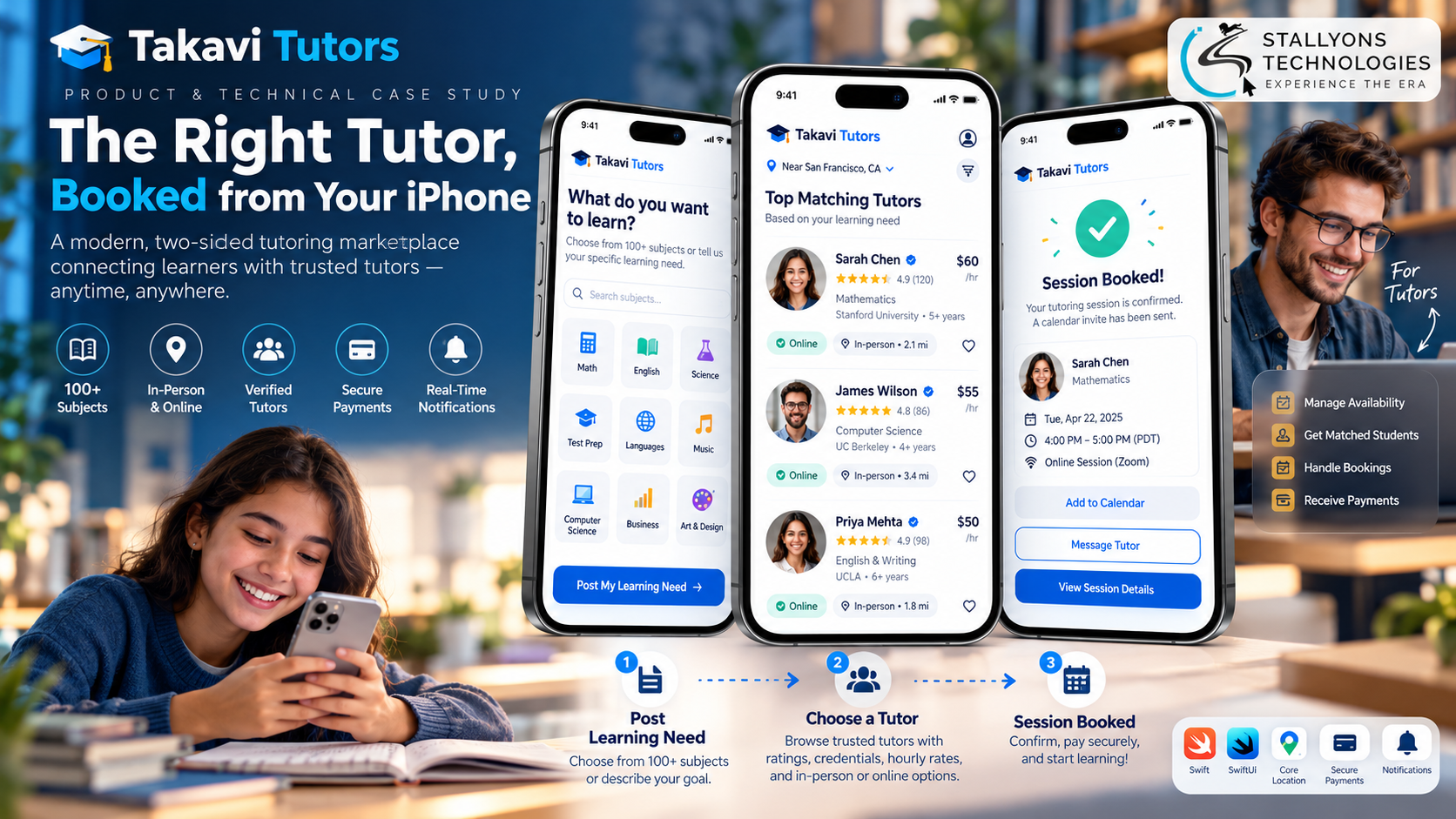
A parent works out on a Tuesday night that their child has a math test on Friday and nowhere to start. They do not want to open a laptop, fill in a long form, and wait for replies that may not come. They want to find someone good, see that other families already trust them, and book a session before bedtime, from the phone that is already in their hand.
That is the job the Takavi Tutors app was built to do. Takavi Tutors is a North American tutoring marketplace that has connected students and parents with vetted tutors in more than 100 subjects since 2015, online or in person. The business already ran on its website. This project brought it to the iPhone as a fully native app written in Swift, serving both sides of the marketplace from one codebase: learners post a need, find a tutor, chat, and pay, while tutors manage their schedule, rates, sessions, and payouts.
Put simply, a learner posts what they need help with, the app shows tutors who match by subject, format, and distance with their credentials and reviews up front, and a session is requested in a tap. Because the app runs on the same platform as the website, accounts and bookings stay in sync, so a booking made on the web appears on the phone and the other way round. The app went live on the App Store in April 2025 and has shipped regular updates since, including a 2.0 redesign.
The Starting Point: One App for Both Sides of a Live Marketplace
Takavi Tutors had already solved matching and booking on the web, so the iPhone app could not be a lesser copy of it. It had to feel native, serve two very different users, and never fall out of step with a platform that already held years of accounts, tutors, and bookings. That set a clear list of requirements.
- Booking in seconds, wherever you are. Posting a need, checking a tutor’s message, or confirming a time had to happen on the move, not at a desk.
- Two users, one app. Learners want to find and book; tutors want to manage requests, schedules, rates, and payments. Each role needed its own focused set of screens.
- A quick way to find the right fit. With more than 100 subjects and both online and in-person options, people needed to narrow tutors by subject, level, format, and distance, with credentials and reviews shown first.
- Real tools for tutors. Tutors had to set their own rates and hours, see requests as they arrived, run sessions, and get paid securely, without juggling email and spreadsheets.
- One platform, not two. The app had to use the same accounts, bookings, and data as the website, so nothing was ever managed twice.
- Payments and location handled with care. Payments had to be secure, and location had to be requested only when someone actually chose an in-person session.
The Build: Post a Need, Choose a Tutor, Session Confirmed
Getting help is as simple as posting what you need. Building this as a genuinely native app rather than a web page in a shell is the kind of work an experienced iOS app development company is hired for, because the feel of the booking flow is what keeps families coming back. A booking runs in a set order:
- The learner or parent signs up and the app loads the screens for their role.
- They post a learning requirement: the subject, the level, and whether they want online or in-person help, setting a distance from 0 to 5 miles up to 25 or more for in person.
- The app shows matching tutors with their rates, credentials, and reviews from other families.
- They choose a tutor and request a session in a tap from the profile.
- The tutor accepts, and the meeting details arrive in the in-app chat.
- The session is paid for securely in the app, and the learner can leave a review and rebook later.
The tutor side runs from the same app. A tutor builds a profile, sets their own schedule and rates, and receives session requests that match what they teach. They accept requests, chat with students, run live or in-person sessions, share lesson plans, and track bookings and payouts. Distance-based search uses the device’s location only after the user grants permission, and online tutoring still works fully if that permission is declined. Push notifications carry new requests, confirmations, and messages at each step.
Technical Architecture
Takavi Tutors for iOS is a native Swift client that talks to the existing Takavi Tutors platform. Each layer does one job, and together they keep the app fast, native, and perfectly in step with the website.
- Language and UI. The app is written in Swift with SwiftUI screens and supports devices back to iOS 15.1, so it feels at home on the iPhone instead of wrapping a website.
- Networking. Calls use URLSession with async/await and Codable, which keeps every request to the platform clean and typed.
- Backend. The app runs against the same Takavi Tutors platform as the web, so accounts, tutors, and bookings are shared, not copied.
- Location. Core Location powers the mile-radius search for in-person tutors, and is only ever used with permission.
- Security. Session tokens sit in the Keychain and all traffic is encrypted. Getting the shared data model right so the two clients never drift is the kind of custom software development that decides whether a marketplace app can be trusted.
- Notifications and release. Apple Push Notification service carries requests and messages, and every build ships through Xcode, TestFlight, and App Store Connect.
The part worth engineering carefully was the join with the live platform. Every response is decoded into typed Codable models, so a booking made on the website shows up in the app and the other way round, with no duplicate data to reconcile. That is what lets one marketplace run across two front ends without the two slowly disagreeing.
Challenges Solved
The harder problems were the ones that break a naive marketplace app. Serving two users was solved by building the experience around role, so learners and tutors each see a focused set of screens while chat, profiles, and sessions are written once in the same Swift codebase. Staying in sync with a platform that already had years of data was solved with typed models for every response, so nothing has to be managed twice. Location was handled without losing trust by asking for it only when someone chooses in-person help, explaining why, and still working fully for online tutoring if it is declined.
Passing Apple’s review was its own task, because an app that handles payments, contact details, and location gets close attention. Each release was tested through TestFlight and submitted with accurate privacy information, which helped it launch smoothly and keep shipping. That mix of booking, trust, and scheduling is exactly what education and tutoring platforms need when learning has to fit around real family schedules.
The Result
The outcome is a native iPhone app that does the full job of the marketplace: a learner posts a need, filters tutors by subject, format, and distance, sees credentials and reviews, and books a session in a tap, while tutors run their side from the same app. It has been live on the App Store since April 2025, carries a 5.0 rating, and has shipped six releases including a 2.0 redesign, all on a platform that has delivered more than 10,000 hours of tutoring since 2015.
The build works because it was designed as a true native app that stays in sync with the website, rather than a wrapper bolted onto it. If you are planning a two-sided marketplace app, you can hire iOS developers who have shipped this kind of Swift app end to end, or tell us how your service works and we will map it to an app that books and pays on the phone.
Frequently Asked Questions
Is the Takavi Tutors app really native, or a web wrapper?
It is a fully native app built in Swift with SwiftUI, not a cross-platform wrapper around the website. It uses Apple’s own frameworks for location, secure storage, and notifications, and supports iPhones back to iOS 15.1, so it is fast and feels at home on the device.
How does one app serve both students and tutors?
After sign-in, the app loads the right screens for the person’s role from a single codebase. Learners get finding and booking; tutors get scheduling, rates, sessions, and payouts. Shared parts like chat, profiles, and sessions are built once, which keeps one app to maintain and one listing to grow.
How do app bookings stay in sync with the website?
The app runs against the same Takavi Tutors platform as the website and decodes every response into typed Codable models. A booking made on the web appears in the app, and a booking made in the app appears on the web, with no duplicate data to reconcile.
How does distance-based tutor search handle privacy?
The app only asks for location when someone chooses in-person sessions, and it explains why. For online tutoring, location is never needed, so the app works fully even if permission is declined. Privacy details are declared clearly on the App Store.
Can you build a two-sided marketplace iPhone app for my business?
Yes. This project shows the full pattern: a native Swift app serving two roles, matching and booking, secure in-app payments, and tight sync with an existing web platform. Tell us how your marketplace works and we can map the same approach to it.