


Blog
Art Wall Visualizer:
A Bubble Tool Bridged to Shopify
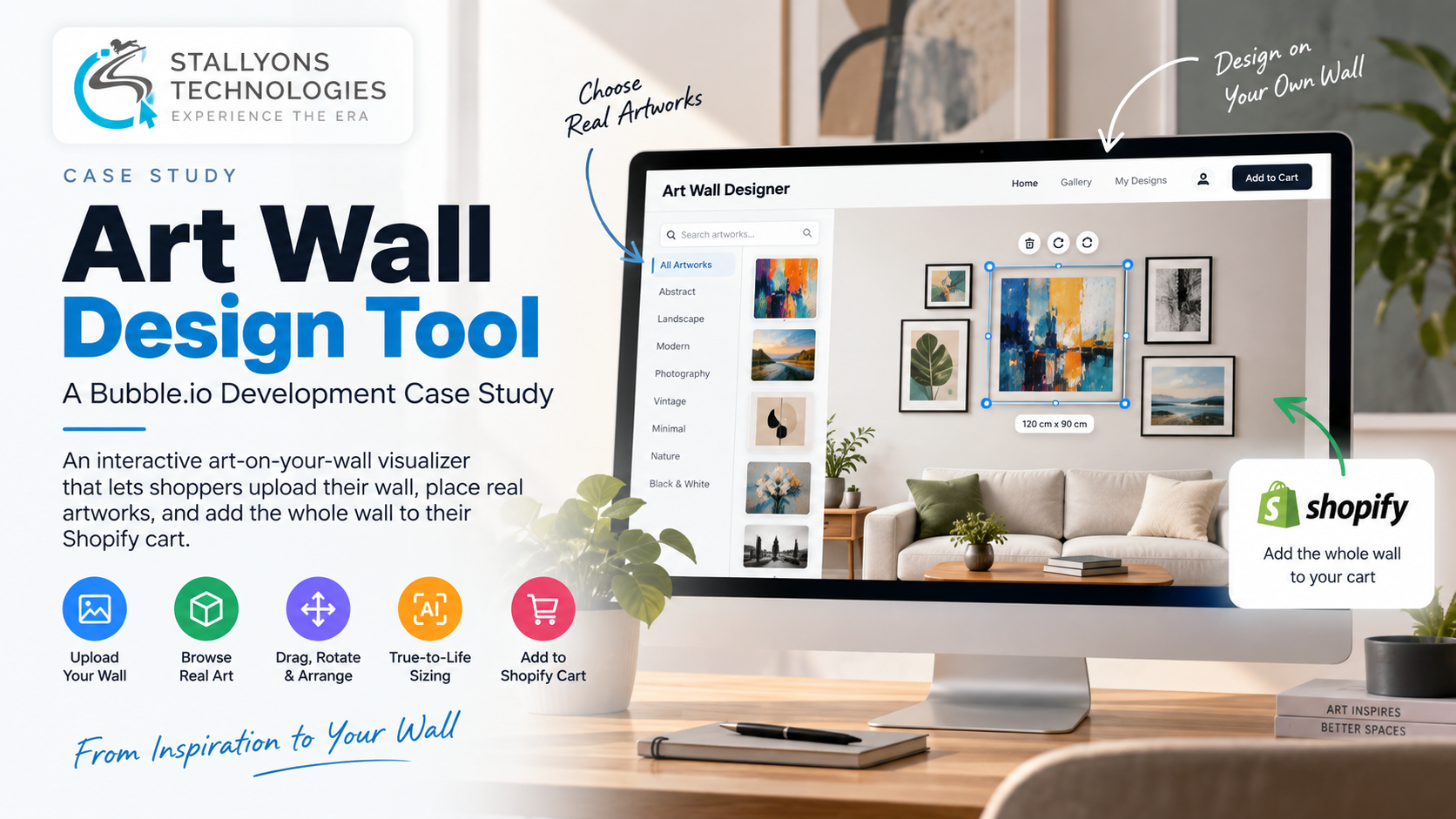
Someone is standing in their living room with a bare wall above the sofa and a phone in their hand, trying to picture how a cluster of paintings would actually look up there. Not a generic mockup with stock frames, but the real pieces from the store they are browsing, at the size those pieces would arrive, on their own wall. That is a hard thing to sell online, and it is exactly what this tool was built to do.
The Art Wall Design Tool is an interactive web app built on Bubble.io for an online store that sells original, physical artworks through Shopify. A shopper uploads a photo of their own wall, drags real artworks onto it, zooms, rotates and crops until the arrangement looks right, and adds the whole wall to their Shopify cart in one step. It works in the spirit of a well-known art-wall designer, with two differences that matter: shoppers use their own wall, and because every piece is an original, there are no frame or size options to choose.
Put simply, it turns browsing into designing. The store’s roughly five thousand artworks live in Shopify with their true dimensions saved as metafields. The tool pulls them in, strips the gray studio backgrounds automatically, estimates the size of the uploaded wall with AI, and scales every piece to true-to-life size, so what a shopper sees on screen is what they would hang.
The Starting Point: A Catalogue Built to Browse, Not to Visualise
The store already had everything a shopper needs to buy, and nothing they need to imagine. Five thousand original works sat in Shopify as product photos on flat gray backgrounds, each tagged with its real length and width, but a shopper could only ever see them as thumbnails in a grid. There was no way to try a gallery wall in a real room, and because the pieces are one-of-a-kind originals, the usual tricks of a print shop, pick a size, pick a frame, did not apply. A piece is what it is.
Building an art-on-your-wall visualiser on top of that catalogue raised a handful of distinct problems:
- Art on the shopper’s own wall. A shopper uploads a photo of their wall and arranges pieces on it, which needs a properly interactive canvas with drag and drop, zoom, rotate and crop.
- Five thousand gray backgrounds. Every product photo sits on a gray studio background that looks wrong on a wall, so the gray has to be removed automatically, at scale, with no hand editing.
- Getting the size honest. A piece has to appear at its true size, which means estimating how big the uploaded wall is and scaling each work by its real dimensions.
- Faithful to the originals. Because the works are original and physical, there can be no size or frame options; a piece is only shown framed when its own photo already is.
- One live catalogue. The artworks, photos, dimensions and details all live in Shopify, so the tool has to read from that catalogue rather than keep a separate copy that drifts out of date.
- Buying the whole wall. A finished design should go to checkout in one move, sending every placed piece into the Shopify cart at once.
The Build: An Interactive Canvas Wired to a Live Shopify Catalogue
The tool is an interactive canvas built in Bubble. A shopper uploads a photo of their wall and drags artworks onto it, with tools to zoom, rotate and crop each piece into place. The catalogue behind the canvas comes straight from Shopify: through Bubble’s API connector, the roughly five thousand artworks are pulled with their photos, details and their true length and width, which the store keeps as Shopify metafields. Because those product photos are on gray backgrounds, a background-removal service strips the gray as the pieces load, so each one sits cleanly on the wall. This is the kind of Bubble.io app development where the interface is only half the job and the data plumbing behind it is the other half.
Sizing is what makes the whole thing believable. The tool estimates the size of the uploaded wall with AI, then scales each artwork against its real dimensions, so a piece appears at true-to-life size relative to the room. Because every work is an original, the reference tool’s frame and size controls are removed entirely: nothing can be resized or reframed, and a piece is shown framed only when its image already is. From the shopper’s side, designing a wall runs in a clear order:
- Upload a photo of the wall you want to fill.
- Browse the live Shopify catalogue inside the designer and drag pieces onto the wall.
- Zoom, rotate and crop each piece, with the gray background already removed, until the arrangement looks right.
- See every piece scaled to true-to-life size against the estimated wall dimensions.
- Add the whole wall to the Shopify cart in one step and go to checkout, with the option to save the design to an account and share it.
Technical Architecture
Under the surface, this is a Bubble app that leans on the platform’s building blocks for the parts Bubble does well and reaches out to external services for the parts it does not. Each subsystem maps to one of the problems above.
- The wall designer canvas. An interactive Bubble canvas handles upload, drag and drop, zoom, rotate and crop, so a shopper can arrange a gallery wall freely in their own space.
- Live Shopify catalogue. Bubble’s API connector reads the products, photos, dimensions and details from Shopify, so the full catalogue is browsable inside the tool and never held as a stale second copy. Building that reliable read-and-cart bridge is a piece of API development in its own right.
- Automatic background removal. A background-removal service strips the gray from each product photo as it loads, so five thousand images look right on a wall without anyone editing them by hand.
- AI wall-size estimation and scaling. The uploaded wall is measured with AI, and each artwork is scaled by its real length and width from the Shopify metafields, so proportions stay true to life.
- Saved designs. The Bubble database stores designs against optional shopper accounts, so a wall can be saved, returned to and shared.
- Wall to cart. A single add-to-cart action sends every piece on the wall into the Shopify cart at once, so a finished design goes straight to Shopify checkout.
Delivering this on Bubble kept the build fast to iterate on and easy for the store to maintain, which is the point of choosing no-code and low-code development for a tool like this: the effort goes into the canvas, the sizing and the Shopify link, not into standing up a backend from scratch.
Challenges Solved
The hardest problems all sat at the seam between a visual designer and a real product catalogue. An interactive Bubble canvas gave shoppers a true wall designer in the browser rather than a static preview. Pulling the catalogue live from Shopify through the API connector meant the pieces, prices and dimensions inside the tool always match the store. Automatic background removal solved the gray-photo problem across five thousand images without any manual cleanup. AI wall-size estimation paired with real-dimension scaling made the sizing honest, which is what a shopper has to trust before spending on original art. And the single wall-to-cart action kept the path from design to checkout short.
Staying faithful to the originals was as much a product decision as a technical one: stripping out the frame and size options meant the tool could never show a work that is not actually for sale. That discipline is what makes this useful for art retailers and ecommerce brands selling considered, higher-value pieces, where a confident buyer is one who has already seen the thing in their own room.
The Result
The outcome is a tool that lets a shopper design a gallery wall from real art, on their own wall, and buy the whole thing at once. Pieces come in clean, with the gray backgrounds gone, and scaled to true-to-life size against the room. The full five-thousand-work catalogue is browsable live from Shopify, designs can be saved to an account and shared, and a single action moves the finished wall into the Shopify cart for checkout. Browsing became designing, and designing led straight to a confident purchase.
If you are planning something similar, a configurator, a visualiser or any tool that has to sit on top of a live commerce catalogue, you can hire full-stack developers who have built exactly this kind of canvas-plus-catalogue system, or tell us what you are selling and we will map out how a Bubble tool could let your shoppers try it before they buy.
Frequently Asked Questions
Can a Bubble.io app connect to a live Shopify catalogue?
Yes. This tool uses Bubble’s API connector to read roughly five thousand artworks from Shopify, including their photos, details and true dimensions stored as metafields, and to push a finished design into the Shopify cart. The catalogue stays live in Shopify rather than being copied into Bubble, so prices and product data never drift apart.
How does the tool show art at the correct size on a wall?
The uploaded wall photo is measured with AI to estimate its size, and every artwork is scaled against its real length and width from the Shopify metafields. That means each piece appears at true-to-life size relative to the wall, so a shopper sees roughly what they would actually hang rather than a loosely scaled preview.
How are the gray product backgrounds removed?
The store’s product photos are shot on gray backgrounds, which look wrong on a room wall. As artworks load from Shopify, a background-removal service strips the gray automatically, so each piece sits cleanly on the uploaded wall with no manual editing across the five thousand images.
Why are there no frame or size options like other art visualisers?
Every piece in this store is an original, physical artwork, so it cannot be resized or reframed. Unlike print-focused tools, the frame and size controls were removed on purpose, and a work is only shown framed when its own photo already is, so the tool never misrepresents what is for sale.
Can shoppers buy every piece on their wall at once?
Yes. A single add-to-cart action sends every artwork placed on the wall into the Shopify cart together, so a finished gallery wall goes straight to Shopify checkout in one step. Shoppers can also create an optional account to save their designs and share them.