


Blog
TxnSync: Transaction Data
Sync API
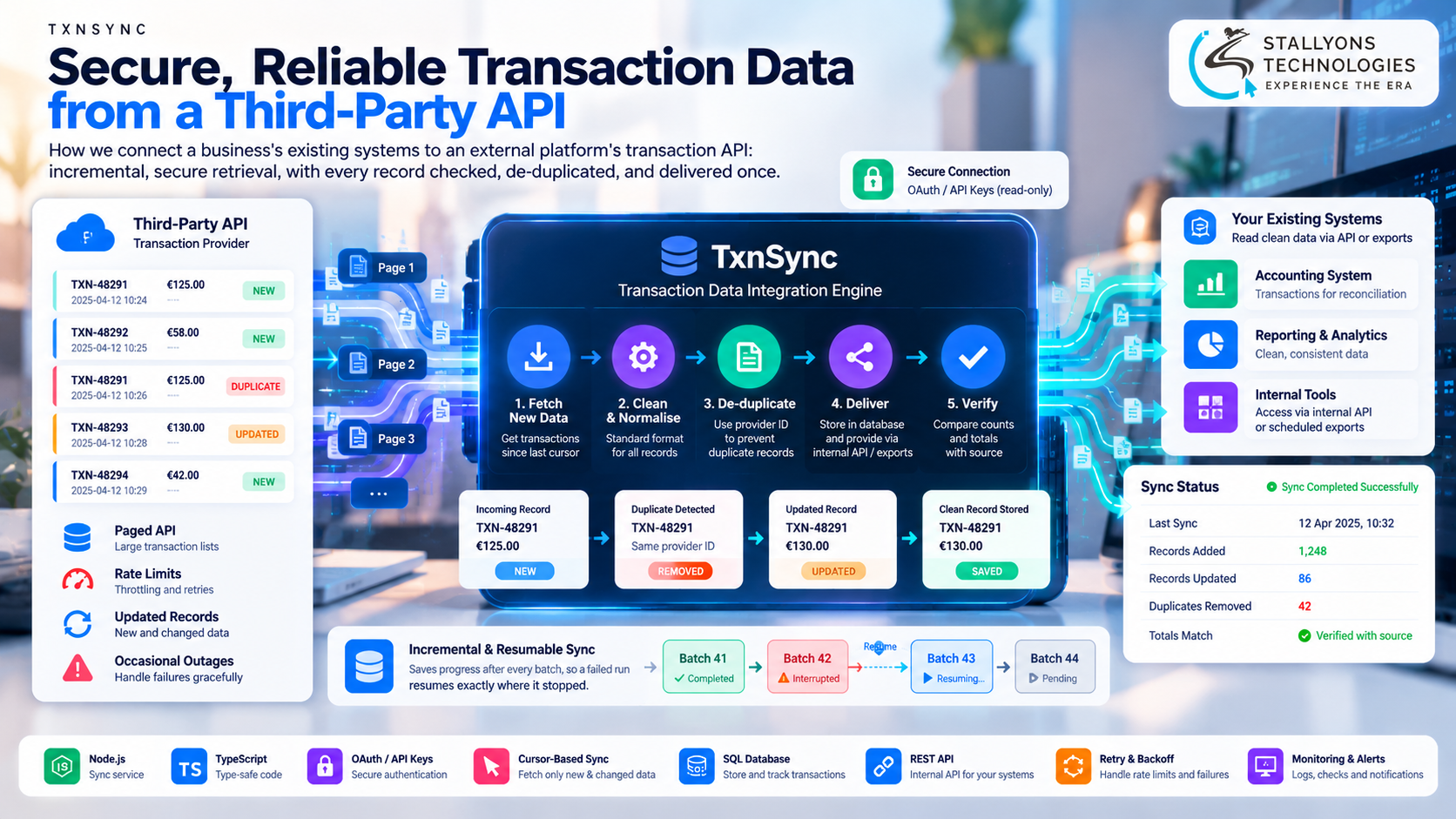
Most businesses that depend on an outside platform for their transaction data end up doing the same chore by hand. Someone signs in to the provider, exports a file of recent transactions, and loads it into the accounting or reporting tool. It holds up for a while. Then the list gets long, a download is missed, the same transaction lands twice, and a number in a report no longer matches the source it came from.
TxnSync is our blueprint for taking that chore off people entirely. It is a small Node.js service that owns the connection to an external platform’s transaction API. It authenticates once with read-only access, fetches only the transactions that are new or changed since its last run, turns them into one clean format, removes duplicates, and stores them where existing systems can read them. This is a solution blueprint, scoped from the requirements of a European client whose first phase was accepted and paid, rather than a report of one finished system. What follows describes how we design the integration and why, not measured figures from a live deployment.
Put simply, instead of every internal tool calling the external API on its own, one service does the job once: it pulls the fresh data, cleans it, makes sure each transaction is stored exactly once, and hands a single trustworthy copy to the systems that need it. No manual exports, no duplicates, no figures that quietly drift apart.
The Starting Point: Pulling Financial Data From Someone Else’s API
Transaction data is only worth anything if it is complete, correct, and current. Pulling it from a platform you do not control brings a set of problems that all have to be solved at once, and each one had to hold up for a business running reports every day.
- Large, paged data. Transaction lists can run long and arrive split across many pages, so a full reload on every run is slow and wasteful.
- Rate limits and outages. External APIs throttle how fast you can call them and occasionally fail outright, which can leave gaps in the record.
- Duplicates and later changes. The same transaction can appear twice, or be updated, reversed, or settled after it first shows up.
- Security. API keys and financial data need real protection, and the connection should be read-only so nothing can be altered at the source.
- Existing systems. The clean data has to fit the accounting and reporting tools already in use, without anyone rewriting them.
The Build: One Service That Fetches, Cleans, and Verifies
A sync runs as one predictable sequence from the provider’s API to a verified internal copy. Designing that sequence, where a throttled, paged, sometimes-failing external feed becomes complete and duplicate-free data a finance team can trust, is the kind of problem an API development company is built to handle, because the difficulty is never the single call. It is guaranteeing the whole picture. A run moves in order:
- The service authenticates with the provider using read-only credentials, so it can read transactions but never change them.
- It asks only for transactions changed since the position it saved on the last run, instead of reloading everything.
- It walks through every page of results, slowing its requests automatically whenever the provider’s rate limit asks it to.
- Each record is mapped into one standard format, with amounts, currencies, dates, and references cleaned up.
- Transactions are stored against the provider’s own unique ID, so a repeat can never create a duplicate and a later change replaces the earlier version in place.
- The service saves its new position after every successful batch, so an interrupted run resumes exactly where it stopped rather than starting over.
- Existing systems read the clean data through a small internal API or receive scheduled exports, and after each run the totals are checked against the source.
Because the whole thing runs on a schedule as a monitored background service, a slow or failing provider never blocks anyone’s work, and the business can add more endpoints or a second provider onto the same foundation later. Running it as a deployed, always-on cloud integration service is what lets the syncs happen quietly in the background and keeps the data fresh without a person starting them.
Also readHow we brought six analog business lines into a UniFi Talk VoIP system through a SIP gateway
Technical Architecture
TxnSync is designed as a Node.js service written in TypeScript with its own database. The hard part is not calling the API. It is guaranteeing complete, duplicate-free data when the provider throttles requests, fails mid-run, or changes records after the fact. Each layer has one job.
- Typed API client. A single client handles authentication, paging, and rate limits, with typed models so a change in the provider’s response is caught early.
- Scheduled sync workers. Background workers run the sync on a schedule or on demand, saving their cursor after each batch so a run always knows where it left off.
- Normaliser. One mapping layer turns every incoming record into the same clean shape, settling currencies, time zones, and date formats in a single place.
- De-duplicator and storage. A SQL database keyed on each transaction’s unique ID stores exactly one copy, upserting later updates over the original rather than adding a second row.
- Delivery. A small internal REST API and scheduled export jobs hand the clean data to the tools that already exist, so nothing downstream has to be rebuilt.
- Security and monitoring. Secrets are vaulted, connections are encrypted, logs are masked so account details never leak, and run logs with totals checks raise an alert the moment a sync fails or falls behind.
The part worth engineering with real care is the join between completeness and resilience. Saving a cursor after every batch, backing off when the provider throttles, and re-checking a short window of recent transactions each run is what turns “the download probably worked” into a record that is checked against the source every single time.
Challenges Solved
The problems that decide whether outside transaction data can be trusted are rarely the obvious ones. Throttling and outages are handled by backing off automatically when the provider asks and by resuming from a saved cursor after a failure, so a run continues instead of restarting and leaves no gap. Records that change later, the reversals and settlements that land after a transaction first appears, are caught by re-reading a short recent window on every run and updating the stored copy in place.
Fitting the data to systems that already exist is the other hard problem, and rewriting those tools is risky. A small internal API and familiar export formats let them read the new data with barely any change, while the provider’s unique ID keeps a single clean copy no matter how many times a run overlaps or retries. One more challenge is human rather than technical: a business needs to know its automated numbers are right, so each run compares its counts and totals against the source and flags any mismatch the same day, turning a silent pipeline into one that proves itself.
The Result
The design adds up to a service where fresh transactions arrive on their own, cleaned and de-duplicated, ready for every report to read from one source instead of a pile of exported files. Staff stop downloading and uploading data, reports run against numbers that are current within hours, duplicates are kept near zero by the unique-ID storage, and every run, record, and change is logged for audit. Because the connection is read-only and the secrets are vaulted, the account and the financial data stay protected throughout.
The blueprint works because it was designed around the risky part, keeping the data complete and verified when the provider misbehaves, rather than around a single tidy API call. If you are planning an integration like this, you can hire Node.js developers who have scoped this fetch-clean-verify pipeline, or tell us which platform’s API you need pulled in and our US-registered team will map your provider, your existing tools, and your reporting to one dependable sync service. It suits any business handling outside payment or transaction feeds, including financial software teams that live or die by the accuracy of their numbers.
Frequently Asked Questions
What is TxnSync?
It is our solution blueprint for a transaction-data integration. Built as a Node.js and TypeScript service, it connects to an external platform’s API, fetches only new and changed transactions, cleans and de-duplicates them, stores one copy, and hands that clean data to a business’s existing accounting and reporting tools.
How does it avoid duplicate or missing transactions?
Every transaction is stored against the provider’s own unique ID, so a repeat updates the existing record instead of adding a second one. The service also saves its position after each batch and re-checks a short recent window on every run, so an interrupted sync resumes without gaps and later reversals or settlements are picked up.
Is it safe to connect to financial data this way?
Yes. The service authenticates with read-only credentials, so it can read transactions but never change them at the source. Secrets are kept in a vault, connections are encrypted, and logs are masked so account and personal details never appear in plain text.
Does it require changes to our existing systems?
Very few. The clean data is delivered through a small internal API or scheduled exports in familiar formats, so your accounting and reporting tools read it with little or no rework. The integration sits beside what you already run rather than replacing it.
How do we know a sync actually worked?
After each run the service compares its counts and totals against the source and logs the result. If anything fails to match or a sync falls behind schedule, it raises an alert the same day, so a problem is seen immediately instead of surfacing later in a report.