


Blog
Tawans Restaurant Case
Study: A POS Loyalty Program in a WebView App
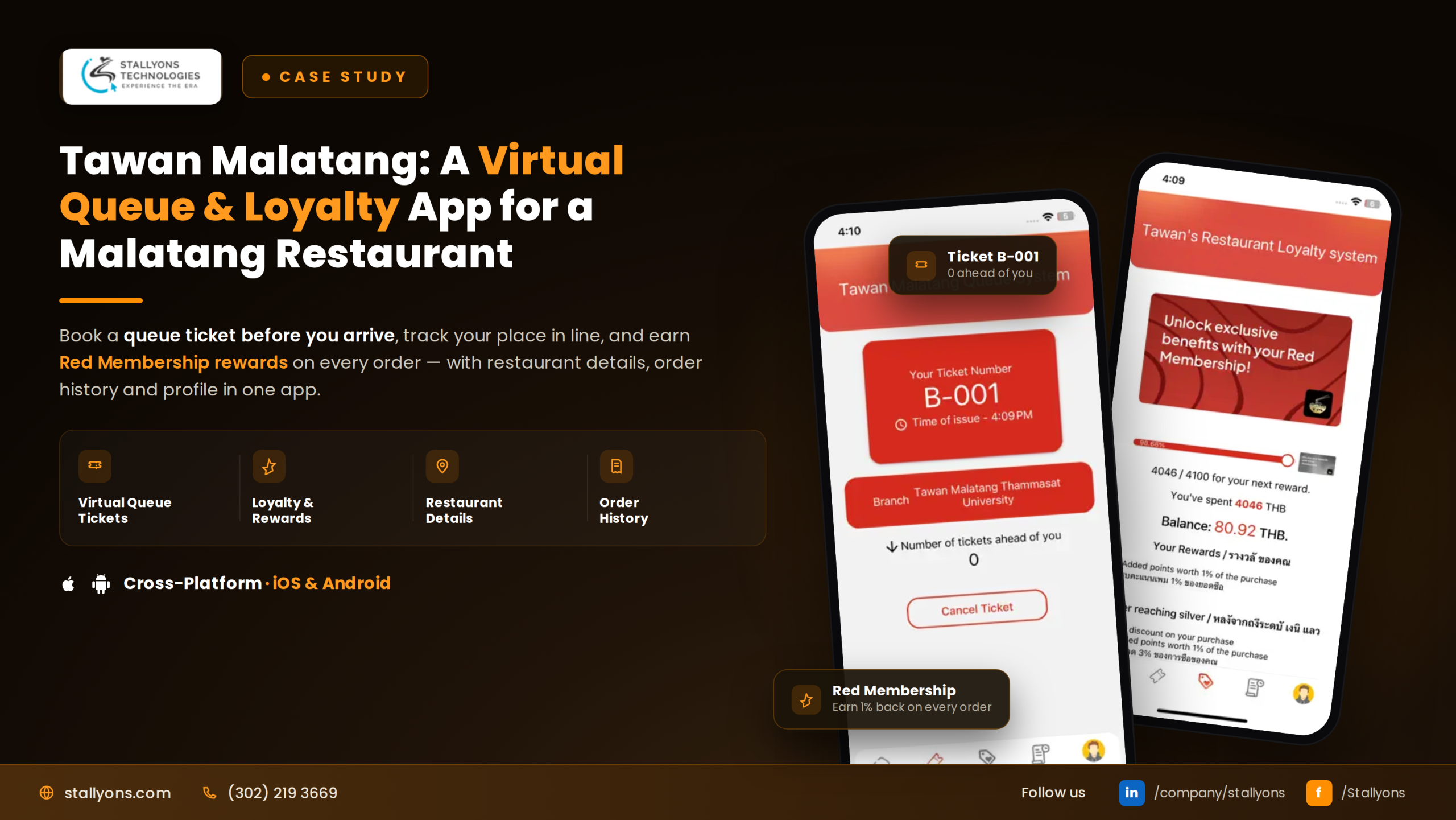
Imagine an app that customers already had on their phones, yet gave them little reason to open it. It worked, but it did not reward anyone, and it had no connection to what happened at the counter. Our team at Stallyons was asked to change that, and to do it without rebuilding the app people already used.
Tawans Restaurant is a mobile app that we connected to the Loyverse POS system, the till software the shop runs, to add a complete loyalty program tied to real purchases, the kind of restaurant and hospitality software where the reward has to line up with what happens at the counter. This project was not a new build. The app already existed and already had users. With the integration in place, every customer now earns points at the till, climbs membership tiers, and carries a scannable barcode, all synced with the shop’s POS. Built on an existing WebView app foundation, here is how we did it.
Project Snapshot
The short version:
- Project type: An enhancement of an existing app, not a new build
- Platform base: A WebView app shell, connected to Loyverse POS
- What we added: A scannable barcode, live points, and membership tiers
- Tiers: Red, Silver, and Gold, shown by the barcode background color
- Who controls the rules: The shop, from the Loyverse POS admin
Connecting a live app to the POS the business already uses, rather than starting over, is exactly what lets an app become genuinely rewarding without disrupting the users it already has.
The Starting Point
To understand the work, it helps to know where it began. There was already a working mobile app with a user profile, so the job was to add a loyalty program by connecting that app to the shop’s POS.
The app already existed, with users and a profile section, so every new feature had to fit into what was there. The shop uses Loyverse POS, the till system that records sales and customers, so the loyalty program had to be built on top of it rather than separately. The app is a WebView app, meaning it runs web pages inside an app shell, so the new loyalty screens fit naturally into that same structure. Points had to come from real purchases, which is exactly what the POS already tracks. And the shop needed to stay in control, so the thresholds and benefits for each level had to be managed in the POS admin, not fixed in the app. The core goal was to add a full loyalty program by connecting the app to the POS, without a rebuild.
The Solution We Built
The project connected the app and the POS so that they work as one, and all of it fit into the existing WebView structure. At the center was a two-way POS API integration between the app and Loyverse POS.
That link lets the app send customer details to the POS and fetch the latest points, purchase history, and membership status back. When a new user signs up, their details and barcode go to the POS, which creates a customer record. From then on, the app regularly asks the POS for fresh data to show the user. On top of that link, the app’s profile was updated to display the loyalty program: the points balance, the purchase history, the membership level, and the barcode. The result is a familiar app that now rewards loyalty and stays perfectly in step with the shop’s till.
One Barcode, Linked to the Till
Everything starts when a user registers. They sign up in the app with their name and mobile number or email, and the app generates a unique barcode number for them. It then sends the user’s details and that barcode to Loyverse POS through an API call. The POS creates a new customer record and assigns the user to the basic Red level to start. From that moment, the barcode is the user’s key at the till. They show it from the app, the cashier scans it, and the POS knows exactly whose account to credit. Because the barcode was created at signup and shared with the POS, the two sides are linked from the very first moment.
Real Points From Real Purchases
Once a user is registered, the loyalty program runs every time they shop. At the counter, the user shows their barcode, the cashier scans it, and Loyverse POS automatically adds points based on how much they spent. The POS records the points and the transaction details against that customer. To keep the app current, it regularly sends API requests to the POS to fetch the latest balance and history. So when the user opens their profile, they see an up-to-date picture: how many points they have, what they have bought, and where they stand. The points live in the POS as the single source of truth, and the app simply shows the freshest version. The honest trade-off in that design is timing: because the app fetches from the POS on a regular cycle rather than the instant a sale closes, a customer who opens their profile the moment the cashier scans may see the new points a beat later, once the next fetch runs, the price of letting the till stay the one place points are ever counted.
The WebView Development Approach
Here is where the engineering choices come together. Tawans Restaurant runs as a WebView app, with its screens served as web pages inside an app shell. This project added new loyalty features into that existing structure rather than rebuilding it, which is exactly why the WebView approach paid off.
Because the interface lived in a WebView, the new loyalty screens dropped naturally into the existing app, while the heavy lifting happened through the Loyverse POS API. That kept the enhancement clean and low-risk, with no rewrite of the app people already used. This is the core strength of WebView app development: a web-driven app shell that is quick to extend and simple to connect to outside systems. It is the same approach behind the huku WebView subscription app, where new features were added to a live app without starting over.
The Technology Stack
The stack is deliberately thin. The app itself is a WebView shell that runs web pages inside a native wrapper, which is where the new loyalty screens live. Loyverse POS holds the customers, points, purchase history, and tier rules, and a two-way Loyverse POS API is the link that sends customer details and barcodes out and fetches loyalty data back. Each user gets a generated barcode the cashier scans at the till; the three tiers, Red, Silver, and Gold, are spending levels the POS manages and the app shows by colour; the shop sets thresholds, benefits, and promotions from the Loyverse POS admin; and real-time alerts push deals, promotions, and membership changes straight to the app.
Membership Tiers That Feel Rewarding
Membership levels are what make loyalty feel rewarding. There are three. Everyone starts at Red, the basic level for all registered users. As a user’s total spending crosses set thresholds, the POS upgrades them to Silver, then to Gold. The POS tracks the spending and decides the level, and the app receives the updated status through the API. The app makes the level easy to see by changing the background color behind the barcode to match the tier, so a glance at the profile shows whether the user is Red, Silver, or Gold. This simple visual turns a number into a feeling of status, which is what keeps users coming back to climb higher.
The Shop Stays in Control
A key part of the design is that the shop runs the program, not the app’s code. The rules live in the Loyverse POS admin, where the shop sets the spending thresholds for Silver and Gold and defines the benefits for each level. The shop can also create and manage promotions or special offers tied to a membership level, to keep customers engaged. Because all of this sits in the POS, the shop can adjust the program at any time without changing the app.
The app can also receive real-time notifications from the POS about new deals, promotions, or a change in membership status, such as reaching Silver or Gold. This split works cleanly: the app shows the loyalty program, but the POS runs it, so the two always agree and the shop keeps full control from a system they already know.
Real-World Value
The value shows on both sides of the counter. Here is what the integration delivers in practice.
- Customers finally have a reason to open the app beyond a plain profile.
- Every purchase counts toward points and a visible membership status.
- Points stay accurate because the POS is the single source of truth.
- The shop controls thresholds, benefits, and promotions without developer help.
- Real-time notifications keep customers engaged and coming back.
By tying the app directly to the till, Tawans Restaurant serves the customer and the business at the same time.
The Results
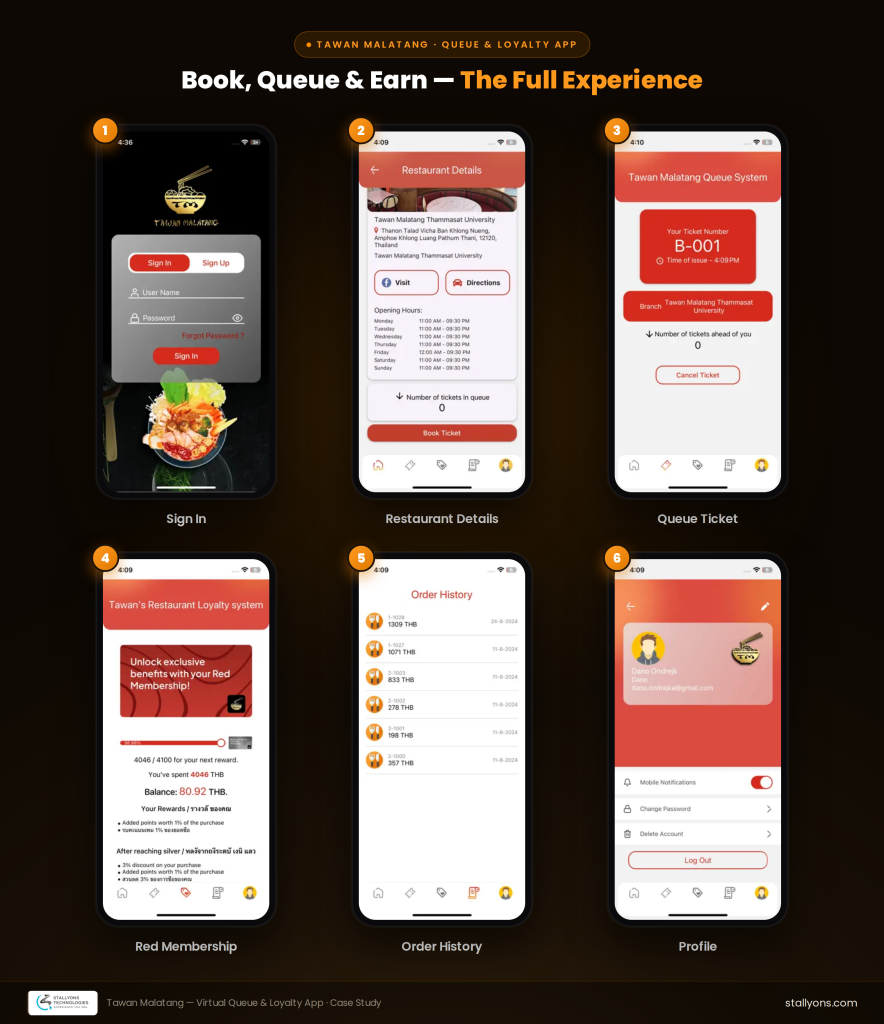
The finished product is a full loyalty program built into the existing app by connecting it to Loyverse POS. Users register and get a unique barcode, which the cashier scans at the till to add points based on their spending. The app syncs with the POS to show each user their current points, purchase history, and membership level, always kept fresh. Membership runs through three tiers, Red, Silver, and Gold, shown by the background color behind the barcode, and the shop manages the thresholds, benefits, and promotions from the Loyverse POS admin.
For the client, the outcome was a plain app turned into a rewarding one, without a rebuild, tied directly to the shop’s till so every purchase counts. For us, it is a clear example of what the WebView approach makes possible: enhancing a live app and connecting it to real-world systems cleanly and safely.
Tawans Restaurant is live and available to the public today. You can see the finished product on the Tawans Restaurants listing on the App Store, where it continues to reward loyal customers.
Why Work With an Experienced WebView App Development Team
A project like Tawans Restaurant shows the value of a partner who can connect a live app to a third-party system, keep data accurate across both, and leave business control with the client. The work here was to extend an existing WebView app with new screens and a POS integration, so the product became far more useful on the foundation it already had, rather than starting over.
If you already have an app and want to connect it to your POS, a loyalty program, or another system your business runs on, that same approach can make it happen without a rebuild.
Ready to Extend Your Own WebView App?
Great products often start with the app you already own. If you want a partner who can connect your WebView app to the systems your business uses, we would love to help. See how we extend and integrate WebView apps, then book a discovery call and tell us what you are building.
Frequently Asked Questions
What is a WebView app?
A WebView app runs web pages inside a native app shell, so the interface is built with web technology while the app is still installed from the app stores. This makes it fast to build and simple to extend.
Can a WebView app integrate with a POS system like Loyverse?
Yes. As Tawans Restaurant shows, a WebView app can connect to Loyverse POS through its API, sending customer details and barcodes out and fetching points, purchase history, and membership status back.
How does a loyalty program stay accurate between an app and a POS?
The points live in the POS as the single source of truth, and the app regularly fetches the latest figures. This way the user always sees an accurate balance without the app trying to track points on its own.
Can you add features to an existing WebView app without rebuilding it?
Yes. Both Tawans Restaurant and huku were enhanced on their existing WebView foundations, with new screens and integrations added rather than a full rebuild.