


Blog
Legacy Site Migration
& Rebrand: Web Dev
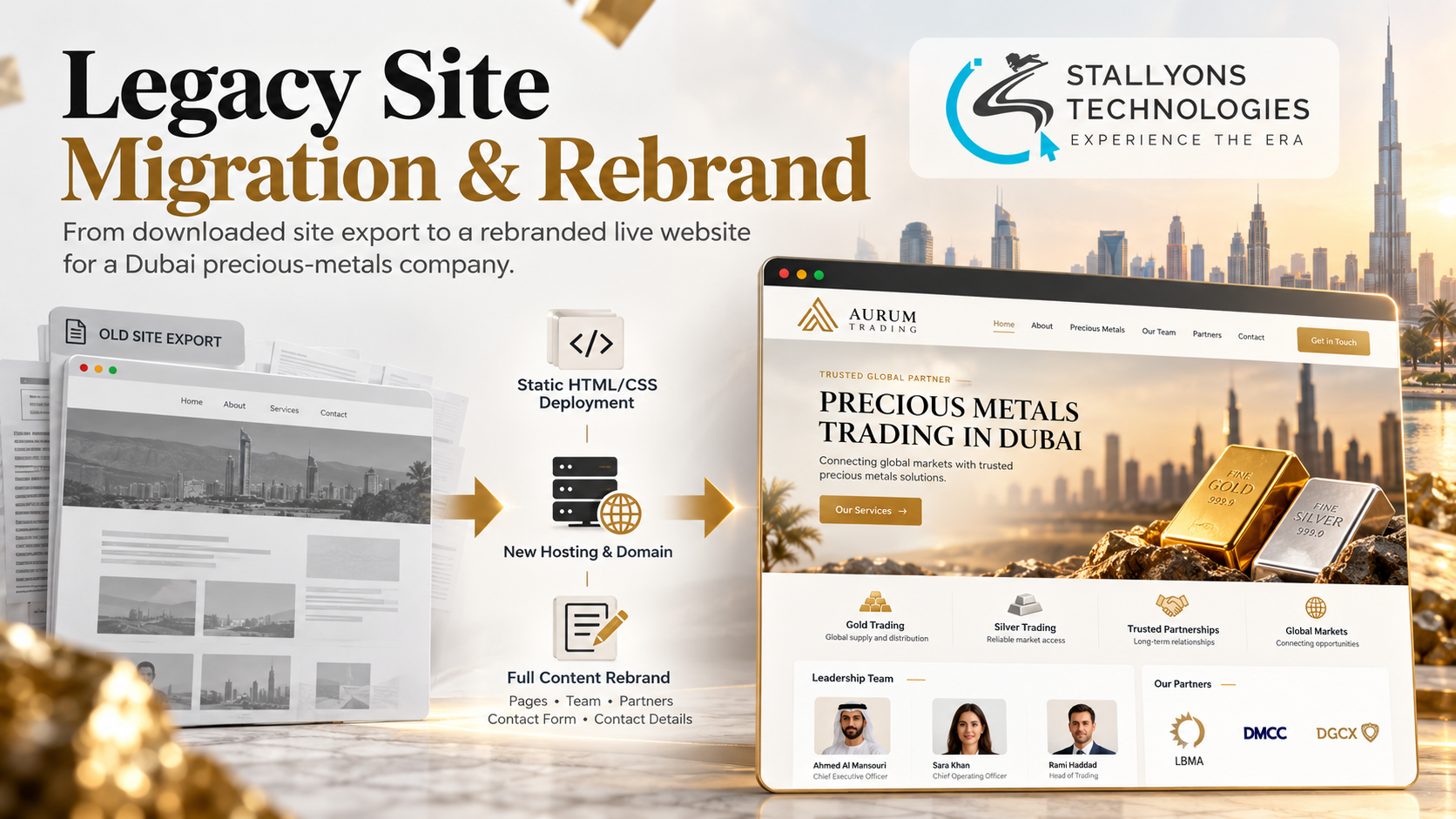
A consultant handed us a folder of files: a full copy of a company website that no longer ran anywhere. His client, a newly formed precious-metals trading company in Dubai, held the rights to that old site and wanted it back online under its own name. The problem was urgent, because the new business’s own customers were already trying to reach it at an address that showed another company entirely.
Legacy Site Migration & Rebrand is the web development project where we took that downloaded copy, deployed it on the new company’s own hosting under a new domain, and then rewrote every page so it spoke in the new business’s name, team, offices, and contact details. The content changes ran in two review rounds, each checked by the client before we moved on.
Put simply, an old website’s leftover files became a live, rebranded site for a new company, on its own domain, without the business having to wait for a ground-up rebuild first.
The Starting Point: An Old Site With No Engine Behind It
Reusing an existing website for a new company sounds like a copy-and-rename job. It is not, because the first question is what the files actually are, and the second is how many places still carry the old identity. Each requirement below had to be met before the new company could point its customers at the address.
- No working original. Nothing was running on a server. All that remained was a downloaded copy of the old site’s pages.
- A borrowed identity. Every page still showed the previous company’s name, its people, and its old office locations.
- An unknown format. It was not yet clear whether the copy was a working install or just saved pages, and that changes everything about how it can be edited.
- Tight timing. The new company’s clients were already trying to use the site, so a quick launch mattered more than a long rebuild.
- Content from many places. New wording arrived as a company profile document, chat messages, and phone photos of pages, not a tidy brief.
The Build: Deploy First, Then Rebrand Page by Page
The order of work mattered as much as the work itself. Getting the site live under the new domain early meant the client could see progress and point customers at a real address, while the slower rebranding happened in the open. Running this kind of migration without breaking the pages is everyday work for our web development team, which is used to moving sites between hosts and tidying up what the previous build left behind. The job ran in a set sequence:
- We inspected the files first, so we knew exactly what the download contained before touching the client’s hosting.
- The copy was deployed to the client’s own hosting account and connected to the new domain, so the site was live under the new brand.
- During set-up we found the copy was static HTML and CSS, captured with a website downloader from an install that was around twelve years old, not a working content system.
- We explained what that meant for future editing, set out the rebuild option, and then took on the content changes directly so the launch was not held up.
- Round one replaced the home page text, vision and mission, services, company profile, and partner sections, and repointed the contact form and details to the new company.
- Round two added the new leadership team with photos, removed every former person and old office location, and finished with small wording and layout fixes after the client’s review.
Because the files were plain markup rather than a database-driven site, each change was made precisely in a code editor, page by page. For a client who wants a site they can log in and edit later, the honest next step is a proper rebuild, which is where our custom software and rebuild services come in, rather than pretending a static export can be managed like a dashboard.
Also readHow we built a bilingual community platform where live streamers watch and support each other
Technical Architecture
There is no framework or database story here, and that is the point. The architecture is deliberately thin, because the client’s real need was speed and control, not a new platform. Each part had one job.
- The site itself. Static HTML and CSS, which is what the export actually contained, edited directly rather than through any admin screen.
- Hosting and domain. The client’s own hosting account and a new company domain, so the business keeps full control of where the site lives.
- Content layer. Page copy, team members, office details, and partner sections, all updated by hand across every page.
- Contact path. The site’s contact form and address details repointed so every enquiry now reaches the new company, not the old one.
- Review loop. Each round was handed to the client for checking, and closed out with the small wording and layout fixes they asked for.
The genuinely fiddly part was not editing markup. It was making sure not a single trace of the old company survived. Names and office locations turned up in headers, footers, image captions, and buried paragraphs, so each one had to be traced and removed before the new identity read as consistent across the whole site.
Challenges Solved
The biggest challenge was an export that was not what anyone expected. The client believed they had a WordPress site to reuse; the files were a static snapshot of a very old install, with no database or admin behind them. Rather than quietly working around it, we surfaced the difference during set-up, explained why the site could be deployed and edited but not managed through a dashboard, and laid out the rebuild option so the client could decide with full information.
The other hard part was content that arrived from everywhere at once. Changes came as a profile document, messages, and photos of printed pages, so we gathered them, matched each to the right place on the site, and applied them page by page. Because the site was already live, feedback from the client’s own customers could be acted on within days rather than held for a big release, which is one of the advantages of launching first and refining in the open. Leftover references to the previous company were the quiet risk, and tracing every one of them is what kept the rebrand from looking half-finished.
The Result
The new company’s site went live on its own domain within days, and the two rounds of content changes were completed over about two weeks, with every requested edit applied and both milestones accepted. The business launched under its own name, kept full control of its hosting, and got a clear, honest picture of what a future rebuild would involve if it ever wants a site it can edit itself.
The project worked because we fixed the urgent thing first, a live site in the right name, and were straight about the rest. If you have inherited an old site or export and need it live under a new brand, you can hire front-end developers who handle migrations and markup-level rebrands, or tell us what state your old website is in and our US-registered web development company will assess the files and map the safest route online. It suits any trading and financial services business that needs a credible presence quickly.
Frequently Asked Questions
What was delivered in the Legacy Site Migration & Rebrand project?
We deployed a downloaded copy of an old company website onto the new company’s hosting and domain, then rebranded every page across two review rounds so the site carried the new business’s name, team, offices, and contact details.
Why could the site not be edited through a WordPress dashboard?
The copy had been captured with a website downloader, which saves pages as static HTML and CSS rather than the database and admin behind them. The original install was also around twelve years old, so the files could be deployed and edited directly but not managed through a dashboard without a rebuild.
How quickly did the new company get online?
The site went live on its own domain within days of us receiving the files, because we deployed it first and did the slower rebranding afterwards. The two content rounds then ran over about two weeks.
Can an old static site be turned into one the business can edit itself?
Yes. We explained the rebuild option to the client so a static export can be rebuilt as a proper content-managed or custom site later. The migration gets the business online fast; a rebuild is a separate, planned step when editing control becomes the priority.
How did you make sure no trace of the old company was left?
Old names and office locations appeared in headers, footers, captions, and body text across several pages. We worked through every page, traced each leftover reference, and removed or replaced it, so the finished site read consistently in the new company’s identity.