


Blog
A Framer CMS
with Image-Bound Project Pages
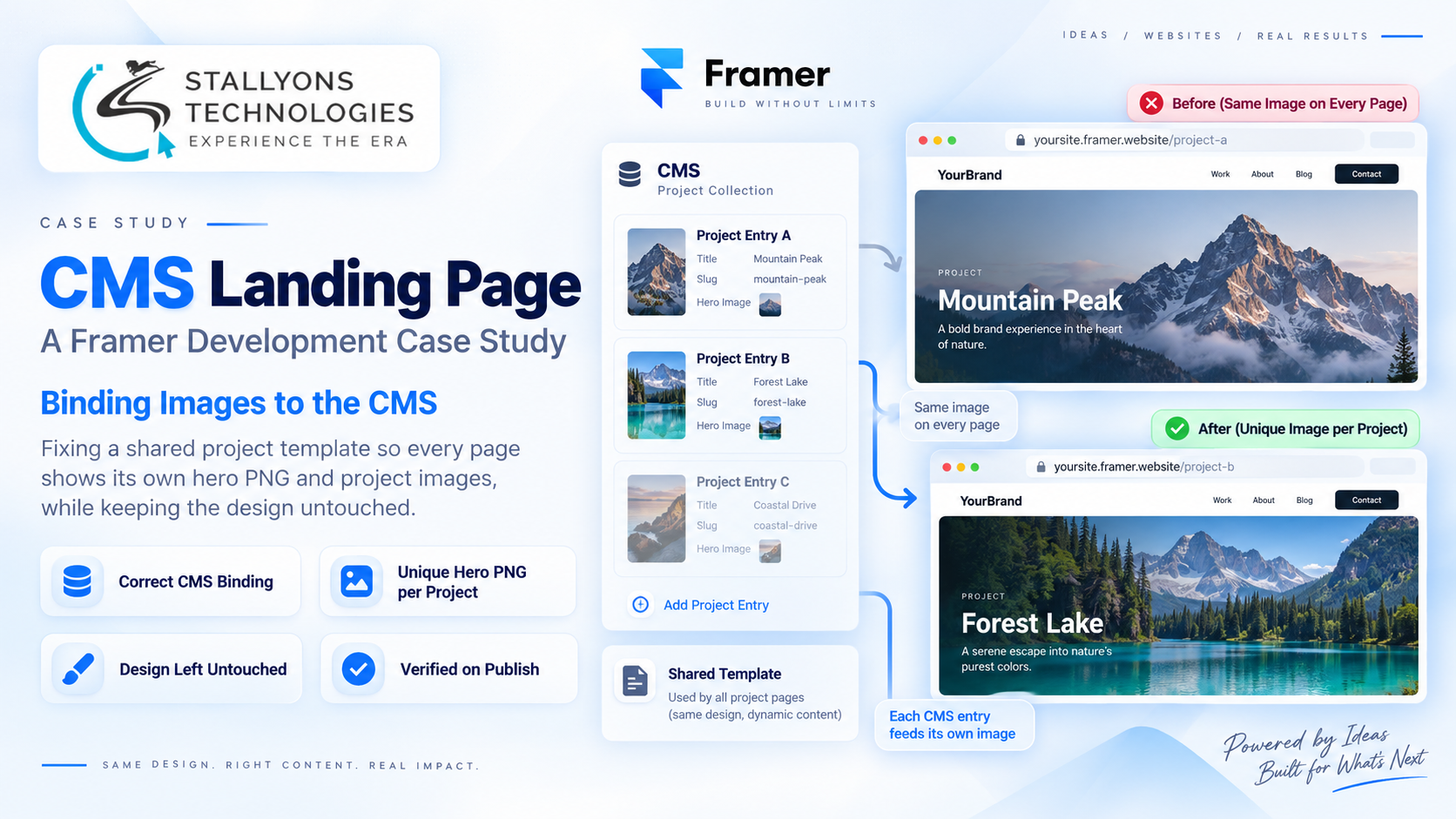
A studio adds its second project to a Framer site, publishes, and opens the new page. The layout is right and the text is right, but the hero image is wrong. It is showing the first project’s picture. Add a third project and the same thing happens again. Every project page, whatever work it is meant to present, keeps displaying the same image.
This case study is about the small, contained Framer fix that solved it. The site is a CMS-driven portfolio where every project page renders from one shared template. That template’s image layer was reading a single fixed image source instead of each project’s own CMS field, so every page inherited the same picture. Put simply, we rebound the image layer to the correct CMS Image field, so each published project now surfaces its own hero and project images, with the design left exactly as it was.
The Starting Point: One Template, One Image, Every Page
The site was built the way a CMS-driven portfolio should be. A collection of projects sits behind a single page template, and each project is meant to render the same layout with its own content. On paper that is efficient. In practice one wiring mistake broke the entire premise, because the part of the template that should have changed per project, the image, was the one part pointing at a fixed source.
The client noticed it the moment they added a second project. The brief was narrow and firm: fix the images, change nothing else. That framing shaped every decision. These were the problems to solve:
- The same image on every page. The template’s image layer pointed at one source, so every project rendered the same picture instead of its own.
- Projects sharing content. Filling in a new project copied the previous project’s images rather than showing new ones, so entries were not properly separate.
- Both hero and project images affected. Each page should carry its own hero PNG and its own in-page images, and both were reading from the wrong place.
- The design had to stay identical. The styling and layout were signed off already, so the fix could touch the image bindings and nothing else.
- It had to hold once published. Looking right in the editor was not enough; every published entry had to show its own image on the live site.
- It had to stay maintainable. The client would add projects for years, so the fix could not be a one-off patch they could not repeat.
The Build: Binding the Image Layer to the CMS Field
The fix came down to one correct connection. The image layer in the shared template was reading a single fixed image; we bound it instead to the project collection’s CMS Image field, so it reads the image stored on each project’s own entry. Because every project page renders from that one template, making the change once carried it to every page automatically, present and future. This is the ordinary discipline of Framer website development: the layout is shared, and the content that should differ has to be driven by the CMS rather than baked in.
Both the hero PNG and the in-page project images were connected to their correct fields, not just the main image, so nothing was left reading the old source. The work ran in a deliberate order:
- Confirm the project collection holds its own image fields, a hero image and project images, on every entry.
- Rebind the template’s hero image layer to the CMS hero field, replacing the fixed source.
- Rebind the in-page project images to their matching CMS fields, so the whole page reads from the entry.
- Publish and open each project in turn, checking that every one surfaces its own PNG on the live site.
- Record a short walkthrough video so the client can add projects and keep the bindings correct going forward.
Nothing else was touched. The styling, spacing, and layout stayed exactly as they were signed off, which was the client’s firm condition and the reason the fix stayed at the binding rather than spreading into the design.
Technical Architecture
There is not much machinery here, and that is the point. The site is a single Framer project with one project collection in the CMS and one page template that every project shares. The value is in wiring that template to the collection correctly. The pieces that mattered:
- One shared template. Every project page renders from the same Framer template, so a single correct binding fixes every page and a single wrong one breaks every page.
- A CMS collection per project. Each project is its own CMS entry holding its own hero PNG and project images, so entries stand fully independent once the layers read from them.
- Image layers bound to fields. The hero and project image layers are connected to their CMS Image fields rather than fixed sources, which is the whole of the fix.
- Verified on publish. Each entry was checked live, not just in the editor, so the binding was proven where it counts.
- Documented for handover. A short video records how the binding works, so the client can extend the site without reintroducing the fault.
This is the kind of precise, low-risk work that sits at the quiet end of no-code and low-code development: no rebuild, no redesign, just the one connection that makes a CMS-driven site behave like one.
Challenges Solved
The central challenge was resisting the urge to do more than the brief. It would have been easy to tidy the template while inside it, but the client had signed off the design and wanted it untouched, so the discipline was to change the bindings and stop. Rebinding the hero and project images to the CMS fields stopped the repeated image at its source; setting each project up as its own entry made new projects independent instead of inheriting the last one’s pictures; and verifying every entry on publish confirmed the fix held live rather than only in the editor.
A CMS-driven portfolio like this is common wherever an organisation publishes many similar pages from one template, from a design studio’s work to the development listings that real estate and property developers maintain, where each project needs its own gallery. The same binding discipline keeps every one of those pages showing its own images rather than a shared default.
The Result
The site now works the way a CMS-driven portfolio is supposed to. Each published project page shows its own hero and its own project images, drawn from its own CMS entry. The second project, and every project added since, no longer inherits an earlier project’s pictures. The design is exactly as it was signed off, because only the bindings changed. And because a short walkthrough video went with the handover, the client can keep adding projects without the fault returning.
Small, well-scoped fixes like this are often the difference between a template that fights its content and one that carries it. If a Framer or CMS site of yours is showing the wrong images, or you want to build one that will not, you can hire JavaScript developers who work fluently in Framer and its CMS, or tell us what your site is doing and we will trace it to the binding.
Frequently Asked Questions
Why did every project page in Framer show the same image?
Because the shared page template’s image layer was pointing at one fixed image source instead of the CMS. Every project rendered from that single template, so they all read the same picture. Binding the layer to the project’s CMS Image field makes each page read the image on its own entry.
Can a Framer CMS give every project page its own images?
Yes. When each project is its own CMS entry with its own image fields, and the template’s image layers are bound to those fields, every published page surfaces its own hero and project images automatically, with no per-page editing.
Did fixing the image binding change the site’s design?
No. Only the image bindings were changed. The styling, layout, and spacing stayed exactly as they were signed off, which was the client’s firm requirement, so nothing about the look shifted.
Does the fix work on the live site or only in the editor?
On the live site. Every CMS entry was published and checked to confirm it surfaces its own image, so the binding holds where visitors see it, not only inside the Framer editor.
Can we add new projects without the problem returning?
Yes. Because the fix lives in the shared template’s binding, a new project entry with its own images renders correctly on its own. A short walkthrough video was provided so the client can add projects and keep the bindings correct over time.