


Blog
Flavor Savers: Android
Local Food-Deals App
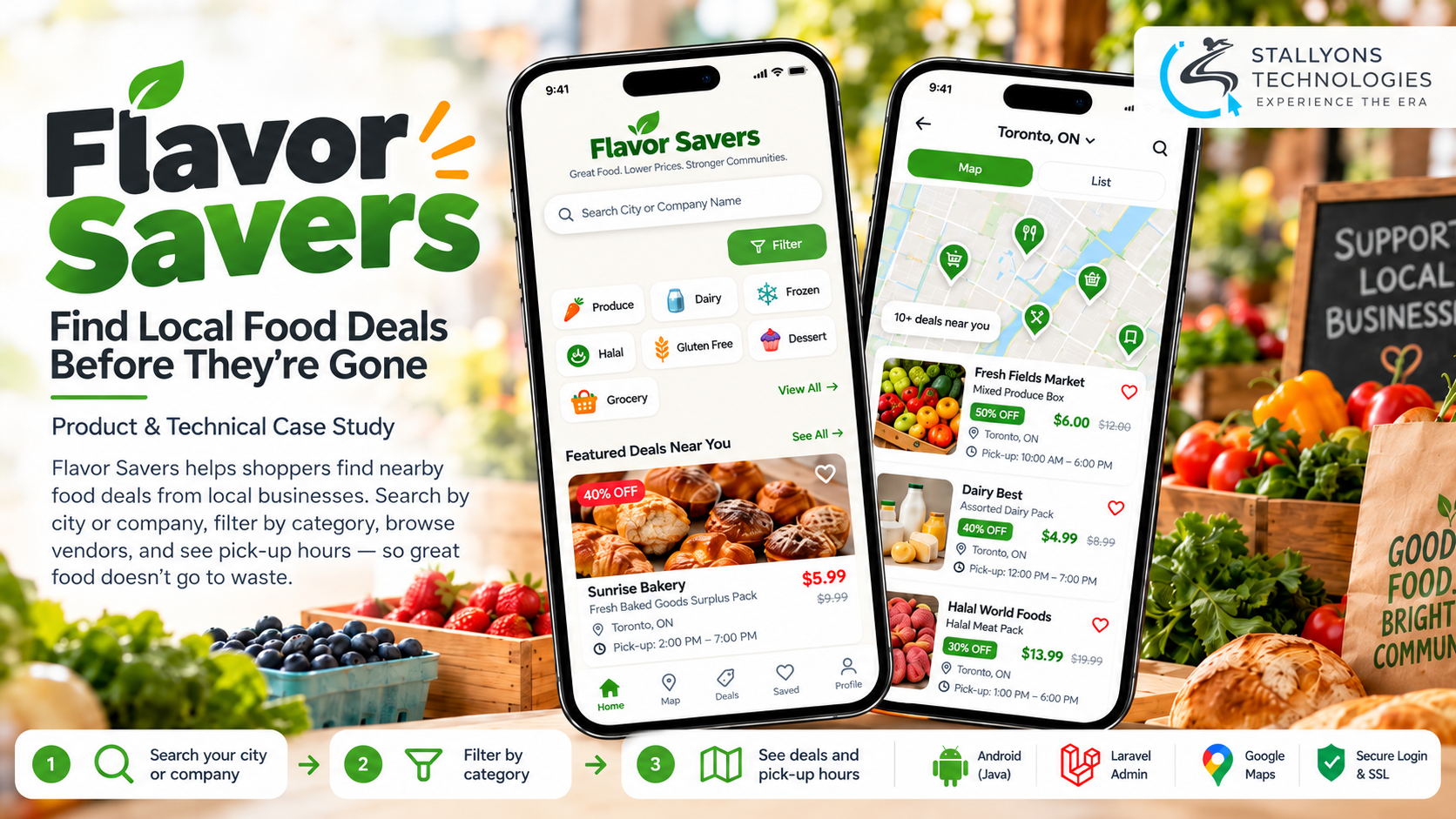
A bakery with a tray of day-old loaves and a shopper who would happily buy them cheap have the same problem: no easy way to find each other. Flavor Savers set out to close that gap. The Canadian app connects shoppers to surplus and overstock food from local businesses, from baked goods and produce to meat and dairy, before it goes to waste. The trouble was that the app on the phone still said the wrong thing.
Flavor Savers already existed. A previous developer had built it as a native Android app in Java with a Laravel admin panel behind it, and it was still set up and worded like a takeout ordering app. The home screen read “Take Out” with a knife-and-fork icon, the search bar suggested “restaurant, pizza, burgers”, and the filter was an unlabelled button whose categories did not match what vendors actually sold. New users opened it and assumed it was food delivery.
Put simply, we took over the codebase, set it up from scratch, and repositioned the Android app around finding deals. The work covered new wording and icons across the main screens, a working category filter with 19 real categories, a cleaned-up vendor catalogue that matches between the list and the map, and a fix for an expired server certificate that was blocking logins. A signed release build was delivered and approved by the client.
The Starting Point: An Inherited App That Said the Wrong Thing
The app worked, but it no longer matched what the business had become. Repositioning it meant fixing what shoppers read, what they could filter, and what they saw, while working safely inside code and servers built by someone else.
- The app said the wrong thing. Takeout wording and a knife-and-fork icon told new users this was a delivery app, not a deals app.
- Search pointed the wrong way. The search bar hinted at food types, while shoppers actually needed to look by their city or a company name.
- Filters did not help. The filter was an unlabelled icon, and its categories did not match the products on offer, so nobody could narrow a search.
- The catalogue was cluttered. Test and inactive vendor accounts from early setup still showed on the list and the map, which made the app look unfinished.
- The setup was inherited. Code, admin panel, and servers came from a previous developer, with the admin panel on a different host from the website and little documentation.
The Build: From Takeout Menu to Deals App
The updated app is plainly about finding deals, and the changes read as one clear product rather than a patch. Repositioning an existing Java app this precisely, without rebuilding it, is the kind of careful custom Android app development that pays for itself. The work ran in a clear order:
- The inherited Java project and Laravel admin panel were set up in a fresh environment, and the signing keystore was located so updates stay tied to the same app.
- Wording and icons were swapped: “Take Out” became “Find Deals”, the takeout tab became “Deals” with a shopping-bag icon, and timing became “Pick Up Hours”.
- The search hint was changed to “Search City or Company Name”, matching how shoppers actually look.
- The filter was fixed and given 19 categories built around real products and dietary needs, from Baking Needs and Produce to Gluten Free, Halal, and Frozen.
- Test and duplicate vendor accounts were removed at the data level, so the list view and the Google Maps view always agree.
- The login failure was traced and fixed, and a signed release build was delivered for the client to approve.
Small wording changes carried a lot of weight here. The same deals-first terms run across every screen, so the app reads as one clear product. The catalogue clean-up was handled with the same care: the correct vendor account was confirmed with the client, using a screenshot of its profile, before anything was deleted.
Technical Architecture
Flavor Savers is a native Android app written in Java, backed by a Laravel API and admin panel. The challenge was not the size of the changes. It was working safely inside a codebase and server setup built by someone else, making sure every change showed up correctly in the live app, and finding the real cause of problems such as the login failure.
- Android app. The existing native Java app, built with the Android SDK, was updated rather than rebuilt.
- Laravel backend. A Laravel API feeds the app and a web admin panel manages vendors and deals. Keeping that server contract clean is a job for solid API development, since the app only works when the backend answers as expected.
- Hosting. The admin API runs on a Plesk server, separate from the website’s own host, which is where the login problem was eventually traced.
- Security. An SSL certificate on the API server keeps logins and data encrypted and is required for the app to connect at all.
- Maps. Google Maps shows vendor locations in the map view alongside the list view.
- Build and release. Android Studio and Gradle, with the existing keystore, produced a signed APK and AAB ready for Google Play.
The admin panel held a trap worth naming. Changes made to a local copy did not reach the app, which revealed that the live admin ran on a separate Plesk host, not the website’s hosting. Once that was found, edits could be made where the app would actually see them.
Challenges Solved
The hardest problem was invisible at first. Partway through, logging in to the app started to spin forever, yet the website’s own certificate was fine, which made the fault confusing. The real cause was an expired SSL certificate on the Plesk server that hosts the app’s API. After it was renewed, logins worked again. Problems like this are common when you inherit another developer’s work: the fault is rarely where it first appears, which is exactly why local businesses in retail and ecommerce are better served by a team that fixes the setup properly rather than papering over it.
The takeover itself was the other real test. The project began as a zip file with no documentation, so the app, admin panel, and signing keys were rebuilt in a clean environment and the real admin server was tracked down before any change was trusted. Deleting vendor accounts was done only after the client confirmed the one account to keep. When the release build was ready, it turned out the business’s old Google Play developer account had been closed, so the client was walked through opening a new one, step by step, so the app can be published under the business’s own name.
The Result
Every requested change was delivered in a signed Android release build, reviewed by the client on her own device, and approved. The app now reads as a deals app the moment it opens: shoppers search by city or company, tap a labelled Filter to pick from 19 categories that match real products, and see each vendor’s deals and pick-up hours on a list or a map, with only live vendors showing. The expired certificate that broke logins is fixed, and the codebase and servers are documented so any future developer can pick them up.
The biggest win was reusing what already existed. A focused set of changes repositioned the whole app without a rebuild, which kept the cost small and let the business change direction quickly. If you have inherited an app that no longer matches your business, you can hire Java developers who are comfortable taking over someone else’s code, or tell us what your app needs to become and we will scope the smallest set of changes that gets it there.
Frequently Asked Questions
What did the Flavor Savers project involve?
It was a takeover and repositioning of an existing native Android app. The app was rewired from a takeout ordering app into a local food-deals app: new wording and icons, a working filter with 19 real categories, a cleaned-up vendor catalogue, and a fix for a server certificate that was blocking logins, delivered as a signed, client-approved release build.
Can an android mobile app development company take over an app another developer built?
Yes. This project started from a zip file with no documentation. The Java app, the Laravel admin panel, and the signing keystore were set up in a fresh environment, the live admin server was located, and the result was a working, documented setup that any future developer can continue from.
Why did logins keep spinning, and how was it fixed?
The app’s API runs on a separate Plesk server from the website, and that server’s SSL certificate had expired. Because the website’s own certificate was still valid, the fault was easy to miss. Renewing the certificate on the API server restored logins.
Why change the wording and icons instead of rebuilding?
The app’s code was sound; its positioning was not. Changing “Take Out” to “Find Deals”, swapping the knife-and-fork icon for a shopping bag, fixing the search hint, and replacing the filter categories told new users what the app is for within seconds, at a fraction of the cost of a rebuild.
Why were vendor accounts removed from the catalogue?
Test and duplicate accounts from early setup were still showing on both the list and the map, which made the app look unfinished. They were removed at the data level, not just hidden, so the two views always match, and the correct account to keep was confirmed with the client first.