


Blog
Squarespace Report Portal:
Form-to-PDF
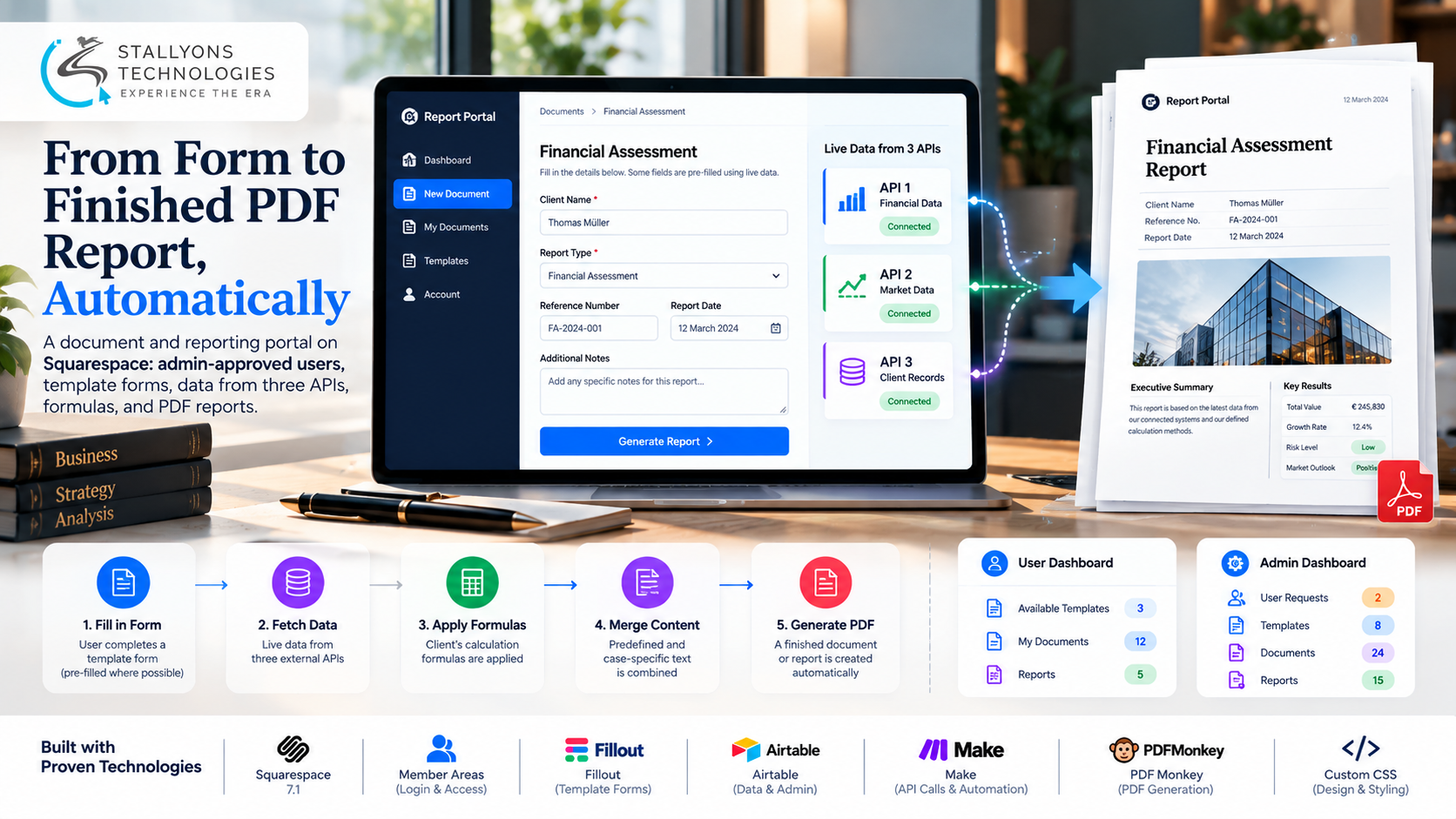
The client used to build documents and reports by hand. Figures were looked up in three separate online systems, run through the firm’s own formulas, and pasted into a text template. It was slow, and a single wrong number could carry through an entire report before anyone noticed.
Report Portal replaces that with a members-only platform on Squarespace. Approved users log in, pick a template, fill in a short form, and receive a finished PDF. Each document combines three things: data pulled from three external APIs, the client’s own calculation formulas, and a mix of predefined and case-specific text. The public site, the login, and the dashboards live on Squarespace using Member Areas; the work the platform cannot do on its own is handled by a small set of connected services, with no custom server code.
Put simply, a user fills in one form and a correct PDF comes back, with no copy-pasting between systems. The administrator approves who gets in, builds the templates, and receives every finished document. Making all of that run on a platform that has no server of its own is the heart of this Squarespace website development project.
The Starting Point: A Reporting Workflow Stuck in Files
To move the whole process onto Squarespace, the platform had to do several jobs that Squarespace does not offer out of the box. Each requirement had to work for approved users only, and none of it could expose the client’s API keys.
- Pull data from three systems. Every report needed figures from three different APIs, each with its own key and format, gathered automatically instead of by hand.
- Apply the formulas the same way every time. The same calculations were redone for every report, which meant a real risk of error that a fixed process could remove.
- Control who gets in. Only people the administrator has checked should be able to use the platform, so open sign-up was not an option.
- Move templates out of files. Users were copying old documents instead of filling in a clean, current template.
- Respect a Squarespace requirement. The client wanted the platform on Squarespace, which runs no server-side code, so every advanced feature needed a safe way around that limit.
The Build: Fill In the Form, Get the PDF
A new user never gets straight in. Access is a two-sided flow where the administrator stays in charge of who is approved and what each template does, and the user only sees a clean form and the documents they have sent. A run works in a clear order:
- A new user requests an account through a sign-up form, which creates a request rather than granting access.
- The administrator reviews the request in the admin dashboard and approves it; only approved users reach the members-only area.
- Inside, the user sees their dashboard: the templates available to them, a form for each one, and a list of the documents they have sent.
- The administrator builds each template in the admin workspace: the fields the form asks for, the API data and formulas it uses, and the predefined text that appears in the PDF.
- When the user submits a form, known details fill in automatically, the platform fetches the three APIs, runs the calculations, and merges the text.
- A PDF is produced, emailed to the administrator, and saved to the record; reports work the same way, with room for text written for that report.
Because each template is a record rather than a file, changing it updates the form and the PDF together, so users always work from the current version. The two dashboards are built from reusable sections styled with custom CSS, which means new pages come together quickly and look consistent across the platform.
Also readSecurity Dashboard: a full Squarespace redesign with live data cards and a 12-month trend chart
Technical Architecture
Squarespace is the front end: the public site, the login, and the member-only dashboard pages. Behind it, a small set of connected services does the work a server would normally do, so nothing here needs a custom backend. Each tool has one clear job.
- Platform. Squarespace 7.1 holds the site, the pages, and the design the client can edit.
- Access. Squarespace Member Areas provide the login and the member-only dashboard pages.
- Design. Custom CSS components, such as stat cards, document lists, form panels, and action buttons, keep both dashboards modular and consistent.
- Forms. Fillout, embedded in the pages, provides the template forms with pre-filled fields.
- Data and admin. Airtable holds the users, templates, documents, and reports, and doubles as the admin workspace.
- Automation. Make handles the three API connections, the formulas, and the routing. This is where careful no-code and low-code development does the job a server normally would.
- PDF. PDFMonkey turns each template into a branded document or report.
The part worth engineering carefully is the join between the website and these services: keeping the API keys off the site, controlling access without custom code, and turning form answers, API figures, formula results, and text blocks into a reliable PDF every time.
Challenges Solved
The hardest problem was keeping three API keys secret on a platform whose pages run in the visitor’s browser. A key placed there could be read by anyone, so every API call was moved into Make, where the keys live as secure connections and never touch the site. Access was the next problem: Squarespace member sign-up is open by default, so sign-ups were turned into requests that land in the admin workspace, and member access is granted only after the administrator approves. Showing each user only their own documents came next, since a shared page cannot filter data per user on its own; the user’s dashboard reads their records through the connected services using their member email, so no one sees anyone else’s work.
Reliability tied it together. A PDF is generated only once every value is present, and missing API data stops the run and alerts the administrator instead of producing an incomplete report. The result is the kind of internal tool, or client-facing product, that SaaS and startup teams often need: a repeatable workflow that saves hours per report and can be offered to clients per report or by subscription.
The Result
The outcome is one place where the administrator approves users, builds templates, and receives finished PDFs, and where approved users turn a short form into a correct document in minutes. Reports that once meant an hour of lookups and calculations are produced from a single submission, the same formulas and data sources are used every time, and a new template is a new record rather than a development project. All of it runs on the Squarespace platform the client wanted, with no custom server to maintain.
The build works because templates are data, not files, and because the services behind the site do the heavy lifting without exposing a single key. If you are planning a platform like this, you can hire remote developers who have wired Squarespace to Fillout, Airtable, Make, and PDFMonkey, or tell us about your reporting workflow and we will map it to an approval-gated portal that produces PDFs on its own.
Frequently Asked Questions
Can Squarespace run a document and reporting portal without a server?
Yes. The site, login, and dashboards live on Squarespace with Member Areas, and connected services do the server-side work: Fillout for the forms, Airtable for the data and admin, Make for the API calls and formulas, and PDFMonkey for the PDFs. No custom server code is needed.
How are the three API keys kept secure?
Every API call runs inside Make, where each key is stored as a secure connection. The keys are never placed in the Squarespace pages or in any browser code, so visitors and users cannot see them, and a key can be changed in one place.
How does the platform control who can use it?
Signing up only creates a request. The administrator reviews each request in the admin workspace and grants member access after checking it, and access can be removed at any time from the same dashboard, so only approved people get in.
What happens if one of the APIs is down when a report is run?
A PDF is produced only once every value is present. If an API source is unavailable, the run stops and alerts the administrator rather than generating an incomplete report, so a finished document always has complete, correct data.
Can templates be changed without a developer?
Yes. Each template is a record holding its fields, formula settings, and text blocks, so changing it updates the form and the PDF together. Adding a new template is a new record, not a development project, and users always work from the current version.