


Blog
Hide and Seek:
Android Social & Dating App
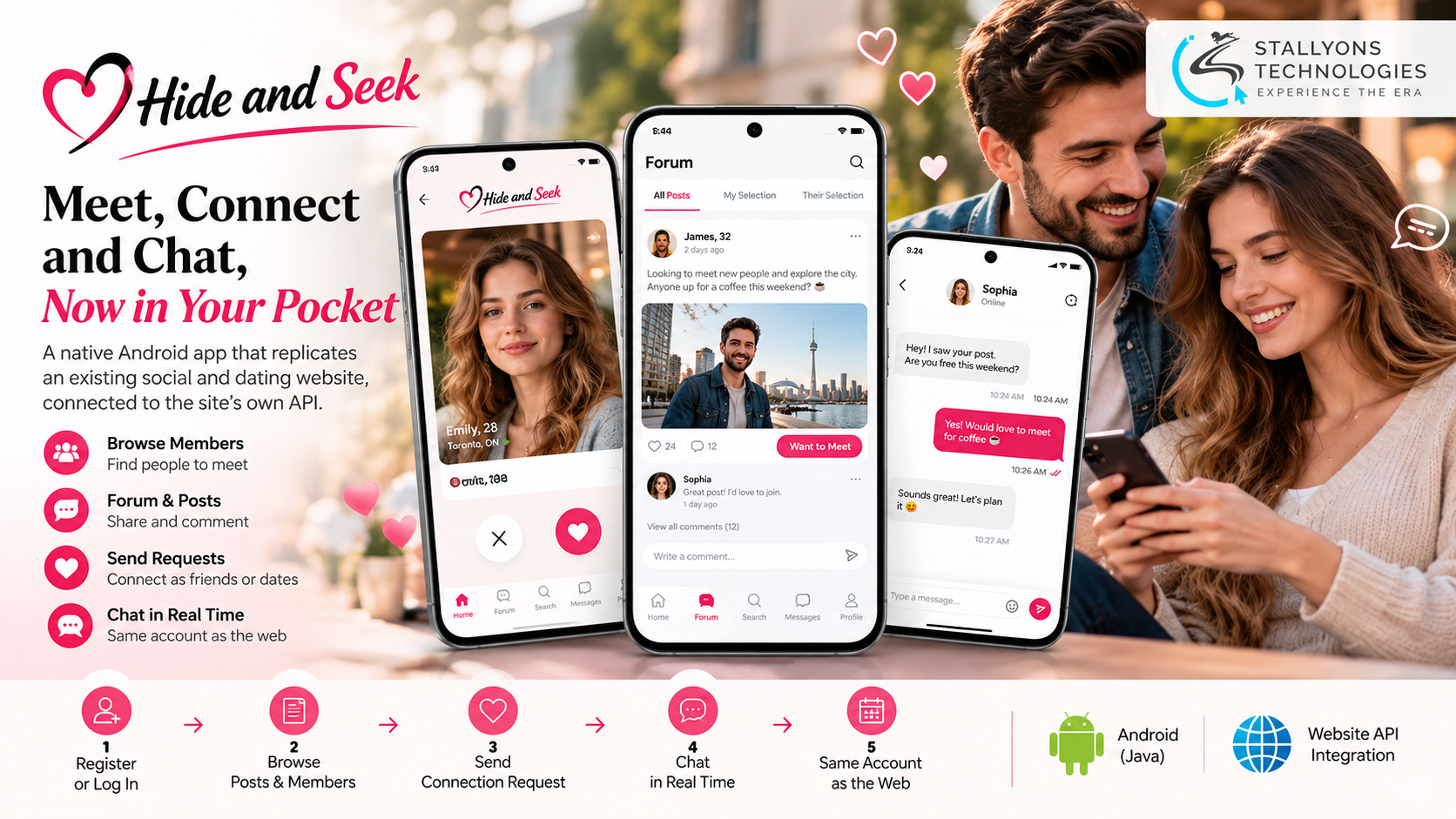
People check a dating app in the gaps of the day: a reply on the bus, a new face over lunch, a message before bed. Hide and Seek had the community for all of that, but it only had a website, and a website in a mobile browser never feels like the apps members already live in. The owner wanted a real Android app, and he wanted it without starting the business over.
Hide and Seek is a social community where people post about themselves, find others they would like to meet, and connect as friends, dates, or business contacts. Members write forum posts, comment, send “want to meet” requests, and chat once they are connected, and the community also runs real-world events such as singles nights. Everything already ran behind the website’s own API, so there was no budget, and no reason, to build a second backend.
Put simply, we built a native Android app in Java that replicates the website’s key screens and connects to the site’s existing API, front end only. Members log in with the same account and see the same posts, connections, and messages on the web and on the phone. The work ran in two stages: a pixel-close front end of the six main screens with placeholder content first, then wiring that front end to the live API. The client tested the final build on his own phone and signed it off.
The Starting Point: A Website That Needed to Live in a Pocket
The owner needed an app that felt native and matched the website, without a new server behind it. That shaped a tight set of requirements, and one of them, speed, turned out to be the one that made or broke the feel of the app.
- No real app. Members had to open a browser and use pages built for a larger screen, which made it harder to keep conversations going and bring people back.
- It had to match the website. The owner wanted the app to look and work as close to the site as possible, so existing members would feel at home straight away.
- No second backend. All data, accounts, and business rules already lived behind the website’s API, so the app had to use it as it was, not replace it.
- A moving API. Some endpoints were added or changed while the app was being connected, so the app had to handle a target that kept shifting.
- Speed matters. Early builds felt slow, with loading spinners on too many screens, and members expect menus to open instantly.
The Build: Design First, Then a Native Front End
Before any code, the six screens were drawn in Figma from the website’s own menus, and the owner chose between two home-page options. Starting from a settled design, then building each screen natively, is the part of Android app development that keeps a build focused instead of drifting. The work ran in a clear order:
- The six main screens were designed in Figma, based on the website, and the owner picked a home-page layout.
- A native Java front end was built with placeholder content, and the demo videos and source were approved.
- Login, register with a photo, posts, comments, connections, messages, and profile updates were wired to the live API.
- The login response was kept in memory as a single user object, so screens re-render from one up-to-date source.
- Spinners were cut back to login, paging, and screens that genuinely need fresh data.
- Final polish, the upgrade prompt, the app icon, and back arrows, was added, and the signed APK and source were handed over.
Messages work the way people expect from a dating app: a conversation list on one screen and the chat on another, with a member’s own messages on one side and the other person’s on the other. When the website’s rules require it, an “upgrade to continue” prompt links to the website’s checkout. A web view is used only for the detailed forum post page, where it saved real time; everything else is native.
Also readCity Lending Centers: a Java WebView app that passed Google Play’s financial-services review
Technical Architecture
Hide and Seek is a front-end-only native Android app for an existing website. The challenge was not drawing the screens. It was matching the website closely on a small screen, working against an API that was still changing, and making a social app feel fast without adding any backend of its own.
- Android app. Native Java with the Android SDK gives full control and native performance, with no cross-platform layer in the way.
- UI layer. Material Components, RecyclerView, and native tabs give smooth scrolling and familiar Android controls. Getting those screens to match the website came from a disciplined UI/UX design pass in Figma before any code was written.
- Networking. Retrofit and OkHttp with Gson make clean JSON requests to the website’s existing API.
- Images. Glide caches profile photos and shows a small, centred loading spinner where one is needed.
- Forum detail. An Android WebView shows the website’s forum page per user, used only where it saved time.
- Backend. The client’s existing PHP API handles login, posts, connections, and messages, so the app shares the same accounts and data as the website.
The detail that made the app feel instant sits in one decision. The website’s login returns everything about the member in a single response, so the app keeps that user object in memory and refreshes it after each action, rather than calling the server every time a menu opens. That is why spinners now appear only at login, when paging, and when a screen needs fresh data.
Challenges Solved
A few problems needed real debugging. Early on, some POST requests to the API returned network errors or empty data from Postman and the app, while the same request worked in another tool. The cause was how the JSON body was sent, and switching to a plain JSON body with the right field names made every call work reliably. The API itself was also a moving target: its path moved partway through, parameters and methods changed, and new fields appeared. Keeping every call in one networking layer meant each change was a small edit in one place, not a hunt across every screen.
Speed and state were the other two. Early builds called the server on almost every screen and showed too many spinners, which the single user object in memory fixed. Connection buttons also lost their highlighted state after switching screens or logging back in, until the app read connection status from the API with the right parameters rather than only from the screen. Solving the speed-and-state problem on a shared backend is exactly what community platforms and SaaS and startup products need when the app and the website have to stay in step without a second system.
The Result
The final Android build and full source code were handed over, and the client confirmed the app was working on his phone before signing off. Members now get the whole community in a native app: register with a photo or log in with their website account, browse forum posts, send “want to meet” requests, confirm connections, and chat in a dating-app style message screen, all on the same account and data as the site. The owner has no second server, database, or admin panel to pay for, and any rule changed on the website applies in the app too.
The build works because it was scoped to what members see and reused the website’s API for everything else, which kept the project small and fast. If you have a working website and want a native app on the same backend, you can hire mobile app developers who build on top of an existing API, or tell us about your website and we will map your screens to an app your members can keep in their pocket.
Frequently Asked Questions
What is the Hide and Seek app?
It is a native Android app in Java that replicates an existing social and dating website, front end only. It covers six core screens, home and profile, forum posts, connections, search, a conversation list, and chat, and connects to the website’s existing API so members use the same account and data on the web and on their phone.
Can an Android app development company build an app without a new backend?
Yes. Hide and Seek has no backend of its own. All data, accounts, and business rules stay behind the website’s existing PHP API, and the app talks to it over Retrofit and OkHttp. The owner runs no second server or database, and any rule changed on the website applies in the app as well.
How was the app made to feel fast?
The website’s login returns the member’s full profile in one response. The app keeps that user object in memory and refreshes it after each action, instead of calling the server every time a menu opens. Loading spinners now appear only at login, when paging, and on screens that need fresh data.
How did the build cope with an API that kept changing?
Every API call was kept in a single networking layer. When the API’s path moved, or parameters, methods, and fields changed during the build, each change was a small update in one place rather than a fix repeated across every screen.
Was the app designed before it was built?
Yes. The six main screens were designed in Figma from the website’s own menus first, and the owner chose between two home-page layouts. Feedback on things like profile image size, the message layout, and the comment box was settled in design and demo videos before the native front end was built.