


Blog
LiveTurb: Claude AI
Live-Style Video Selling
A shopper is twenty minutes into a forty-minute sales video when a doubt lands: does this actually work with the plan they already pay for? There is no one to ask. They close the tab, and the seller never learns the question existed.
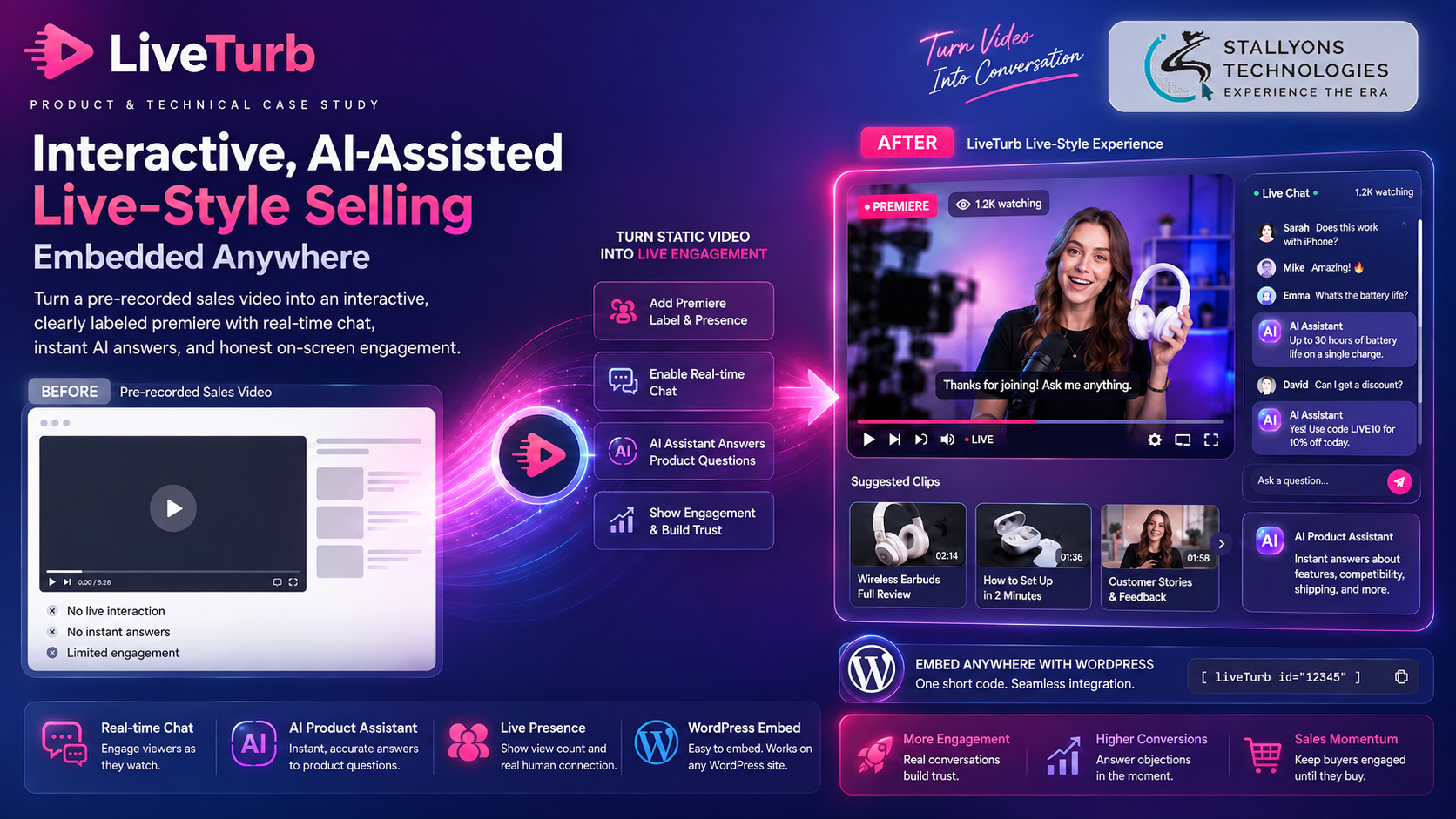
LiveTurb keeps that shopper in the room. It is a subscription platform that wraps an ordinary sales video in an interactive, live-style layer: a real-time chat beside the video, a viewer count drawn from real presence, suggested clips, and an assistant, powered by Claude, that answers product questions in seconds. The seller keeps their existing video on the player they already use and adds the whole experience to a WordPress page with a plugin or one line of embed code.
Put simply, LiveTurb turns a static pitch into something that feels live without pretending to be. Every session shows a badge saying whether it is a live premiere or a replay, the viewer count reflects real presence, and the assistant is always labeled as AI. Sellers get the momentum of a live event and stay on the right side of the rules that now govern fake broadcasts and fake audiences.
The Starting Point: Live-Style Selling Without the Fakery
Sales videos still work, but the format has aged. A viewer sits through a long pitch with nothing to do and no way to raise the one question that would decide the sale. The brief was to capture the pull of a live event honestly.
- Break the one-way format. A twenty to forty minute video asks a lot of a viewer who can only watch.
- Catch objections before they cost the sale. When a viewer has a question and no way to ask it, they leave, and the seller never hears it.
- Stay compliant. Faking a live broadcast, an audience, or testimonials is increasingly illegal, so engagement had to be real and disclosed.
- Answer product questions instantly and accurately. No seller can staff a chat around the clock, and an assistant that invents claims would mislead buyers.
- Add nothing to the video pipeline. Sellers host on players tuned for conversion and will not re-upload to add a chat box.
- Drop onto an existing WordPress page. Real-time tooling had to install cleanly on a site LiveTurb does not control.
The Build: Any Video, Wrapped in a Live Layer
A seller sets up a session through a dashboard, then embeds it wherever they sell. Getting an assistant to answer buyers’ questions accurately and on-brand, in seconds, rather than improvising, is the substance of the Anthropic Claude integration at the center of the product. Setup runs in order:
- The seller pastes their existing video’s JavaScript embed snippet into LiveTurb, so nothing about the video changes.
- They set the channel name, description, and branding.
- They configure the chat and give the assistant the product facts and approved messaging it may use.
- They schedule any host announcements, posted under the official channel name.
- They pick a plan for one, two, or three live pages and subscribe through PayPal.
- They drop the LiveTurb block onto a WordPress page with the plugin or a line of embed code.
- Once live, they watch engagement and questions in the panel.
For the viewer it feels like a live event. They land on a page with the video front and center, a real-time chat beside it, a viewer count, and suggested clips, with a badge showing whether the session is a premiere or a replay. When they ask a product question, the assistant answers in seconds, clearly marked as AI, and stays inside what the seller has approved. A doubt that would have ended the visit gets addressed while the viewer is still watching.
Technical Architecture
LiveTurb runs as a real-time layer that wraps a third-party player and lives inside someone else’s WordPress page. The video is the easy part, because the seller’s player handles it. The engineering is in delivering live chat, presence, and an accurate assistant in real time on a page LiveTurb does not control, while keeping every session disclosed and every subscription gated.
- Backend. Laravel, in PHP, handles auth, business logic, page and chat configuration, and billing.
- AI assistant. Claude, via the Anthropic API, answers viewer questions, grounded in each seller’s product facts and guardrailed to approved messaging. Building that kind of assistant is the core of practical AI integration.
- Real-time layer. A WebSocket server, on Laravel Reverb or Pusher, pushes chat, presence, viewer counts, and scheduled host messages to every viewer at once.
- Database. MySQL stores accounts, pages, subscriptions, and chat logs.
- State and cache. Redis tracks presence, queues, and scheduled messages, so the viewer count reflects who is connected.
- WordPress integration. A custom plugin, with a plain JavaScript snippet as an alternative, mounts the experience on any page.
- Video. The seller’s existing third-party player loads through its own JS embed; LiveTurb never uploads or hosts video.
- Payments. PayPal Subscriptions drive recurring billing, and the plan tier gates how many live pages an account can run.
The part worth engineering carefully was making real-time interactivity run cleanly inside a page LiveTurb does not own, while disclosure travels with it everywhere. The status badge and the AI label are on by default, and the viewer count comes from real presence tracked in Redis, so honesty is built into the embed rather than added as a footnote.
Challenges Solved
Adding interactivity without owning the video was solved by wrapping the seller’s existing player and loading the layer alongside it through the same embed, so there is no migration to manage. Running real-time inside someone else’s page was solved with a WebSocket layer that the plugin and embed connect cleanly wherever the block sits. Keeping the assistant accurate and honest was solved by grounding Claude in each seller’s approved information, guardrailing it, and labeling it as AI. Compliance was solved by turning status badges, AI labeling, and real presence counts on by default. And access control across pages was solved by gating plans on live-page count, with PayPal driving billing and expired accounts routing to a renewal page.
For online sellers and ecommerce brands, that combination turns a passive video into a conversation that answers doubts as they arise, instead of letting the viewer close the tab.
The Result
The result is a way to run live-style selling on any WordPress page in minutes, honestly. Sellers keep their conversion-tuned player, add a real-time chat and a Claude assistant that answers product questions in seconds, and show engagement that is genuinely real. Viewers get their questions answered before the moment passes, and sellers get a format they can defend. This is the kind of work our Claude AI development services take on: an assistant tied to a client’s own approved facts, not a generic model.
The build works because transparency and grounding were designed in from the start, not bolted on afterwards. If you are planning something similar, you can hire the engineers who build interactive AI layers like this, or tell us about your sales pages and your product and we will map them to a compliant, live-style experience.
Frequently Asked Questions
What does LiveTurb do?
It wraps an ordinary sales video in an interactive, live-style layer: a real-time chat, a viewer count from real presence, suggested clips, and a Claude-powered assistant that answers product questions in seconds. Sellers add it to a WordPress page with a plugin or one line of embed code.
Does LiveTurb host or replace my video?
No. LiveTurb never uploads or stores the video. It loads the seller’s existing third-party player through the same JavaScript embed they already use and wraps the interactive layer around it, so sellers keep their player and hosting with no migration.
How does LiveTurb stay compliant with rules on fake “live” selling?
Disclosure is on by default. Every session shows a badge saying whether it is a live premiere or a replay, the assistant is always labeled as AI, and the viewer count reflects real presence tracked in Redis. Sellers get the pull of a live-style format without faking a broadcast, an audience, or testimonials.
How does the AI assistant answer product questions?
Claude answers, grounded in a per-seller knowledge base of product facts and approved messaging, and guardrailed to stay within it. So it answers real questions correctly instead of improvising, and it is clearly presented as an assistant rather than a person.
What technology runs behind LiveTurb?
A Laravel and PHP backend handles auth, configuration, and billing. A WebSocket layer on Laravel Reverb or Pusher delivers chat, presence, and viewer counts in real time. Claude powers the assistant through the Anthropic API, MySQL stores accounts and chat logs, Redis tracks presence and scheduled messages, PayPal drives subscriptions, and a WordPress plugin plus a JS embed mount the experience on any page.