


Blog
Smile Notify Case
Study: An HTML5 Hybrid App for User Management and Rich Notifications
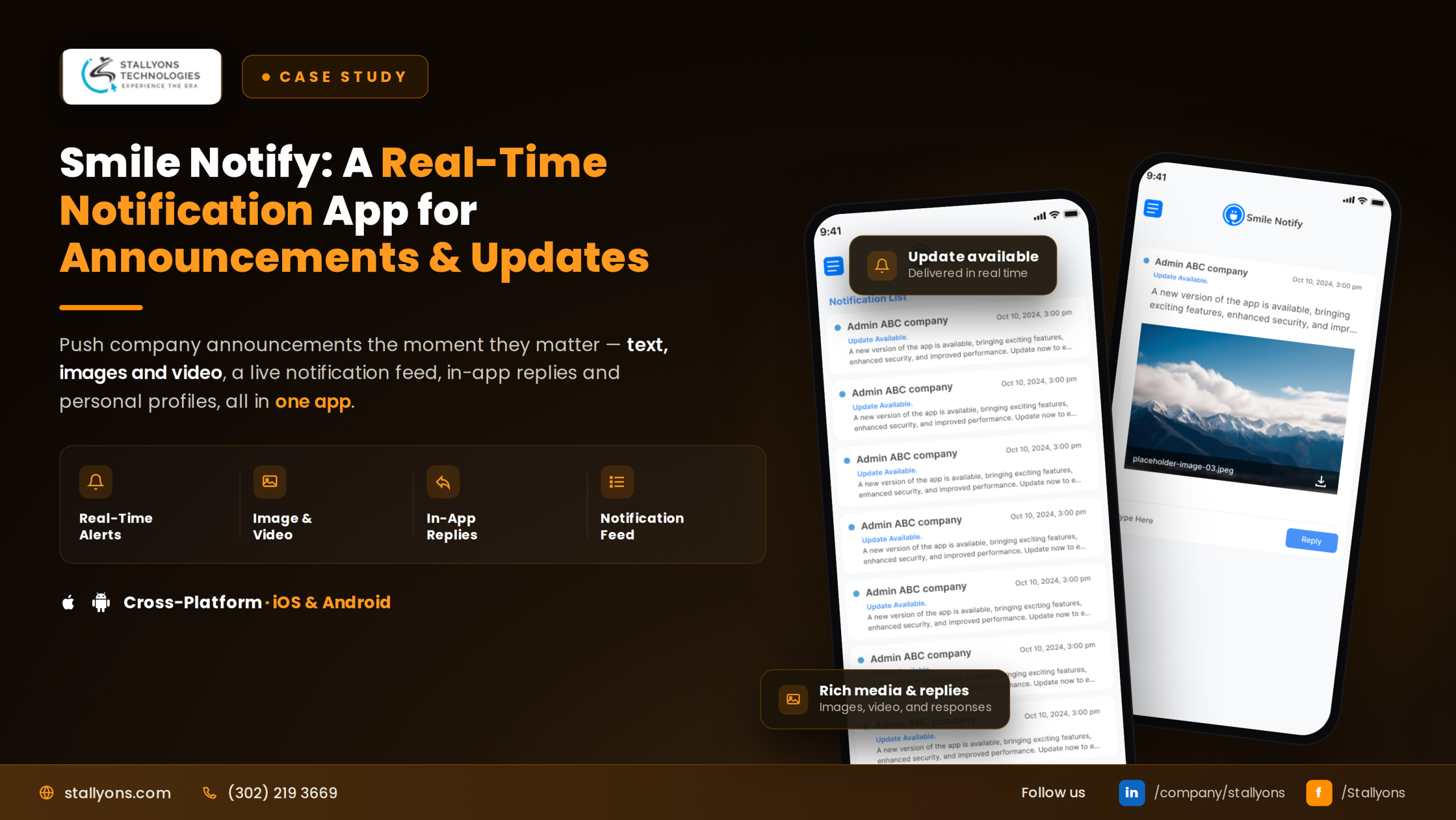
Picture one person responsible for a whole group of users, juggling a scattered spreadsheet of accounts, sending updates through email one day and a chat app the next, with no reliable record of who was told what. Messages get missed, questions go unanswered, and no one can say for certain what went out or when. This is the everyday mess our team at Stallyons set out to fix when we built Smile Notify.
Smile Notify is a secure app, a compact piece of mobile app development, that brings user management and messaging into one place. An admin logs in, sees every registered user, and can add, edit, or remove accounts and set permissions. From the same app, they send rich notifications as text, images, or videos, target exactly the right people, and track everything in a full history. Built as an HTML5 hybrid app for both iOS and Android, with a matching web backend, it turns a scattered process into one tidy, two-way system. Here is how we did it.
Project Snapshot
Here is the quick view for readers who like the summary first.
- Product type: An admin app for user management and rich notifications
- Platforms: iOS and Android, built from one HTML5 hybrid codebase
- Standout feature: Text, image, and video notifications targeted to users or groups
- Extra reach: A web-based admin backend that shares the same data as the app
- Two-way built in: A secure chat that lets users reply directly to the admin
One HTML5 codebase serving both app stores, paired with a web console that shares the same backend, is a pattern that gives clients speed, consistency, and one source of truth across every screen.
The Challenge: Scattered Users and Messages
Organizations often need one person to manage a group of users and keep them informed. Without the right tool, that job gets clumsy fast, and the problems pile up.
User accounts become hard to manage when they live across spreadsheets or separate systems, where adding, editing, and removing people is slow and easy to get wrong. Messages get sent in too many places at once, spread across email, texts, and chat apps, so there is no single reliable channel and no clear record. Plain text is often not enough either, since some messages truly need an image or a video to be clear. On top of that, there is usually no history of what was sent, which leaves everyone guessing about who was notified, with what, and when.
Two more gaps mattered just as much. Users often cannot reply easily, because notifications flow only one way, and permissions are hard to control when there is no proper admin tool to decide who can access what. The real tension underneath all of this is that managing people and messaging them are normally two separate jobs in two disconnected tools.
The Solution We Built
Smile Notify joins those two jobs into one secure system, with a web backend to match. The admin gets full control, and users get a clean, simple experience.
The admin logs in securely and lands on a list of every registered user. From there they manage accounts fully: adding new users with details like name and email, editing anyone’s information or permissions, and removing users who no longer need access. Access levels can be changed whenever needed. Sending a notification is just as direct. The admin picks the type, writes the message, chooses who receives it, customizes the icon and name, then taps Send. Every notification is saved to a timeline, so the admin can always look back at who received what, and when.
Users have their own straightforward side. They log in to a dashboard that shows their profile and recent notifications, and they can update their own details. Crucially, the admin can do all of this from a web-based backend too, which shares the same data as the app, so the work stays perfectly in step across phone and web.
Rich Notifications, Not Just Text
The standout feature is that notifications are not limited to plain text. The admin can send text, an image, or a video, because a picture or a short clip often explains something far better than words alone. With custom icons and names on top, each notification can be made clear and on brand. The admin can also target a single user or a whole group, so the right people get the right message without anyone being spammed. Relevant messages keep users paying attention.
A Full History and Two-Way Chat
Two features turn Smile Notify from a broadcast tool into a trustworthy communication system. First, every notification is logged to a timeline showing who received it and when, which removes all doubt about whether a message went out and to whom. Second, a secure chat lets users message the admin directly and get a reply. A user with a question about a notification can reach the admin without leaving the app, turning a one-way notice board into a real conversation.
The honest flip side of routing everything through one admin is that the whole system moves at that one person’s pace. The admin is the only sender and the single point of contact, so when nobody is watching the console, nothing goes out and replies wait. That is the right trade for a small team that wants tight control and a clean record; a larger organization would soon want more than one hand on the switch, which is a question of adding roles rather than rebuilding the app.
The HTML5 Development Approach
Here is where the engineering choices come together. Smile Notify was built as an HTML5 hybrid app, wrapped for both the Android and iOS stores from a single web-based codebase. The app handles what admins and users see on their phones, while a web-based backend gives the admin a larger-screen console. Both the app and the web console share the same backend and data, so the admin sees the same users, messages, and history no matter where they work.
We chose this route deliberately. A hybrid HTML5 build let us ship to both app stores from one code source, keep behavior consistent across phone and web, and cut the cost and time of maintaining separate products. This is the heart of our HTML5 hybrid app development: one modern web-based codebase that feels native on every device while sharing a single source of truth. It is the same approach behind our HTML5 hybrid chat app build and another HTML5 app we delivered.
The stack behind it is compact. One HTML5 hybrid codebase is wrapped for the App Store and Google Play and paired with a web admin console for larger screens, and both talk to the same backend, a piece of notifications and backend integration that stores users, notifications, and chats, enforces permissions, and guards every account behind a secure username-and-password login. Push delivery carries text, images, or video to the right people, cloud storage holds the media each notification sends, and a secure messaging channel carries the two-way chat between users and the admin.
Real-World Use Cases
The value shows in who Smile Notify serves. Here are a few situations where it changes how an organization communicates.
- A school admin sends a video update to one class group, while parents in other classes are left undisturbed.
- A facilities team pushes an image alert about a repair to a single building’s users.
- A membership organization keeps an auditable record of every notice sent, with recipients and timestamps.
- A user replies to a notification through secure chat, and the admin answers without either side leaving the app.
By pairing rich, targeted notifications with a full history and two-way chat, Smile Notify fits any team that needs to manage users and reach them reliably.
The Results
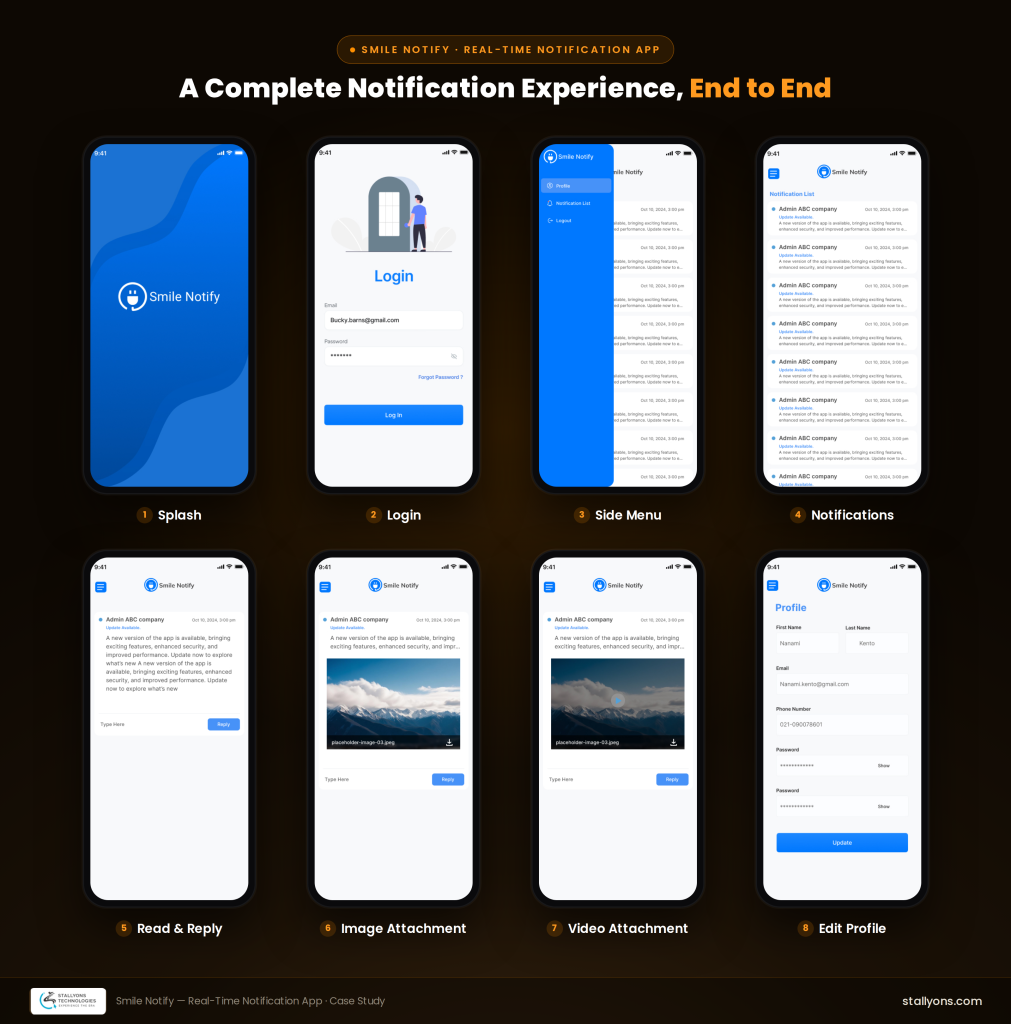
The finished product is a clean, secure tool for managing users and keeping them informed, delivered as an HTML5 hybrid app on the Android and iOS stores, with a web-based backend for the admin. The admin logs in securely, manages every account, sets permissions, and sends rich notifications, all from the app or the web. Notifications can be text, images, or videos, sent to specific users or groups, with custom icons and names, and every one is logged in a timeline that shows who received it and when. Users get a simple dashboard, can update their own details, and can reach the admin directly through secure chat.
For the client, the outcome was a single tidy system that replaced a scattered mix of tools, giving the admin full control and a clear record while keeping users informed and able to reply. For us, it is another example of what a well-planned HTML5 hybrid build delivers: one codebase, two app stores, a shared web console, and a genuinely useful product.
Why Work With an Experienced HTML5 App Development Team
A project like Smile Notify shows the value of a partner who knows how to unify separate jobs into one clean tool and keep it consistent across app and web. The pattern is straightforward but easy to get wrong: a front end that ships to both app stores from one codebase, wired to a shared backend so everything stays in step no matter which screen you use.
If you are planning a cross-platform app, an admin and notifications tool, or any hybrid build that has to work the same on phone and web, that same approach can shape your project from day one.
Ready to Build Your Own HTML5 Hybrid App?
Great products start with the right technical foundation. If you want a partner who can turn one HTML5 codebase into a polished app across iOS, Android, and the web, we would love to help. Explore our HTML5 progressive web app development, then book a discovery call and tell us what you are building.
Frequently Asked Questions
What is an HTML5 hybrid app?
An HTML5 hybrid app is built with web technologies like HTML5, CSS, and JavaScript, then wrapped so it runs as a native app on iOS and Android. It combines the speed of web development with access to both app stores and native features like push notifications.
Can one HTML5 codebase power both a mobile app and a web backend?
Yes. As Smile Notify shows, a single HTML5 hybrid app and a web-based admin console can share the same backend and data, so an admin sees the same users, messages, and history whether they work on a phone or a larger screen.
Can hybrid apps send image and video push notifications?
They can. Smile Notify delivers rich notifications as text, images, or videos, with custom icons and names, targeted to individual users or whole groups.
How does HTML5 hybrid development lower cost and speed up delivery?
Because one codebase runs across multiple platforms, teams build faster and maintain the product with less effort than managing separate native apps. This usually lowers the total cost of building and running the app over time.