


Blog
Advisor Profiles: Editable
Drupal Team Grid
For a professional services firm, the people are the product. A potential client usually checks who they will be working with before they pick up the phone, so a new advisor who is missing from the website, or shown in a way that clashes with the rest of the team, quietly makes the firm look less established. When a Quebec firm hired a new advisor, its “Our Firm” page had nowhere to put them.
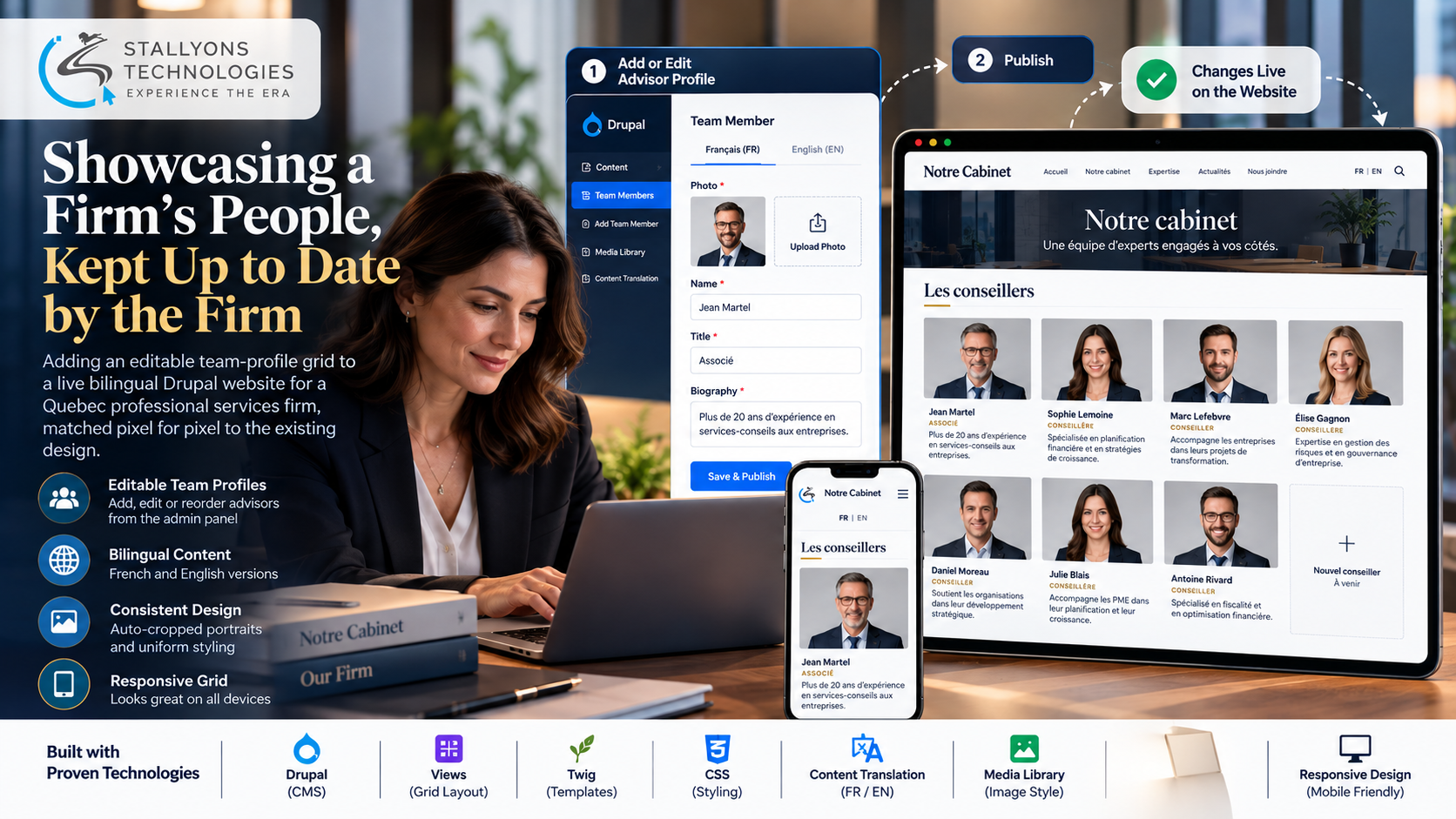
Advisor Profiles is the section that solved that. It added an editable team-profile grid to a live bilingual Drupal website, matched to the existing design so closely that a visitor cannot tell it was built later. A new “Les conseillers” section now presents each advisor with a portrait, name, and biography, laid out in the same style as the rest of the page, in both French and English.
Put simply, the firm no longer needs a developer to introduce a new team member. A staff member logs into Drupal, uploads a photo, types in the person’s details, and the advisor appears on the page straight away in the right place and style. The firm paid once and kept the ability to maintain the page itself.
The Starting Point: One Section That Had to Disappear Into the Page
The site already worked well, but adding people to it was not simple. The brief looked small, and that was the trap: a new section that is almost right is worse than none, because it draws the eye to the seam. The requirements made that clear.
- Somewhere to put the new advisor. The page had no section for advisors, so the new hire could not be shown without development work.
- An exact design match. The new section needed the same photo format, fonts, spacing, and framing as the existing profiles, so the page reads as one design.
- A clean grid, not a list. The firm wanted the team shown as a tidy grid that adapts to phones and tablets rather than a long column.
- No developer for future changes. Without an editable section, every new hire or updated biography would mean paying for another change.
- Safe to ship on a live bilingual site. The page is public in French and English, so the work had to go in without breaking anything for visitors.
The Build: Add a Person, See Them Live
Each advisor is a Team Member item in Drupal, with fields for the portrait, name, title, and biography in both languages, and a Views grid displays them under the new heading. Working inside an existing live theme and matching it exactly is the kind of Drupal development company work where the craft is in what you do not see. Adding a new advisor runs like this:
- A staff member logs into the Drupal admin.
- They create a new Team Member item.
- They upload the portrait photo, which an image style crops and resizes to match the existing team photos.
- They enter the name, title, and biography.
- They add the French and English versions through content translation.
- The advisor appears on the live “Les conseillers” grid, in the correct place and style, straight away.
After the first version went live, the client asked for the text to be right-aligned and for a framed square to fill the empty grid position left by an odd number of advisors, so the layout stays balanced. Both changes were made the same day and checked together with the client until every portrait, caption, and frame lined up with the existing profiles. Existing entries can be edited or reordered the same way, with changes appearing on the page instantly.
Technical Architecture
The site runs on Drupal, and the new section was built from Drupal’s own standard building blocks rather than a new plugin or page builder. The challenge was not the size of the change. It was working inside an existing live theme, matching its design exactly, supporting two languages, and leaving the firm with something it can manage on its own.
- Team Member content type. A reusable content type holds each person’s portrait, name, title, and biography as editable fields, so every future advisor is just a new item.
- Drupal Views grid. A Views block lists advisors in a responsive grid under the “Les conseillers” heading, ordered by the firm, and placed on the existing page. For firms that want this kind of editable section added to a site they already run, it is a focused slice of web development rather than a rebuild.
- Image style. A dedicated image style crops and resizes every uploaded portrait to the same shape as the existing photos, so any photo lines up with the team.
- Content Translation. Drupal’s Content Translation gives each advisor a French and English version from a single entry, matching the rest of the bilingual site.
- Twig template and CSS. The section’s styling, including the right-aligned text and the framed placeholder square, lives in the theme so it mirrors the existing page design.
The part that took real care was reusing the existing styles instead of writing new ones. The theme files were studied so fonts, spacing, colours, and photo frames all match, which is why the new grid sits inside the page without a visible seam.
Challenges Solved
Matching an existing design exactly meant the new section had to be indistinguishable from the rest of the page, so the existing styles were read straight from the theme files and reused rather than approximated. An odd number of advisors leaves a gap in a grid, which looks unfinished, so a framed square matching the existing photo frames fills the empty position and keeps the section complete. Portraits arrive in all shapes and sizes, so an image style crops and resizes each upload automatically and nobody has to edit images by hand. The biggest decision was scope: the request was to add one person, but building a reusable Team Member section instead, and showing the client where to manage it, means every future advisor can be added in minutes by the firm.
That instinct to leave a client self-sufficient is what serves fintech and professional services firms best, because the people on the team change far more often than the website does.
The Result
The “Les conseillers” grid went live with the new advisor’s profile, was refined after the client’s feedback, and was approved in September 2024. The design matches the existing profiles down to the photo frames, the section is editable by the firm from the admin, and no developer is needed for the next hire or the next biography update. A change that looked like a one-off turned into a lasting improvement to the site.
The work lasts because it was built from reusable Drupal parts and handed over with the firm shown how to run it. If you need an editable section added to a site you already own, you can hire PHP developers who work carefully inside live Drupal themes, or tell us what your page needs and we will build it to match, in every language your site speaks.
Frequently Asked Questions
What was added to the firm’s website?
A new “Les conseillers” section on the “Our Firm” page, showing each advisor in a responsive grid with a portrait, name, and biography in French and English, styled to match the firm’s existing profiles exactly.
Can the firm add new advisors without a developer?
Yes. Each advisor is a Team Member item in Drupal, so a staff member logs into the admin, uploads a photo, enters the name, role, and bio, and the person appears on the live page in the correct style. Existing entries can be edited or reordered the same way.
How does every portrait end up looking consistent?
A dedicated Drupal image style crops and resizes each uploaded photo to the same format as the existing team photos. Whatever shape or size a photo arrives in, it is adjusted automatically so it lines up with the rest of the grid.
How does the section handle two languages?
The site is bilingual, so the section uses Drupal’s Content Translation. Each advisor is entered once and given a French and an English version, and visitors see the profile in whichever language they are browsing the site in.
Why build a reusable section for just one new advisor?
Because the people on a professional services team change regularly. Building a reusable Team Member content type instead of hard-coding one person means the firm pays once and can present every future hire itself, with no repeat development cost.