


Blog
Luxury WooCommerce Email
Templates
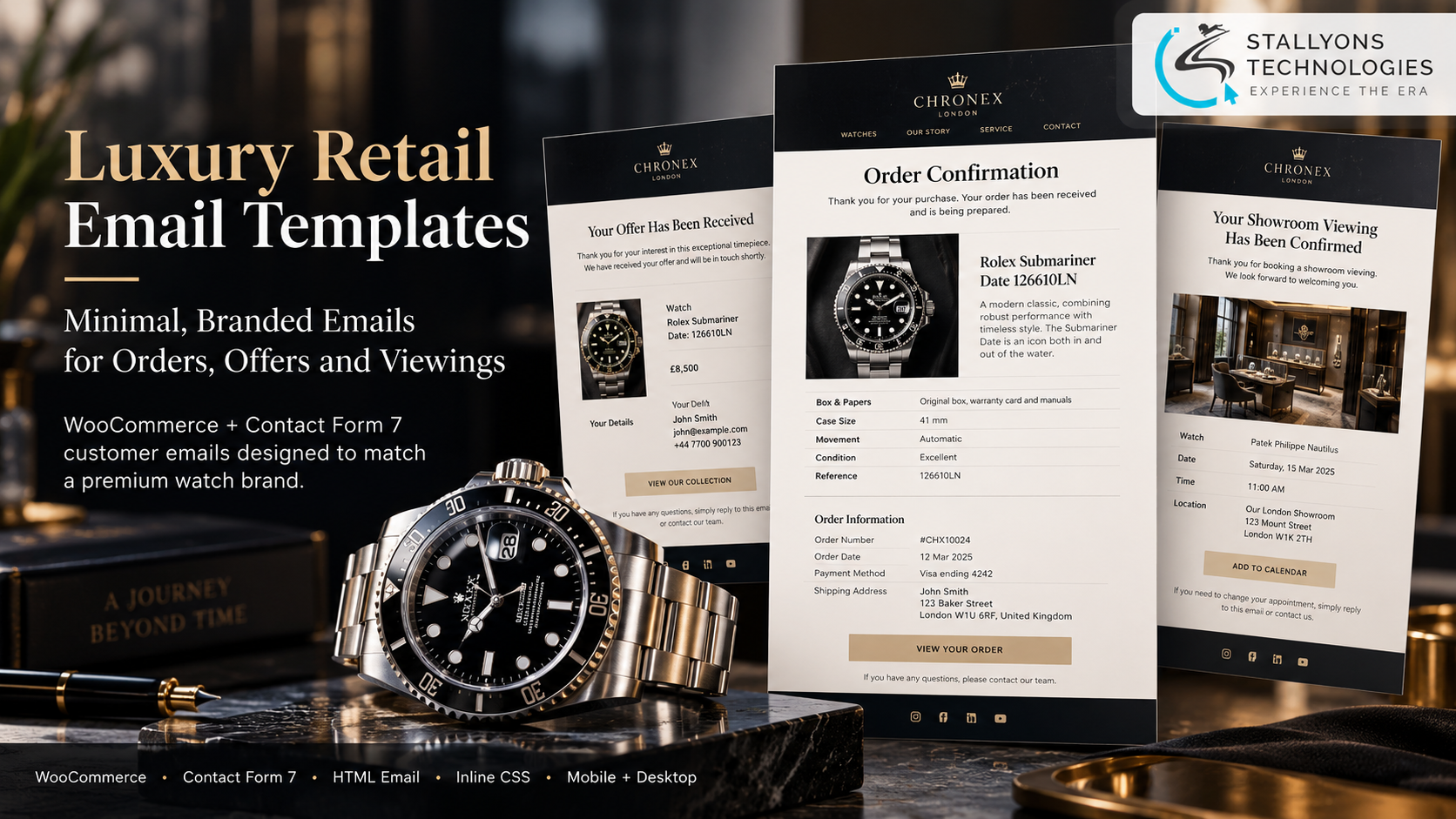
A buyer spends several thousand pounds on a vintage watch, hits confirm, and the first message back is a plain grey WooCommerce receipt that could have come from any shop selling phone cases. For a London dealer whose website is quiet, premium, and carefully art-directed, that gap between the site and the email was jarring. The piece someone just bought, its photo, its description, the box and papers it ships with, none of it was in the one message every customer actually reads.
Luxury Retail Email Templates is a set of three custom emails we designed and coded for that dealer’s WordPress and WooCommerce site: a WooCommerce order confirmation that shows each watch’s photo, description, and a short details table, plus Contact Form 7 auto-replies for the shop’s “Make an offer” and “View in showroom” forms that confirm exactly what the customer entered. The brief was to make every message feel as considered as the pieces being sold.
Put simply, an order or an enquiry now triggers a clean, branded email that matches the website and shows the customer their own details back, instead of a generic default.
The Starting Point: Three Messages, One Premium Standard
The website already looked the part. The emails did not. For a business where each sale is a significant purchase, the first message after an order or an enquiry had to carry the same restraint as the shop itself, and it had to do that across three different moments without touching the shop’s own internal notifications.
- Match the brand. The default WooCommerce notice and the basic form replies looked nothing like a premium watch dealer, so each template needed a minimal design drawn from the website.
- Show the piece. The order email had to carry each watch’s photo, its description, and a short details table covering things like box and papers, so the customer sees exactly what they bought.
- Echo the enquiry. The “Make an offer” and “View in showroom” replies had to repeat back the details the customer submitted, confirming the request at a glance.
- Serve two audiences without crossover. The customer-facing auto-replies had to change while the shop’s own notifications stayed exactly as they were.
- Survive real inboxes. Every template had to display consistently across common email apps on both desktop and mobile.
- Stay editable. The structure had to be clean enough for the client to adjust wording and small styling later.
The Build: From Static Draft to Live Data
Each template shares the same spine: a brand header with the logo, a clear main message, the details that matter for that moment, and a footer with contact information and social links. Coding emails that hold their layout across Gmail, Apple Mail, and Outlook is a narrow craft, and it is the sort of careful front-end WooCommerce development services that keeps a premium brand intact in the one place a shop cannot control, the customer’s inbox. The three emails were delivered in a set order:
- We reviewed the website’s style and the client’s reference designs to fix the look.
- We built three static HTML templates and had them approved on both mobile and desktop before any wiring.
- We connected the order template to live WooCommerce order data, pulling the thumbnail, description, and details table for each item.
- We wired the two Contact Form 7 auto-replies to their form fields, so each confirms the customer’s own submission.
- We tested using a hidden, non-indexed page holding copies of both forms and a private product for test orders, keeping test traffic off the main pages.
- We installed the approved templates on live orders and the customer auto-replies.
A detail that made the whole thing safe: Contact Form 7 can send two emails per form, one to the shop and an optional auto-reply to the customer. The new designs were applied to the customer auto-replies only, so the shop’s own notifications were never altered. The minimal, brand-matched look also owes a lot to considered design work, since a luxury email lives or dies on typography and restraint, not features.
Technical Architecture
The templates sit on the client’s existing WordPress and WooCommerce site, with Contact Form 7 handling the enquiry forms. Nothing here is a heavy plugin; it is markup and data, built to survive the quirks of email clients. Each layer has a clear role.
- Platform. WordPress runs the client’s existing site, with no new infrastructure added.
- Order email. A custom WooCommerce order template pulls order data into the design, showing the photo, description, and details for each watch.
- Form replies. Contact Form 7’s second mail slot (Mail 2) carries the branded customer auto-replies for the offer and viewing forms.
- Markup. HTML with inline CSS keeps each message consistent across common email apps on desktop and mobile.
- Test setup. A hidden page with copies of the forms and a private test product stood in for a staging site the shop did not have.
- Handover. A clean template structure lets the client make small text and style changes without a developer.
The real engineering was in the order email. Pulling the right thumbnail, description, and details table for every item in an order, then rendering it all with inline styles that hold up in apps that each handle layout differently, is what separates a branded email that works from one that collapses into broken boxes on a phone.
Challenges Solved
The first challenge was testing with no staging site. Rather than risk the live shop, we built a hidden, non-indexed page that held copies of both enquiry forms and used a private product to place real test orders, so every template could be checked end to end without test traffic touching the public pages. The second was keeping two audiences apart: the shop’s internal notice and the customer’s auto-reply had to stay separate, so only the customer-facing message took the new design while the shop’s own alerts were left untouched.
The third was email itself. Email apps handle styling very differently, and a layout that looks right in one can fall apart in another. We kept the designs simple, used inline styles throughout, and checked each message on mobile and desktop before install. The client approved the drafts early and again after installation, and the project was paid in full.
The Result
Orders and enquiries now trigger emails that match the website: an order confirmation that shows each watch with its photo, description, and details, and offer and viewing replies that confirm the customer’s own request back to them. The shop’s internal notifications were left exactly as they were, and the clean template structure means the client can adjust wording and small styling without coming back for every change. Every message now carries the same restraint as the pieces the shop sells.
If your store’s emails let your brand down, you can work with WooCommerce developers who code order and form templates that hold their design across real inboxes, or tell us how your customers order and enquire and we will map your order, offer, and enquiry emails to a branded set. It fits any online retail business where the first message after a purchase is part of the product experience.
Frequently Asked Questions
What did the Luxury Retail email project include?
Three custom templates on a WordPress and WooCommerce site: a branded WooCommerce order confirmation showing each watch’s photo, description, and a details table, plus Contact Form 7 auto-replies for the “Make an offer” and “View in showroom” forms that confirm what the customer entered.
Does the order email show the actual product details?
Yes. The order template pulls live WooCommerce order data, so each item shows its own thumbnail, description, and a short details table covering things like box and papers. The customer sees exactly what they bought without opening another page.
Were the shop’s own notifications changed?
No. Contact Form 7 sends two emails per form, one to the shop and an optional auto-reply to the customer. Only the customer auto-replies took the new design, so the shop’s internal notices stayed exactly as they were.
How were the emails tested without a staging site?
We built a hidden, non-indexed page with copies of both forms and used a private product to place real test orders. That let every template be checked on desktop and mobile end to end, while keeping test traffic away from the shop’s live pages.
Can the client edit the templates later?
Yes. The templates use a clean HTML structure with inline styles, so the client can make small wording and styling changes without a developer, while the overall branded layout stays intact.