


Blog
DocAssist AI: ONLYOFFICE
LLM Integration
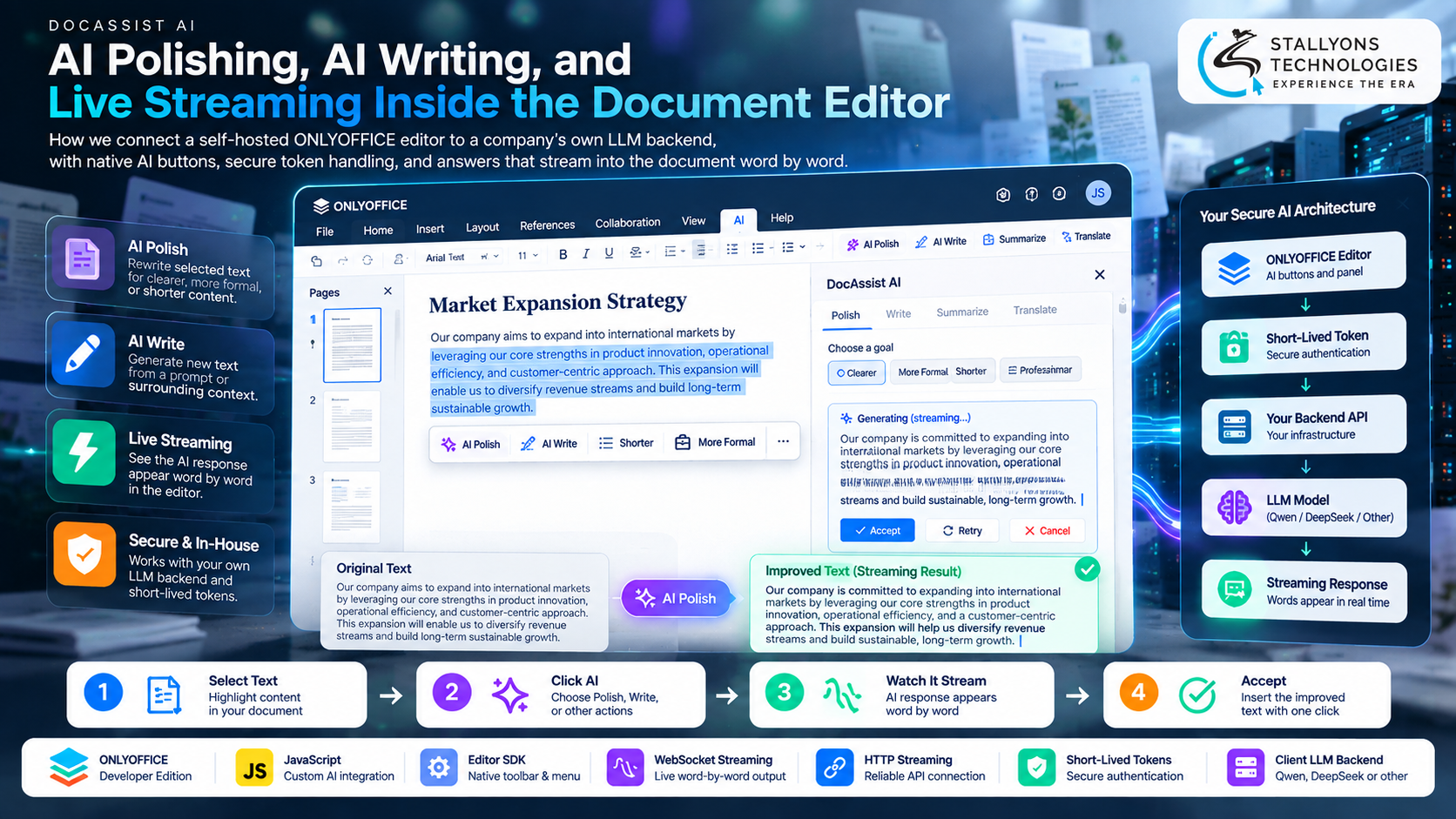
A writer in a company that runs its own document editor wants a paragraph tightened. Today that means copying the text into a public chatbot, waiting, pasting the result back, and fixing the formatting the paste broke. The company does not want its documents leaving its own servers, and it does not want staff bouncing between apps all day. The AI help they want is real, but the place they want it is inside the editor they already use, talking only to the model they already run.
DocAssist AI is our blueprint for putting that help where it belongs: three features built directly into a self-hosted ONLYOFFICE Developer Edition editor. AI Polish rewrites selected text, AI Write drafts new text from a prompt or the surrounding content, and live streaming shows the answer appearing word by word instead of after a long, blank wait. Every action calls the company’s own backend with a short-lived token, so the choice of model, whether Qwen, DeepSeek or another, stays with the client. This is a solution blueprint based on requirements we scoped for a software company, backed by a paid editor customisation trial we delivered, so what follows describes how we design the AI layer, not figures from a finished deployment.
Put simply, a user selects text, clicks one button, watches the improved writing stream straight into the document, and accepts it as a single undoable change, without sending anything to a third party. The model stays the company’s own, the controls look native to the editor, and the whole layer is written in JavaScript.
The Starting Point: AI Help That Never Leaves the Editor
For built-in AI writing to be worth shipping into a production editor, it has to earn trust on several fronts at once. The company that scoped this with us writes in Chinese and English and already runs a deeply customised ONLYOFFICE deployment, which set the conditions the design has to meet.
- Keep the work inside the editor. Copying text into an outside chatbot and back is slow and breaks formatting, so the AI has to act on the selection in place.
- Keep the data in-house. Every request has to go to the company’s own backend and model, never to a third party chosen by the editor vendor.
- Never feel broken while it thinks. A model can take many seconds, so the answer has to stream in from the first word rather than appear all at once after a wait.
- Respect an already-customised editor. ONLYOFFICE’s interface is complex and the client has their own changes in it, which the new features must not disturb.
- Handle failure without damage. Expired tokens, dropped connections and model errors have to leave the document exactly as it was, with a clear message and a retry.
- Look native, not bolted on. The buttons, menu items and panel have to match the editor’s own styles so users see one product.
The Build: One Click, and the Answer Streams In
Designing AI that writes live into a complex editor, without breaking undo or the client’s existing work, is the kind of problem an AI development company is set up to solve, because the difficulty is not in calling a model but in rendering its output safely inside a real document. A typical AI Polish action runs as an ordered flow:
- The user selects a paragraph and chooses AI Polish from the toolbar or the right-click menu, then picks a goal such as clearer, more formal, or shorter.
- The editor sends the selection and a little surrounding context to the company’s backend with a short-lived token.
- The backend opens a streaming connection and the improved text arrives chunk by chunk into a preview, correctly buffered so multi-byte Chinese characters never show as broken symbols.
- The user can stop generation at any point, which cancels the request cleanly.
- Accepting the result replaces the original text in one undoable step, so a single undo reverses the whole change.
- If the connection drops or the token expires, the editor refreshes the token, offers a retry, and leaves no half-written text behind.
AI Write follows the same shape from the cursor instead of a selection, and both features share one pipeline so a new AI action plugs in with a small config entry. The streaming client speaks both WebSocket and HTTP streaming to the backend, which is where careful API development matters most: tokens, timeouts and endpoint URLs all sit in config, and every call is wrapped in a token manager and error handling so the editor stays steady when the network does not.
Technical Architecture
All the work sits in JavaScript inside the ONLYOFFICE Developer Edition front end. New toolbar buttons, menu items and an AI panel extend the interface, and the editor SDK reads the selection and inserts or replaces text. Each layer has one job, and the model stays behind the client’s own backend.
- Native UI extensions. Toolbar buttons, a right-click menu and an AI panel built in the editor’s own styles, so the features look like part of ONLYOFFICE.
- Editor SDK calls. The SDK reads the current selection and context and applies the accepted result as one change the user can undo.
- Streaming client. A client that supports WebSocket and HTTP streaming, buffers partial characters for Chinese text, and can be stopped mid-answer.
- Safety layer. Short-lived tokens over HTTPS, automatic token refresh, request cancellation, and graceful handling of timeouts and model errors.
- The model. The company’s own LLM backend, which can change from one model to another without touching the editor.
The part that needs the most care is streaming into a live document. Writing every chunk straight into the page would flood the undo history and fight with the user’s own typing, so output streams into a preview first and is applied as a single change only when accepted. That one decision is what keeps the AI from damaging the document it is meant to improve.
Challenges Solved
The first problem the design has to answer is trust in a production editor. The client already has their own changes in ONLYOFFICE, so the AI features are built and tested on a clean editor build first, then merged in as a self-contained module. That keeps the existing customisations safe and means the AI layer can be reviewed in isolation before it ever reaches the real system. Before any of the AI work, the client asked for a paid technical trial to confirm we could change the editor at all, and we delivered it: a clean ONLYOFFICE 9.1.0 instance on AWS with its two-row toolbar reshaped into a single row, which the client approved and paid for.
The second set of problems is streaming and failure. Chinese text can split across stream chunks and show as broken symbols, so the streaming client decodes and buffers each chunk before it is displayed. Tokens expire and connections drop, so short-lived tokens are refreshed automatically, any request can be cancelled, and every error leaves the document untouched. Because the editor only ever talks to the company’s backend, the model behind it can be swapped at any time without a single change to the front end.
The Result
The design adds up to an editor where a user improves or drafts text with one click and sees the answer start almost at once, without leaving the document or risking their work. The company keeps its data in-house, chooses and changes its own model, and can turn AI writing into a premium feature on a higher plan. The editor trial is a delivered fact that proves we can reshape the interface cleanly; the AI features are the blueprint this document sets out, ready to build on a clean editor and merge into the client’s production version.
The blueprint holds together because it was designed around the risky step, streaming live into a complex document, rather than around a simple API call. If you are planning AI inside your own editor or product, you can hire generative AI developers who have scoped this ONLYOFFICE-to-LLM pipeline, or tell us which model you want to keep in-house and our team will map the buttons, streaming and safety layer to your editor. It suits any software and SaaS business running its own document platform.
Frequently Asked Questions
What is DocAssist AI?
It is our solution blueprint for adding large language model features to a self-hosted ONLYOFFICE Developer Edition editor. It covers AI Polish for rewriting selected text, AI Write for drafting new text, and live streaming so answers appear word by word, all built in JavaScript and calling the company’s own model rather than a third-party service.
Is this a delivered project or a design?
It is a blueprint for the AI features, backed by one delivered, paid piece of work: a technical trial in which we deployed a clean ONLYOFFICE 9.1.0 instance on AWS and turned its two-row toolbar into a single row, which the client approved and paid for. The AI layer describes how we would build and ship those features, not results from a finished deployment.
How does it keep documents in-house?
Every AI action calls the company’s own backend with a short-lived token, and the editor never talks to an outside AI service. The company chooses the model behind that backend, such as Qwen or DeepSeek, and can switch it at any time, so documents and model choice both stay under its own control.
Why does the answer stream in instead of appearing at once?
A model can take many seconds to finish, and without streaming a user assumes nothing is happening. Streaming shows the first words almost immediately, so progress is visible. The output streams into a preview first and is applied as one undoable change on accept, which keeps the undo history clean and the document safe.
Will it break our existing editor customisations?
No. The AI features are built and tested on a clean editor build, then merged into the client’s customised version as a self-contained module. That order keeps existing changes safe, and because the AI layer is isolated, it can be reviewed on its own before it reaches the production editor.