


Blog
Artist Marketplace: Multi-Vendor
WooCommerce
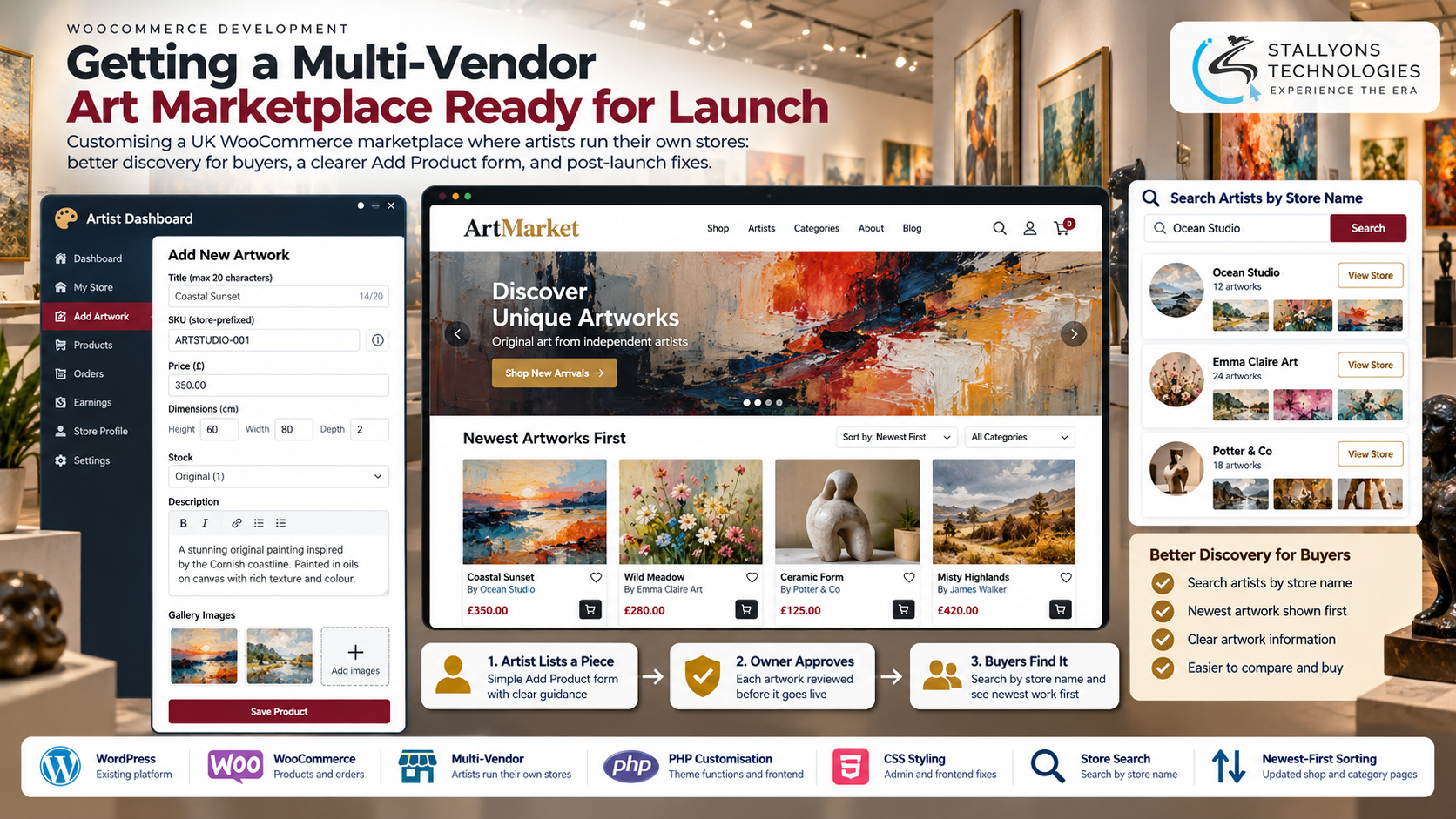
Picture a painter who sells under a studio name, not her own first name. A buyer hears about her work, types the studio name into the marketplace search, and gets nothing back. Meanwhile her newest piece, just approved, sits near the bottom of a page that lists every artwork from A to Z. On a marketplace where artists run their own stores, that is the difference between a sale and a shrug.
Artist Marketplace is a UK WooCommerce site where independent artists each get their own store and dashboard, upload their own artworks, and have every piece approved by the marketplace owner before it goes on sale. The site was already built on WordPress and WooCommerce with a multi-vendor plugin and a premium theme. Before the owner invited artists in, he needed a final round of changes: buyers had to find artists by store name and see the newest work first, and the artists’ Add Product form had to be simpler and much harder to get wrong.
Put simply, we made the marketplace easy for artists to list on and easy for buyers to search, then fixed the problems that only appeared once real artists started uploading in volume.
The Starting Point: A Marketplace That Had to Work for Two Sides at Once
A marketplace only earns its keep if artists can list work without tripping over the form and buyers can actually find what they came for. Several gaps stood between the site and a confident launch, and each one had to be fixed without replacing the paid marketplace plugin the owner planned to move away from later.
- Find artists by store name. Many artists sell under a studio or shop name, but the system listed and searched by first name only, so a buyer searching the store name found no one.
- Show the newest work first. The Buy Art page, category pages, and search all listed products A to Z, which buried freshly approved pieces among older ones.
- Make the Add Product form hard to get wrong. Titles had no length limit, two artworks could share a name, key fields were split across tabs artists skipped, and some fields confused more than they helped.
- Make every button visible. Buttons in the dashboard, account area, and media library were light grey on white, and the owner’s own CSS fix had only reached some of them.
- Keep descriptions as written. Store and product descriptions collapsed into a single paragraph the moment they were saved.
- Clear a fatal error. WordPress was reporting that a vendor plugin class had been declared twice, a notice that had to go before launch.
The Build: One Listing, From Upload to Found
The work sat in the layer between the theme and the plugin: hooks and filters in the theme files, front-end scripts, and admin styling, with nothing edited inside the marketplace plugin itself. That boundary matters, because it is what lets plugin updates roll in later without wiping the changes out, and it is the kind of careful customisation a WooCommerce development company handles rather than a generic plugin swap. A single artwork now moves through a clear, repeatable sequence:
- The artist sets up a store with its own name, icon, and bio, so buyers can find and recognise it.
- They open the Add Product form and enter a title capped at 20 characters, with a clear hint explaining the limit.
- They type their own stock code, and the store identifier is added in front, so two pieces with the same name never clash in the owner’s product list.
- They set weight and dimensions in the General tab (with “Length” renamed “Height”), and skip the stock-status and shipping-class fields that were removed.
- They write a description in paragraphs, which now stay as written when the piece is saved.
- The owner approves the piece, and it appears at the top of the Buy Art page, its category, and search results, found by store name the day it goes live.
Around that flow, the discovery changes reworked how WooCommerce queries list and sort products, and the admin and front-end styling gave every button a brand colour with readable text. Treating the interface and data-entry work as proper ecommerce development, rather than a quick cosmetic patch, is what stopped bad listings reaching the catalogue in the first place instead of leaving the owner to tidy them after approval.
Also readHow a London watch dealer got branded WooCommerce order and enquiry emails to match its site
Technical Architecture
The marketplace runs on WordPress and WooCommerce, with a multi-vendor plugin providing the artist stores, vendor dashboards, and the front-end Add Product form, and a premium theme for the public site. Our changes lived in the gaps between those pieces. Each layer had one job.
- Platform and store. WordPress and WooCommerce handle products, categories, and orders on the client’s existing site.
- Marketplace plugin. The Pro multi-vendor plugin gives each artist a store and dashboard, untouched so updates stay safe.
- Customisation layer. Code in the theme’s functions and footer files holds the store-name listing, newest-first sorting, prefixed SKUs, and the form restructure.
- Styling. Admin and front-end CSS gave the dashboard, account area, and media library brand-colour buttons with text set to match the rest of the site.
- Sorting and search. WooCommerce query changes drive newest-first ordering and store-name search across the Buy Art and category pages.
- Workflow. Every change was built on a local copy first and moved to the live site once checked, with a video walkthrough for each review round.
The part that needed the most care was the SKU rule. The first version built the code from the product name, but the owner wanted artists to keep their own stock codes with only the store identifier added in front. Getting that right kept the admin product list unique while letting each artist use the system they already knew.
Challenges Solved
The buttons were harder than they looked. They came from three different sources, WordPress, WooCommerce, and the marketplace plugin, each with its own styles, which is exactly why the owner’s single CSS rule had only fixed some of them. Each source was styled in turn, including the media library and upload screens, so the whole interface finally read as one site. The duplicate-class fatal error was traced and cleared, and unused plugins and files were removed afterwards to cut clutter and security warnings.
The trickier problems only showed up at scale. Once artists were uploading every day, long titles slipped past the limit and the first gallery image could not be removed. Both were traced and fixed, with a recorded walkthrough of each so the owner could see the change without logging in as an artist and testing every screen himself. Working on a live marketplace this way, local copy first and a changed-file list at handover, kept the public site stable throughout.
The Result
The marketplace went live with its launch blockers cleared: artists are listed and searched by store name, the newest approved work shows first everywhere buyers look, and the Add Product form guides artists to a complete, clean listing the first time. The owner signed off after two short review rounds, released payment, and left a review, and the changes that surfaced once uploads grew were fixed in the same careful way. Because the work sat outside the plugin, the owner keeps a clear path to replacing it with custom code later.
If you are preparing a multi-vendor store for launch, you can bring in WooCommerce developers who have untangled vendor forms, SKU rules, and plugin-layer styling before, or tell us how your sellers list their products and we will map the fixes your store needs. It suits any online retail and marketplace business where sellers upload their own catalogue and buyers need to find it fast.
Frequently Asked Questions
What was changed on the Artist Marketplace?
We delivered a round of WooCommerce customisations on an existing multi-vendor marketplace: store-name listing and search, newest-first sorting on the Buy Art and category pages, a tightened Add Product form, brand-colour buttons across the interface, kept-as-written descriptions, and a fix for a fatal error notice. The marketplace plugin itself was left untouched.
Why not just edit the marketplace plugin directly?
Editing the plugin would mean every update risked wiping the work out. Instead the changes went into the theme’s functions and footer files and into admin CSS, so plugin updates stay safe and the owner received a list of exactly which files changed.
How do the prefixed SKUs work?
Each artist enters their own stock code, and the store identifier is added in front automatically. That keeps every SKU unique in the owner’s product list even when two artists name a piece the same way, while letting artists keep the codes they already use.
How were the changes tested before going live?
Everything was built and checked on a local copy of the site first, then moved to the live marketplace once complete. Each review round came with a screen-recorded walkthrough, so the owner could approve each change without logging in as an artist and testing every screen.
What happened after the marketplace launched?
Once artists began uploading in volume, two limits showed up: long titles slipping past the character cap and the first gallery image not deleting. Both were traced and fixed, and shown back in recorded walkthroughs, so the launch stayed on track.