


Blog
Bubble.io Supplier Order
Automation
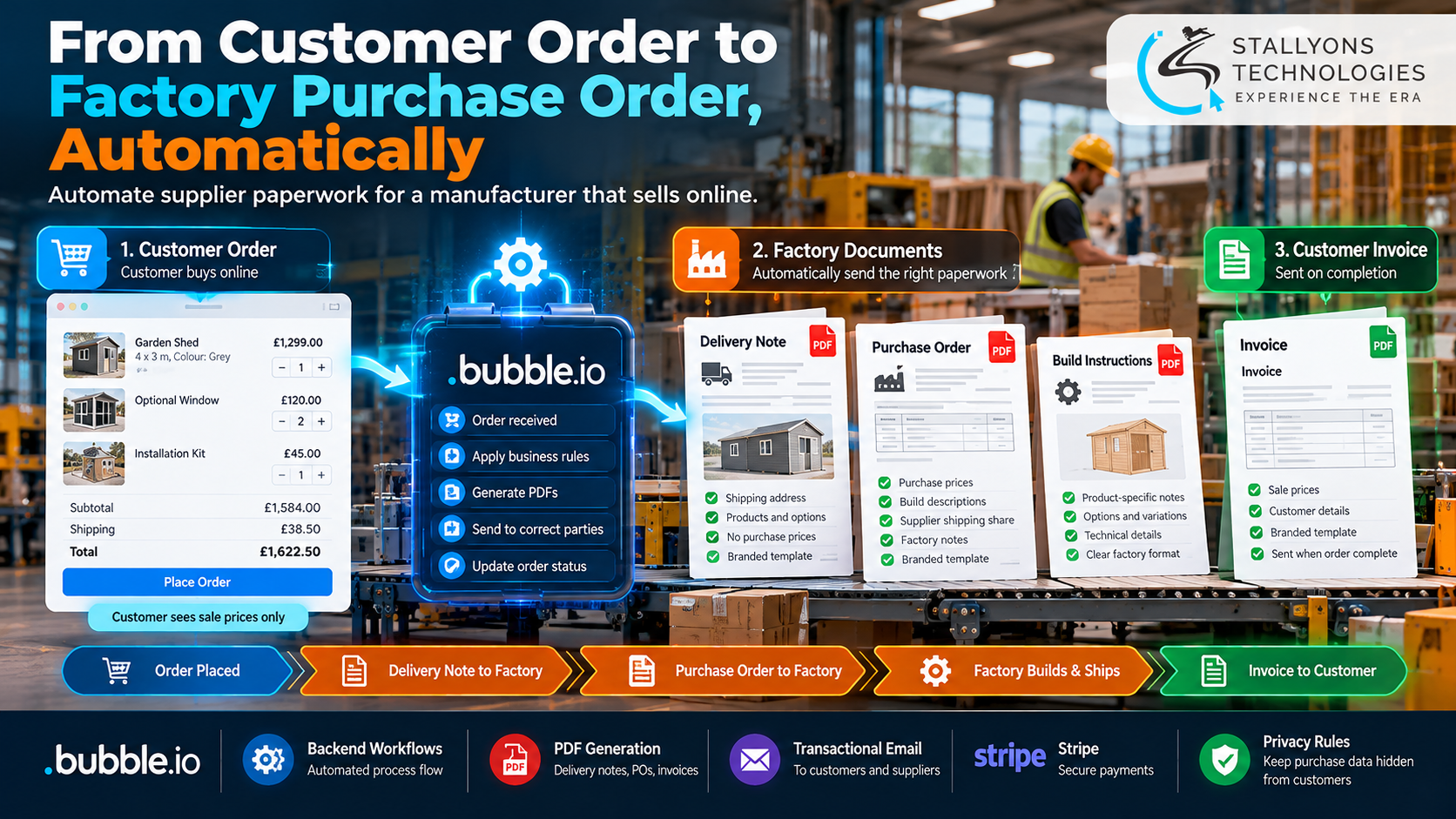
Plenty of small manufacturers sell online but never touch the thing they sell. A partner factory makes it and ships it. So every web order turns into a stack of paperwork: a delivery note for the factory, a purchase order with the prices the factory is actually paid, a note explaining how to build each item, and later an invoice for the customer. Type all of that out by hand and the first few orders are fine. Then trade picks up, a second supplier joins, and someone sends a customer’s billing details to the factory by mistake.
Supplier Order Automation is our blueprint for turning that whole loop into software on Bubble.io. A customer places an order on the store, and the system quietly sends the right document to the right party at the right moment: a branded confirmation to the buyer, a delivery note and a purchase order to the factory, and an invoice to the customer once the order is marked complete. Each document is drawn from the same order but shows only the slice that party is allowed to see. This is a solution blueprint based on requirements we have scoped, not figures from one client’s live system, so what follows describes how we design the flow and why.
Put simply, one order fans out into the documents each side needs, the factory never sees billing data, the customer never sees purchase prices, and nobody retypes anything. The owner sets prices and rules once, and the paperwork runs itself after every checkout.
The Starting Point: One Order, Four Different Readers
When a factory builds and ships the goods, an order is not finished at payment. It still has to reach the factory as correct, complete paperwork without leaking the wrong information to the wrong reader. That set a clear list of requirements, and each one had to hold up for a business running more than one supplier.
- Carry two prices on every product. Customers pay the sale price; the factory is paid the purchase price, including for each product option a buyer can choose.
- Write build notes for the factory. Each product needs its own technical description for the people making it, separate from the words a shopper reads.
- Split the shipping automatically. The factory is paid a share of the shipping charge, set as a percentage that the owner controls and that changes with every destination.
- Keep the parties apart. The factory needs the delivery address but not the customer’s billing details, and a customer must never see a purchase price.
- Send documents on the right event. A confirmation and the factory paperwork go out when an order is placed; the invoice goes out only when the order is marked complete.
- Let the owner change the rules. The shipping percentage, tax numbers, and supplier addresses have to be editable settings, not something buried in code.
The Build: A Checkout That Finishes the Paperwork
A sale runs as one flow from the store to a complete set of documents. Designing that flow, where a single checkout produces four documents that each tell a different reader exactly what they need and nothing more, is the kind of work a Bubble.io app development team is suited to, because the logic lives in backend workflows rather than a shopping-cart plugin. An order moves in a set order:
- The customer browses the store, adds products and any options, and pays at checkout through Stripe.
- The moment the order is placed, a backend workflow sends the customer a branded order confirmation.
- The same workflow builds a delivery note with the shipping address and a purchase order with purchase prices, build notes, and the factory’s share of shipping, then sends both to the assigned supplier as PDFs.
- The factory makes and ships the goods, working only from the documents it received.
- When the customer has the goods, the admin marks the order complete in the console.
- That status change triggers the invoice, which goes to the customer’s own invoice e-mail address.
Behind the store sits the admin console, where the owner records each product’s sale price, purchase price, purchase-order description, and the supplier it belongs to, then sets the shipping percentage, for example 75%, along with the tax numbers that print on every document. Because the recurring, rule-driven side of the business lives in editable settings, the owner can add a supplier or change a price without a developer, which is where treating it as proper custom software development pays off over a generic store.
Technical Architecture
The system is designed to run on Bubble.io, with products, suppliers, and orders in Bubble’s database and the document flow in backend workflows. The hard part is not the store. It is calculating purchase totals and the supplier’s shipping share correctly for every mix of products and options, generating clean PDFs, and making sure each party only ever receives the slice meant for them. Each layer has one job.
- Customer store. Bubble pages for browsing, product options, checkout, and the customer account, with the dedicated invoice address held on each account.
- Admin console. One place to set sale and purchase prices, write purchase-order text per product, assign suppliers, and track each order through placed, shipped, and complete.
- Purchase and shipping maths. Purchase totals that include every product option, plus the factory’s share of shipping worked out from the owner’s set percentage.
- Document engine. A PDF service that renders four layouts, the confirmation, delivery note, purchase order, and invoice, each from the same order record.
- Privacy rules. Bubble privacy rules that keep purchase prices and supplier details away from customers and billing data out of supplier documents.
- Sending and payments. A transactional e-mail service that delivers each document to the right recipient, and Stripe for card checkout and account customers.
The part worth engineering with real care is the join between an order’s status and the documents it fires. Tying each send to a status change, placed or complete, means nothing waits on someone remembering to do it, and routing every supplier document through a privacy rule is what keeps a customer’s billing details from ever landing in a factory’s inbox.
Challenges Solved
The problems that decide whether this can run unattended are the quiet ones. Retyping is removed by building each document from the order record automatically. Two sets of prices stay straight because sale and purchase prices sit side by side on every product, so the customer sees one and the factory the other. The shipping split stays correct because the factory’s share is the customer’s shipping multiplied by the owner’s set percentage, recalculated for each destination rather than guessed.
Privacy between parties is handled in the database, not by hoping a template leaves the wrong field out: purchase prices and supplier details are hidden from customers, and billing never reaches a supplier. Testing is the other trap, because a test order can fire real e-mails to real people. In test mode every message is routed to a single sandbox inbox the owner can open, so nothing escapes by accident. Before any build starts, each document is mapped field by field and signed off, so later requests are clearly new work rather than disagreements.
The Result
The design adds up to a system where a customer order becomes a correct delivery note and purchase order at the factory seconds after checkout, with no retyping and no leaked details, and the invoice follows automatically when the order is done. The owner sets prices, build notes, suppliers, and the shipping share once, sees the margin on every order at a glance, and can add products or suppliers without touching code. Because the paperwork runs itself, more orders mean more records rather than more admin hours.
The blueprint works because it was designed around the risky moment, the handoff from a paid order to the factory, rather than around a generic cart. If you are planning something similar, you can hire full-stack developers who have scoped this order-to-paperwork pipeline end to end, or tell us how your orders reach your factory today and our US-registered team will map your products, suppliers, and documents into an automated flow. It suits any manufacturing business that sells online and has a partner factory build and ship the goods.
Frequently Asked Questions
What is Supplier Order Automation?
It is our solution blueprint for a manufacturer that sells online but has a partner factory make and ship the goods. Built on Bubble.io, it takes each web order and automatically sends a branded confirmation to the customer, a delivery note and a purchase order to the factory, and an invoice once the order is complete, all from the same order record.
How does one order produce four different documents?
Every document is drawn from the same order but shows a different slice of it. Backend workflows send the confirmation and factory paperwork when the order is placed, and the invoice when the admin marks it complete, so the customer, the factory, and the owner always see consistent, correct information.
How are purchase prices kept hidden from customers?
Each product carries both a sale price and a purchase price, and Bubble privacy rules keep the purchase price and supplier details off anything a customer can see. Supplier documents, in turn, never include the customer’s billing details, so the two sides stay apart by design.
How is the factory’s shipping share worked out?
The owner sets a shipping percentage, for example 75%, as an editable setting. For each order the factory’s share is the customer’s shipping charge multiplied by that percentage, recalculated for every destination and printed on the purchase order, so the factory is paid correctly every time.
Can the owner change prices and suppliers without a developer?
Yes. Prices, purchase-order descriptions, supplier assignments, the shipping percentage, and the tax numbers that print on documents are all settings in the admin console. The owner can add a supplier or adjust a price from the panel, with no code change needed to grow.