


Blog
Live Review Counter:
Google Places API
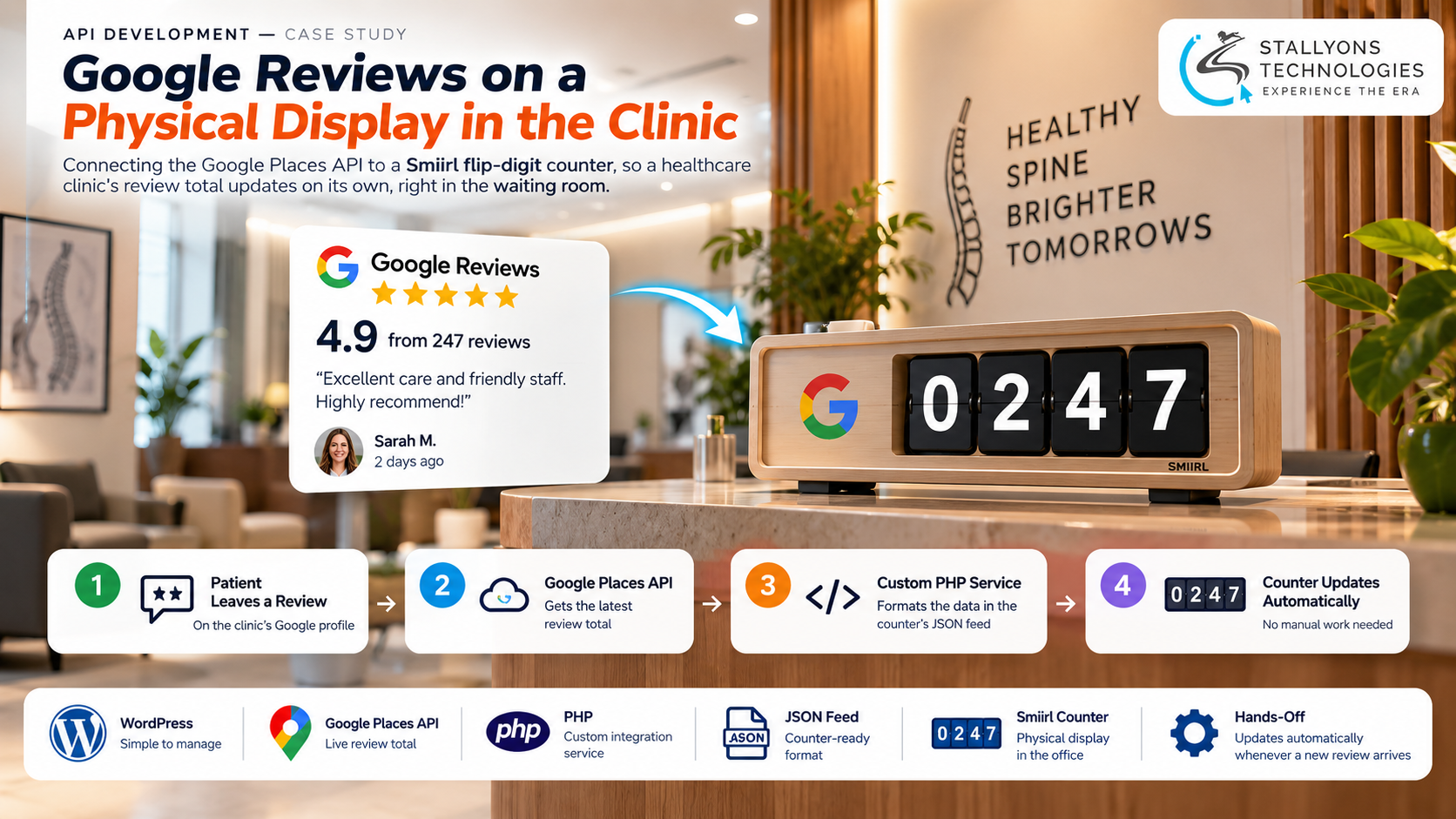
A patient sits in the waiting room of a chiropractic clinic, and on the wall a small row of physical digits flips over to a new number. That number is the clinic’s Google review total, and it climbs on its own every time someone leaves a review. The clinic had bought the display, a Smiirl flip-digit counter, for exactly that reason: a visible, growing count builds trust and nudges happy patients to add a review of their own.
The catch is that the counter does not read Google by itself. It needs a custom data feed, and that feed needs a Google API key. The clinic had neither, and the team are clinicians, not developers, so nobody knew how to set any of it up. Live Review Counter is the integration we built to close that gap, a service that reads the clinic’s review total from Google and hands it to the counter in the exact format the device expects, so the number on the wall stays current without anyone touching it.
Put simply, a patient leaves a Google review, Google records it, and the counter in the waiting room updates by itself. No one on the clinic’s team has to log in, copy a figure, or edit anything.
The Starting Point: A Counter That Could Not Read Google
The clinic owned the hardware and had a healthy Google profile. What was missing was the connection between them, and the people to build it. That set a short but strict list of requirements, each one shaped by a team that does not work in code.
- Connect the counter to Google. The display could show any number fed to it, but it had no way to fetch the review total from the clinic’s Google profile on its own.
- Create an API key from scratch. Reading the review total needs a Google API key, and the clinic had never opened a Google Cloud account.
- Keep every step simple. The staff are chiropractors and front-desk team, so each setup task had to be explained in plain language and kept to the minimum.
- Make it hands-off. Once live, the number had to refresh by itself whenever a new review arrived, with no daily job for anyone to remember.
- Leave control with the clinic. The key and the Google account had to belong to the clinic, so it keeps full control and its own billing.
The Build: From a New Review to a New Number on the Wall
Teaching one system to hand a single, correctly formatted number to another is everyday API development work, and that is most of what this project came down to. We started with the account the clinic did not have yet, then built the small service that would do the fetching. An update to the counter runs in a set order:
- We walked the clinic through creating a Google Cloud project, enabling the Places API, and generating an API key, with advice on restricting the key so it can only do what the counter needs.
- The key stays in the clinic’s own account, so the clinic keeps control and billing sits with it rather than with us.
- We built a small PHP service that asks the Places API for the clinic’s current review total.
- The service publishes that total as a custom JSON feed, laid out in the exact format the counter reads.
- We connected the feed inside the clinic’s counter account, not on the device itself.
- We tested it by adding a real review and watched the figure change on the physical display before handing it over.
We ran it as a guided, staged piece of work rather than a code drop. We reviewed the counter, the Google profile, and the device’s own documentation first, then took the clinic through the account and key setup, built the feed and service, connected the device, and stayed on hand afterwards to sort out the one issue that came up. None of this came from a plug-in. The feed is a small piece of custom software written to match one specific device’s data format, which is why the output lines up with what the counter expects instead of forcing the clinic to accept whatever a generic tool produces. Because the connection is stored in the counter’s cloud account rather than on the hardware, the clinic can move the display anywhere it likes and the feed keeps working.
Technical Architecture
The whole thing is deliberately light. It runs on standard hosting, reads one number from an official source, and writes it out in one specific format. Each piece has a single job.
- Data source. The Google Places API is the official source of the clinic’s review total, read with the clinic’s own API key.
- Integration service. A small PHP web service fetches the total, checks it, and prepares it for the counter. It is light enough to run on ordinary hosting.
- Custom JSON feed. The service publishes the number at a fixed URL in the JSON layout the Smiirl counter expects, so the device can read it directly.
- The counter. The Smiirl flip-digit display shows the figure in the waiting room and refreshes from the feed on its own.
- Counter cloud account. The feed is linked in the device’s online account, which is why the counter survives being unplugged and moved.
The part that needed real care was not reading the number. It was matching the output to the counter’s own data format down to the field, because the device only updates when the feed is shaped exactly the way it expects. Get one key wrong and the display stays blank, with nothing on screen to tell you why.
Challenges Solved
The clearest problem showed up a few days after launch, when the display went blank. We traced it to Google refusing the requests because billing had not been switched on in the clinic’s Google Cloud project. We pointed the clinic to the one setting to change, and once billing was enabled the counter came back on its own. Nothing in the integration had broken; Google had stopped answering until the account was complete.
The other challenges were about people and placement more than code. The team had never dealt with hosting, API keys, or JSON, so every step was explained in plain terms and the clinic was only ever asked for what each stage needed. The counter also needs a wired network connection, which limits where it can sit. Because the feed lives in the counter’s cloud account rather than on the device, the clinic can plug the display in wherever suits the waiting room and the number keeps updating.
The Result
The clinic now has its live Google review total flipping over on a counter in the waiting room, updating by itself as patients leave reviews, with no one on the team logging in or editing anything. The clinic owns the Google account and the API key, so it stays in control of the connection and its own billing, and it can move the display wherever it wants. A visible, climbing number does the quiet work of reminding happy patients that leaving a review takes a moment.
If you have a device or a dashboard that needs a feed like this, you can hire PHP developers who have built this kind of lightweight integration, or tell us which system you want showing on your counter and our US-registered team will scope the feed and the key setup for you. The same approach suits clinics and healthcare practices that want social proof on display without adding work for a non-technical team.
Frequently Asked Questions
What is Live Review Counter?
It is a small integration that connects a clinic’s Google review total to a Smiirl flip-digit counter. A PHP service reads the total from the Google Places API and publishes it as a custom JSON feed in the format the counter expects, so the number on the physical display updates on its own.
Who owns the Google API key?
The clinic does. We guided the team through creating their own Google Cloud project and key, so the account, the key, and the billing all stay with the clinic. We built the feed that uses it, but control never leaves the clinic.
Does the counter update automatically?
Yes. Once the feed is connected, the counter reads the latest review total on its own whenever a new review arrives. No one on the clinic’s team has to log in, copy a figure, or edit the display by hand.
Why did the counter go blank after launch?
Google had stopped answering requests because billing was not yet enabled on the clinic’s Google Cloud project. Enabling that one setting brought the counter back on its own. The integration itself had not failed; the Google account just needed to be complete.
Can the counter be moved around the clinic?
Yes. The feed is connected in the counter’s cloud account rather than on the device, so the display keeps working wherever it is plugged in, as long as it has a wired network connection.