


Blog
Dar-ul-Quran: A Zoom
& Payment API Integration
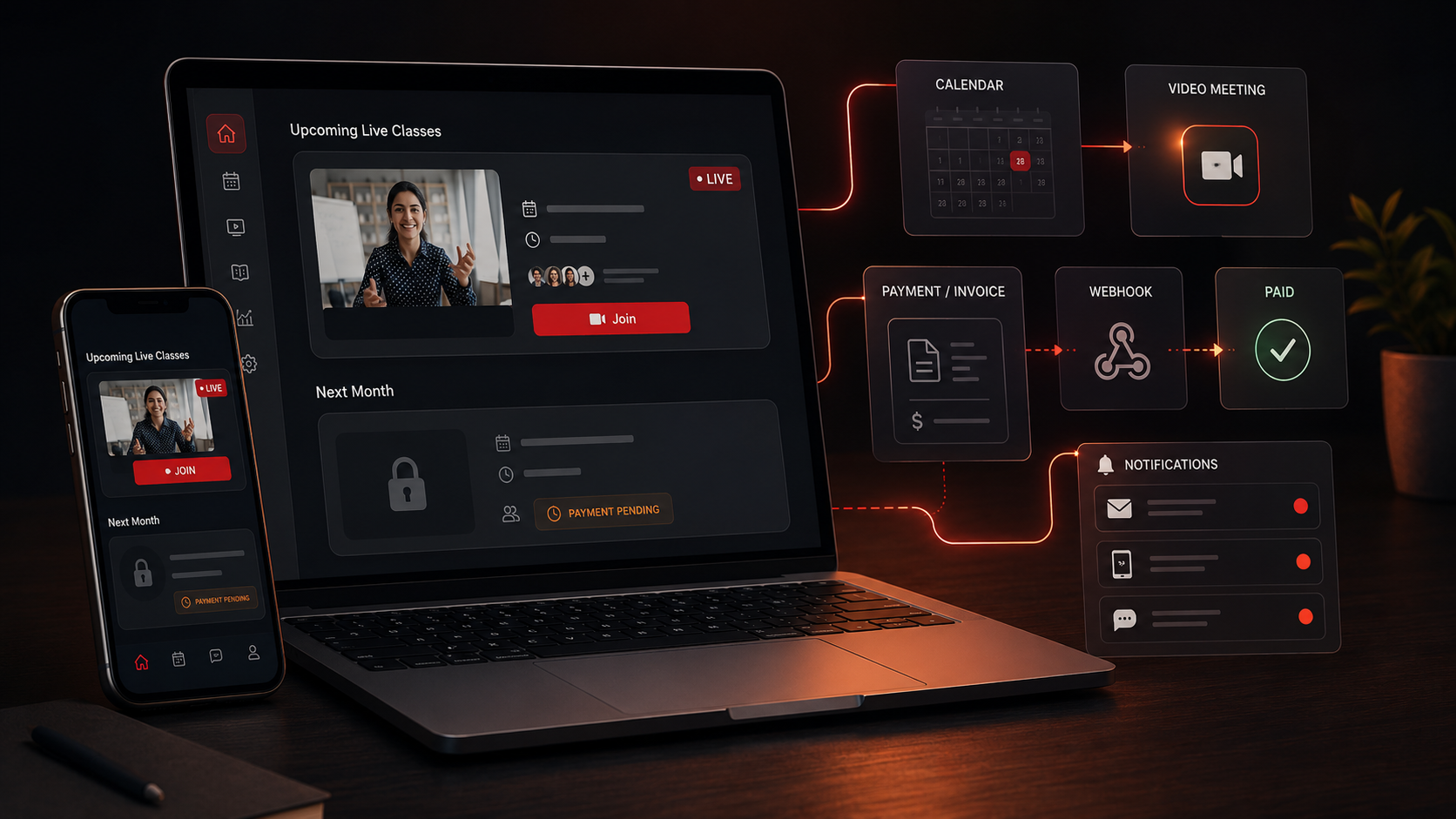
A teacher opens a calendar and schedules next week’s Quran class. That is the entire action. No Zoom login, no copying a meeting link into an email, no checking who has paid this month. The meeting is created, the link reaches exactly the right students, and only the students who have paid can join. Everything after the teacher picks a time happens on its own.
Put simply, Dar-ul-Quran is an online platform for live Quran classes, and its core is two API integrations working in step: the Zoom API that turns a scheduled class into a live session automatically, and a payment gateway whose status decides who is allowed in. Built on Laravel, the platform ties meeting creation and student access to a single source of truth, whether the student has paid, so live classes and access manage themselves. This case study is about those integration problems, how we solved them, and the result.
The Starting Point: Live Classes That Should Just Work
Dar-ul-Quran connects students and teachers, with an admin overseeing the whole system. Its value is that live classes and access simply work, and delivering that meant solving several integration problems around Zoom and payments at once.
- Teachers should never touch Zoom. A class has to become a live meeting automatically, so the system, not the teacher, creates the Zoom meeting and its link.
- The right link must reach the right students. Each session’s unique link has to get to exactly the registered students and be joinable from inside the platform, not by passing Zoom links around.
- Access has to follow payment. Only students who have paid may see and join a month’s classes, so class and Zoom access must be tied to a live payment status.
- Payment status must be real-time. When a student pays, access should unlock at once, which means reacting to the gateway rather than waiting or checking by hand.
- Billing and reminders cannot be manual. Monthly invoices, payment reminders, locking after the due date and a grace period all have to run on their own.
- Zoom and payments can fail. Tokens expire, calls time out and classes get rescheduled, so both integrations have to stay correct through change.
The Build: Zoom Meetings on Autopilot, Access Gated by Payment
Both integrations sit behind a Laravel backend so they run automatically and stay in step. For live classes, the platform uses its own server-to-server Zoom credentials rather than any teacher’s account, so class creation is fully automatic and nobody has to log in or share a link. That server-to-server design is exactly the kind of API integration services work that removes a manual step people would otherwise repeat every week.
When a teacher schedules a session, the live-class flow runs in order:
- A queued job calls the Zoom API with the platform’s own server-to-server credentials to create the meeting and a unique join link.
- The link is stored against the session and sent to the registered students through in-app notifications and email.
- Both students and teachers join through a single button in the platform, with no Zoom link to hunt for.
- Recurring classes have their meetings created ahead of time, and when a class is rescheduled the Zoom meeting is updated and students are notified.
Access is gated on payment. Scheduled jobs generate each student’s next-month invoices from their registered classes, and the payment gateway takes bank-transfer or card payments and reports success through webhooks, which flip the invoice to Paid and unlock access immediately. Until then, the next month’s classes stay locked behind a clear payment-pending message, and reminders go out by email, in-app and SMS during the last week, with a grace period before access is fully denied. Every Zoom and gateway call runs in a queued job with token handling and retries, which is where careful Laravel development keeps an expired token or a timeout from dropping a meeting or a payment update.
Technical Architecture
The architecture is a Laravel backend that integrates the Zoom API and a payment gateway, with access control tying them together, behind student, teacher and admin web apps. It centres on a handful of subsystems, each mapped to a requirement.
- Automatic Zoom meetings. A queued job calls the Zoom API with the platform’s own server-to-server credentials to create the meeting and a unique join link, so the teacher never logs into Zoom.
- Link distribution and in-platform join. The unique link is stored against the session and sent to registered students by notification and email, and both teachers and students join with one in-platform button.
- Payment-gated access. Class visibility and the Zoom join are gated on the student’s invoice status, so only students marked Paid can see and join the next month’s classes.
- Payments and real-time status. The gateway handles bank-transfer and card payments, and its webhooks update the invoice to Paid in real time, which unlocks access at once.
- Monthly invoicing and reminders. Scheduled jobs generate each student’s next-month invoice, send reminders by email, in-app and SMS, and lock access after the due date and grace period.
- Reschedules, recurring and resilience. Recurring classes create meetings ahead of time, reschedules update the Zoom meeting and notify students, and Zoom and gateway calls run in queued jobs with token handling and retries so they do not fail silently.
Challenges Solved
Each problem was met in a specific way. Turning a scheduled class into a live meeting was solved by the server-to-server Zoom API creating the meeting and link the moment a class is booked, so classes become live sessions with no teacher effort. Getting the link to the right people was solved by storing it on the session, sending it to enrolled students, and opening it with one join button, so there is no manual link sharing and nothing to lose. Tying access to payment came down to gating class visibility and the Zoom join on the invoice status, so attendance and payment can never drift apart.
Unlocking access in real time was handled by gateway webhooks flipping the invoice to Paid and opening access on the spot, with no waiting and no manual checks, the sort of billing behaviour that fintech and subscription-billing products depend on. Running billing without hands was solved by scheduled jobs that generate invoices, send reminders and enforce the grace period, so the monthly cycle runs itself. And staying reliable through expiring tokens and rescheduled classes came from queued jobs with token handling and retries, plus meeting updates on reschedule, so neither integration fails silently.
The Result
The outcome is a platform where live classes and access run themselves. A teacher schedules a class and the Zoom meeting, its link and the student notifications happen automatically. Students and teachers join with one button. Only students whose payment is confirmed can see and join the month’s classes, and the moment a payment clears a webhook unlocks access without anyone lifting a finger. Around this sit role-based dashboards for students, teachers and admins, messaging, rescheduling with approval, and monthly invoicing and reminders that need no manual work, all on Laravel.
If you are building a platform where scheduling, live sessions and paid access all have to stay in step, you can hire Laravel developers who have integrated Zoom and payment gateways into one automated backend, or tell us how your platform works and we will map your meetings, payments and access to flows that manage themselves.
Frequently Asked Questions
Can a platform create Zoom meetings automatically without teachers logging in?
Yes. Dar-ul-Quran uses the Zoom API with the platform’s own server-to-server credentials, so a queued job creates the meeting and a unique join link the moment a class is scheduled. No teacher ever logs into Zoom or shares a link, and recurring classes have their meetings created ahead of time.
How do you stop unpaid students from joining classes?
Class visibility and the Zoom join are both gated on the student’s invoice status. Only students whose payment is marked Paid can see and join the next month’s classes, so attendance always matches payment. Until payment clears, those classes stay locked behind a clear payment-pending message.
How does access unlock the moment a student pays?
The payment gateway reports a successful payment through webhooks, which flip the invoice to Paid and unlock access immediately. Because the platform reacts to the gateway rather than polling on a schedule or checking by hand, access opens the instant a payment clears.
What happens if a Zoom or payment call fails?
Every Zoom and gateway call runs in a queued job with token handling and retries. An expired token or a timed-out call is recovered rather than dropping a meeting or a payment update, and admins can adjust access by hand when a payment needs manual attention.
How are monthly invoices and reminders handled?
Scheduled jobs generate each student’s next-month invoice from their registered classes, send reminders by email, in-app and SMS during the last week, and lock access after the due date and grace period. The whole billing and access cycle runs unattended.