


Blog
A Wix Membership
Registration Website with Auto-Approval
The worst kind of bug is the one that locks people out. On this mobility and strength assessment platform, employees who had been added in bulk by an admin received a friendly welcome email asking them to set a password, clicked through, and could not. They were marked pending approval, so the password step did nothing and their accounts were dead on arrival. Fixing that, safely, was the heart of the project.
This is a Wix registration website for a mobility and strength assessment business, serving two kinds of user: direct sign-ups from the public, and employees registered in bulk by an admin on behalf of client companies. The work enhanced and repaired both flows, with the blocking approval bug as the priority.
Put simply, CSV-imported employees are now auto-approved as full members and can set passwords and use the site straight away, the direct sign-up and free-trial flow was smoothed, trial scores carry through an upgrade, and the whole change was scoped and tested so existing paying users were never at risk.
The Starting Point: A Registration System That Locked People Out
The project centred on registration, and several problems had to be solved without disturbing the members already paying to use the platform:
- Employees stuck as pending. The pressing issue: employees imported by the admin were not approved, so the welcome emails asking them to set a password did not work and they could not get in.
- A change that must not break paying users. The fix had to be made without risking existing, paying members, so it had to be careful and well-tested.
- Trial scores lost on upgrade. When a user moved from the free trial to the full program, their assessment scores were not carried over.
- A smooth direct sign-up and trial. Direct users needed a clear path from one button through registration to the free mobility assessment and their score.
- Plans with different rules. Two subscription plans, monthly and annual, were needed, with different usage limits and clear handling when a subscription lapses.
- Resuming an unfinished assessment. A user who closed the browser part-way through an assessment needed to finish it that month rather than lose it.
The Build: Fix Approval at the Source, Protect the Payers
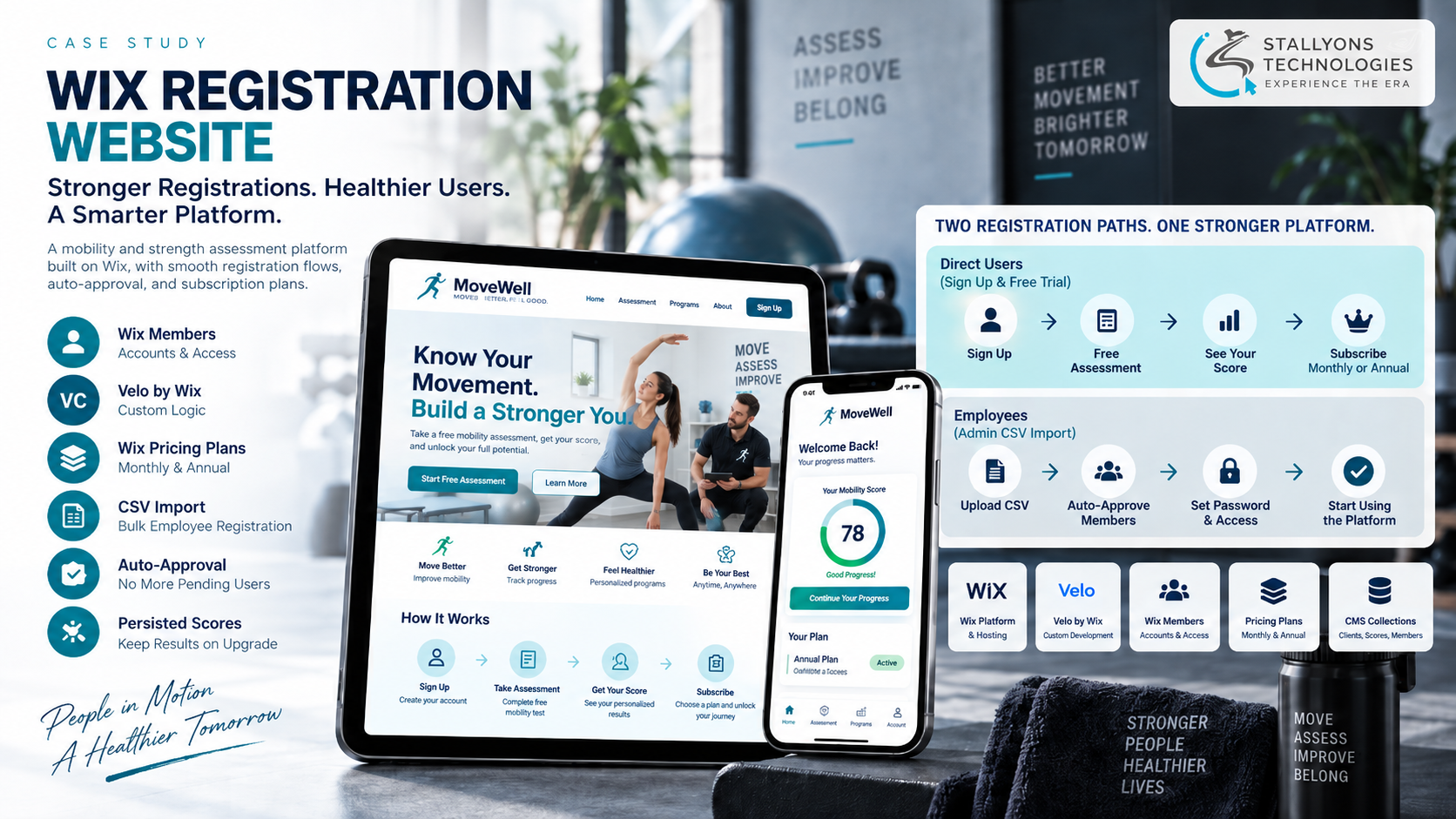
The central fix changes how admin-imported employees are registered. When the admin uploads a client’s employees as a CSV, selects the company and processes the registrations, the code now marks those new members as auto-approved rather than pending. As a result they can act on their welcome emails, set their passwords and access the site straight away. The change was scoped to this one admin CSV flow and tested before going live, so approved and paying users were left untouched, which the client insisted on. That careful, custom logic on top of Wix is where our Wix website development team spends most of its effort on a build like this.
For direct users, the sign-up flow was smoothed: a clear create-an-account-and-start-free-assessment button leads to a simple registration, then the free mobility assessment, then a customized score page showing the result, the business’s own sales copy and a discounted offer. Getting that path to feel effortless, from a single button to a score a user is proud of, is as much interface work as logic, and our team gave it the same care as the fix underneath. Assessment scores are persisted, so results carry over when a user upgrades from the trial to the full program, and an unfinished assessment can be resumed within the month.
Technical Architecture
The platform is built on Wix, using the platform’s own building blocks for accounts, subscriptions and data, with Velo code only where custom logic is needed, which is a good example of pragmatic no-code and low-code development. A subscription platform with members, plans and gated content is a familiar shape for SaaS and subscription products, and the parts worth calling out here are:
- The auto-approval fix. The registration code is changed so CSV-imported employees are auto-approved as full members and can set passwords and access the site at once.
- A safe, scoped change. The fix is limited to the admin CSV flow and tested before release, so existing approved and subscribed users are untouched.
- The admin CSV flow. A client’s employees are uploaded as a CSV into the CMS clients section; the admin selects the company and processes the registrations into approved members.
- Accounts and data. Wix Members handles accounts and CMS collections hold the imported clients, scores and members.
- Direct sign-up and trial. A single button leads to registration, the free mobility assessment and a customized score page with the score, sales copy and a discounted offer.
- Subscriptions and access. Monthly and annual plans run through Wix Pricing Plans, monthly members limited to each program once a month and annual members unlimited, with the members area gated so a lapsed subscription prompts a resubscribe.
The admin registration that used to strand people is now a clean, ordered flow that ends with active accounts:
- The admin uploads a client’s employees as a CSV into the CMS clients section.
- They select the company those employees belong to.
- They process the registrations, and the code creates the new members as auto-approved.
- Each employee receives their welcome email and sets a password.
- They sign in and use the site straight away, with no pending-approval wall in the way.
Challenges Solved
Unblocking imported employees was the priority, solved by auto-approving them as full members where the CSV registrations are processed, so their welcome emails and password setup work at once. Protecting the paying users meant scoping the change to the admin CSV flow and testing it before release, so existing subscribers were left completely untouched. Keeping trial scores meant persisting assessment results across the upgrade, so a user does not lose their numbers moving from trial to full program. Smoothing onboarding meant a single button into registration, the free assessment and a customized score page with an offer. Setting up the commercial side meant monthly and annual plans through Wix Pricing Plans, with the right usage limits and lapse handling. And not losing work meant tracking completion so an unfinished assessment can be resumed within the month.
The Result
Both registration paths now work cleanly. Imported employees are approved and active the moment they are created, so their welcome emails and passwords do what they promise, and the existing paying members were never disturbed. Direct users move smoothly from a single button through the free assessment to a score, sales copy and a discounted offer, keep their scores when they upgrade, and can resume an unfinished assessment within the month. Monthly and annual plans run through Wix Pricing Plans with the correct limits and a clear resubscribe prompt when a plan lapses.
If you are building or repairing a membership site with trials, subscriptions and bulk onboarding, you can hire UI/UX designers and developers who handle both the flow and the logic, or tell us about your registration problem and we will scope a safe fix.
Frequently Asked Questions
Why could imported employees not access their accounts?
They were created as pending approval, so although they received welcome emails asking them to set a password, the approval had never been granted and the password step did nothing. The fix auto-approves CSV-imported employees so they can set passwords and sign in straight away.
How was the fix kept safe for existing paying users?
The change was scoped to only the admin CSV registration flow and tested before going live, so approved and subscribed members were never touched. Protecting the paying users was a firm requirement, and the fix was written and released with that limit in mind.
Do users keep their assessment scores when they upgrade?
Yes. Assessment scores and results are persisted, so when a user moves from the free trial to the full program their results carry over, and an unfinished assessment can be resumed within the same month rather than lost.
How do the subscription plans work?
Two plans run through Wix Pricing Plans: monthly members are limited to each program once a month, and annual members are unlimited. The members area is gated, so when a subscription lapses the user is prompted to resubscribe before they can continue.
How does a company register its employees in bulk?
An admin uploads the company’s employees as a CSV into the CMS clients section, selects the company, and processes the registrations. The code creates those employees as auto-approved members, so each one can set a password from their welcome email and start using the site.