


Blog
Agent CRM Case
Study: A One-Click Chrome Extension for Contact Capture and Form Fill
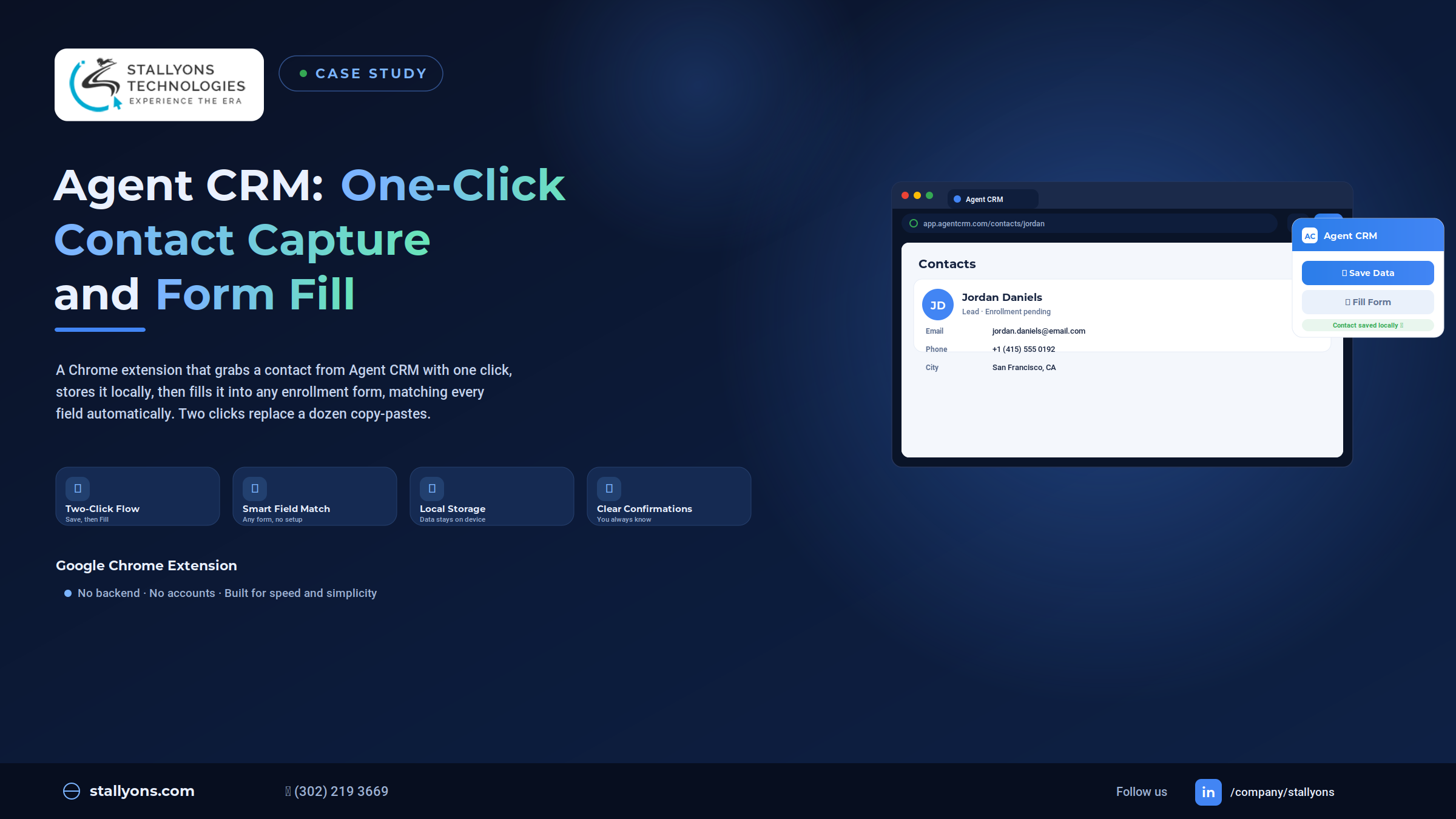
Here is a cost most teams never put a number on. Every time someone copies a contact out of a CRM and retypes it into an enrollment form, they lose a minute or two and risk a typo in an email or phone number. Do that across hundreds of contacts a week and it quietly adds up to hours of wasted, error-prone work that nobody enjoys.
Our team at Stallyons was asked to delete that cost. The result is a small, fast Chrome extension, a piece of CRM workflow automation that turns the whole chore into two clicks. The user clicks Save Data on a contact in Agent CRM, then clicks Fill Form on any enrollment page, and the extension matches the fields and fills them in. No mapping, no setup, no retyping. Here is how it works and why we built it the way we did.
Project Snapshot
In short, this is a single-purpose tool that trades features for focus.
- Product type: A lightweight Google Chrome extension
- Two actions: Save Data on Agent CRM, and Fill Form on any other site
- The smart part: Automatic field matching on forms it has never seen
- By design: Local storage on the user’s machine, no backend, no accounts
- The payoff: A dozen copy-pastes replaced by two clicks
Keeping the tool this focused was a deliberate choice. There is less to learn, less to maintain, and nothing to slow the user down.
The Hidden Cost of Manual Data Entry
Moving contact details from a CRM into enrollment forms by hand is one of those small tasks that quietly drains time and invites mistakes. The problems stack up quickly.
The same details get typed again and again, since a contact’s name, email, and phone live in Agent CRM but have to be re-entered into every separate form. Copying by hand is slow, because switching between the CRM and the form and copying one field at a time adds up across many contacts. Manual entry breeds errors, and a single wrong digit in a phone number or a typo in an email can cause real problems later. Every form is laid out differently, so there is no reliable copy-paste shortcut. And above all, it is dull, repetitive work, exactly the kind of task that wears people down and is far better handled by a tool.
The Solution: Two Clicks Instead of a Dozen
The extension replaces all of that manual copying with two simple clicks, one to save a contact and one to fill a form, and it stays out of the way otherwise.
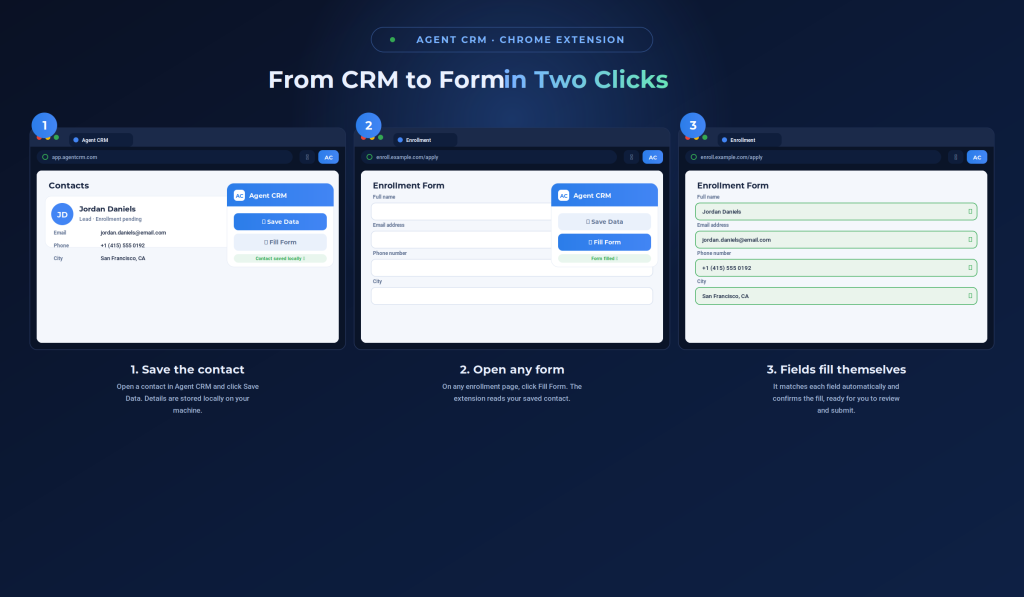
The first click is Save Data. When the user is viewing a contact in Agent CRM, they click it, and the extension reads the details, such as name, email, and phone, straight from the page and stores them locally on the user’s own computer. It only does this while the user is on Agent CRM, so its behavior is clear and predictable. The second click is Fill Form. On an enrollment page anywhere else, the user clicks it, and the extension takes the saved contact and enters each detail into the right box on that form. After each action, a clear confirmation tells the user it worked, so there is never any doubt.
Smart Field Matching That Needs No Setup
The real magic is that the extension figures out each form by itself. It inspects the page, decides which box is for the name, which is for the email, which is for the phone, and places every detail where it belongs. Because it matches fields automatically, it works on forms it has never seen before, without the user mapping anything in advance. That is what makes it reusable across every enrollment site a user visits. The honest limit of a no-setup matcher is that it reads a form by its structure, so an unusual layout, an unlabeled field, or a custom widget can leave a box unmatched. That is exactly why every action ends with a clear confirmation, so the user can glance at the result before submitting rather than trust it blindly.
Local, Private, and Deliberately Simple
The contact details are stored locally, on the user’s own machine, not sent to any server. There is no account to manage and no backend to worry about. This keeps the tool light and quick, keeps the data close to the user, and removes anything that could slow it down. Simplicity here is a feature, not a limitation.
How We Built It: The Chrome Extension Approach
Here is where the engineering choices come together. This is a lightweight Chrome extension that runs right in the browser, which is exactly where both the CRM and the enrollment forms already live. That placement is the whole point, because the tool can read from one tab and fill in another without any external plumbing.
The build is deliberately lean. Capture is scoped to Agent CRM, so the extension only reads contact data on that site and never grabs anything elsewhere. The saved contact is held in local storage on the user’s device. On a form page, on-page field detection inspects each input and decides what it is, then fills it. Nothing happens automatically, so the user stays fully in control, clicking Save Data to capture and Fill Form to fill. This kind of focused, browser-native tooling is the heart of our Chrome extension development: building a small extension that does one job perfectly and disappears into the workflow.
The Technology Behind It
The whole thing is a Google Chrome extension, chosen because it runs in the browser where the CRM and the enrollment forms both already live. Data capture reads the Agent CRM contact page, pulling name, email, phone, and more, but only while the user is on Agent CRM. The captured contact is held in local storage on the device, so there is no server and no account, and the data stays close to the user. On a form page, on-page field detection works out which box is for which detail so it can handle almost any layout, automated field entry places each saved detail into the right box, and on-screen messages tell the user clearly when data has been saved or filled.
The Payoff in Practice
The value shows up as time saved and errors avoided. Here is what the extension changes day to day.
- Hundreds of contacts move from CRM to form in moments instead of minutes each.
- Transcription errors drop close to zero, because nothing is retyped by hand.
- There is no training curve, since the whole tool is two buttons and a confirmation.
- There is no maintenance overhead, because there is no server or account to run.
Each of those maps directly to money saved or risk removed, which is exactly what makes a tool like this worth commissioning.
The Results
The finished product is a small, fast Chrome extension that wipes out a tedious piece of daily work. The user clicks Save Data on an Agent CRM contact, and the details are read and stored locally. They click Fill Form on an enrollment page, and the fields are matched and filled, each step ending with a clear confirmation. The tool is scoped to read only from Agent CRM, keeps the data on the user’s own machine, and matches form fields automatically so it works on different forms with no setup.
For the client, the outcome was a slow, error-prone copying job turned into a smooth two-click task, delivered lean and easy to live with. For us, it is a clean example of scoping a tool tightly and building it to do one thing exceptionally well.
Need a Custom Chrome Extension for Your Workflow?
Repetitive browser work is everywhere. Copying between tabs, filling the same forms, syncing data across tools, all of it is precisely what a well-scoped Chrome extension can erase. We design small, focused extensions that fit neatly into how your team already works, then get out of the way, the same approach behind the Gmail work-order Chrome extension we built for a different team’s daily workflow. When a build needs deeper interface work, teams can also hire front-end developers to extend it.
If you have a tedious browser task and want it gone, that same approach can turn it into a single click.
Ready to Automate the Boring Part?
The best tools save time on every single use. If you want a partner who can turn your most repetitive browser chore into a one-click action, we would love to help. Explore our custom Chrome extension development, then book a discovery call and tell us what you want to automate.
Frequently Asked Questions
What can a custom Chrome extension automate?
A Chrome extension can automate almost any repetitive browser task, such as capturing data from one site, filling forms on another, syncing information between tools, or adding controls to pages you use every day. The Agent CRM extension automates contact capture and form filling.
How does automatic form field matching work?
Instead of relying on a fixed map, the extension inspects each form on the page, works out which field is for the name, email, or phone, and fills each one accordingly. This lets it handle forms it has never seen before, with no setup from the user.
Is my data safe if a Chrome extension stores it locally?
Storing data locally means it stays on the user’s own device rather than on an outside server. For the Agent CRM extension, the captured contact never leaves the machine, which keeps the tool simple and the data close to the user.
How long does it take to build a custom Chrome extension?
It depends on scope. A focused, single-purpose extension like this one is far quicker to build than a large tool with accounts and a backend, which is one reason keeping the scope tight pays off.