


Blog
iOS App Development
Case Study: An Accessible, Offline Museum Audio Guide
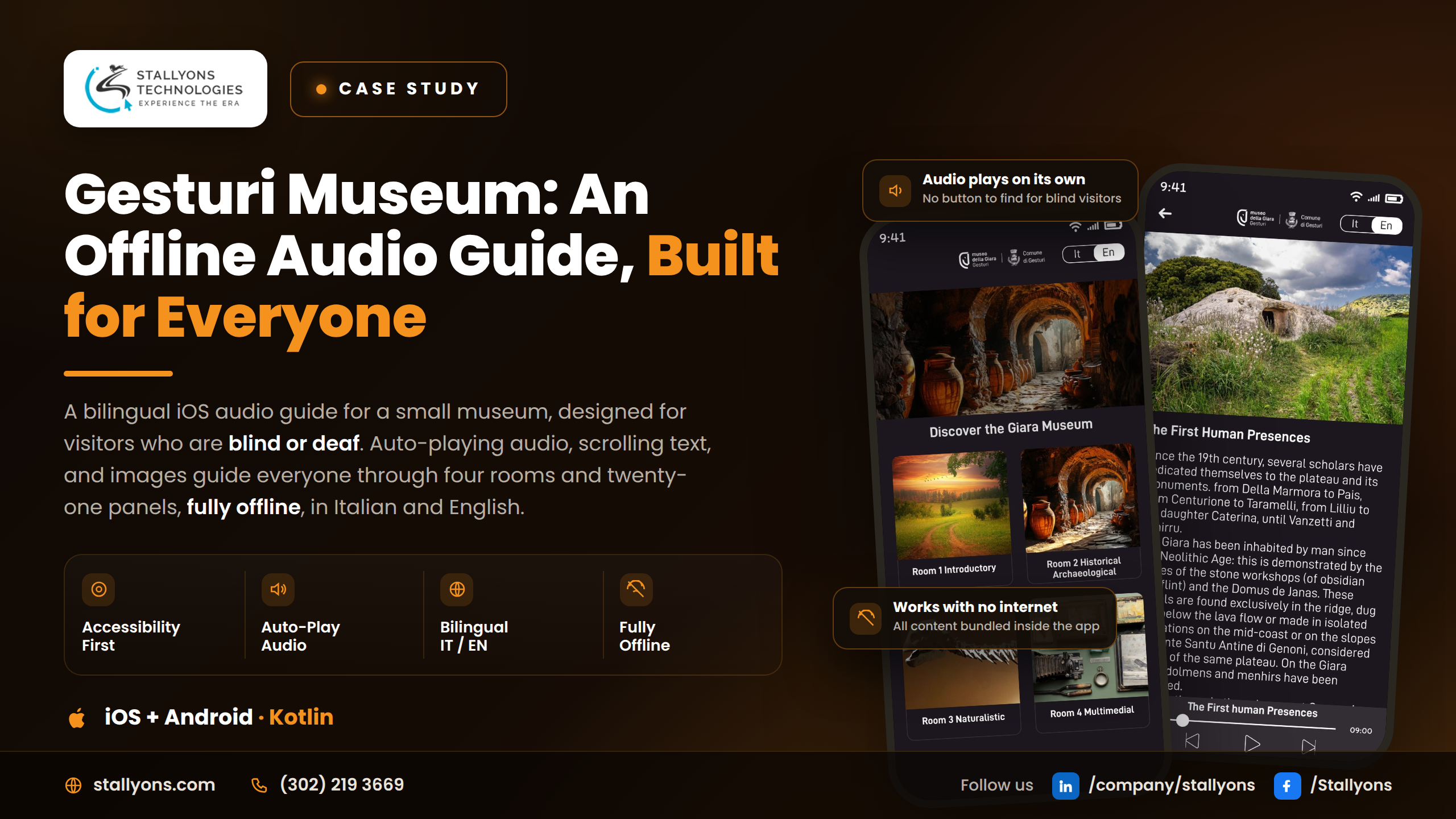
Imagine two visitors standing in front of the same museum panel. One of them is blind: the neat printed paragraph on the wall, the dates, the story of the plateau and its ancient burials, none of it reaches her. The other is deaf: when a guide begins to speak, or an audio-only handset starts to play, the words simply pass him by. Same room, same exhibit, two people quietly shut out in opposite ways.
The Gesturi Museum app was built for exactly those two visitors, and for everyone standing between them. It’s a bilingual audio guide and a small piece of education and cultural software, delivered on iOS (and Android) from a single codebase, designed so that a blind visitor can hear every panel and a deaf visitor can read and see it, all fully offline, deep inside a museum where there’s no signal at all. This is the story of how a small, kind idea became a genuinely inclusive product.
Put simply, you choose a language, pick a room, open a panel, and listen. The app guides every visitor, including those who are blind or deaf, through four rooms and twenty-one panels, fully offline, in Italian and English.
Why Small Museums Leave Visitors Behind
A small museum is full of things worth sharing, and yet the usual ways of sharing them quietly exclude people. It’s worth naming exactly who gets left out, because the solution has to answer every one of these at once.
A printed panel on a wall means nothing to a blind visitor, so without audio a large part of the museum is simply closed to them. A guided tour or an audio-only handset does the reverse, leaving a deaf visitor with nothing to follow. Language adds another wall: a museum welcomes people from everywhere, but a single-language guide only serves some of them. Then there’s the building itself, thick walls and basements that kill any internet signal, so a guide that depends on the cloud may not work in the very spot the visitor is standing. And underneath all of it sits money: rented audio-guide hardware and complex systems are far beyond what a small museum can spend. What they need is something simple, owned, and affordable.
Any one of these is a real barrier. Together, they’re the reason so many small museums stay partly out of reach.
The Idea: Turn the Visitor’s Own Phone Into a Guide for Everyone
The insight was to stop thinking about special hardware and start using the device already in every visitor’s pocket. One clean app, two languages, no internet, designed from the first screen to serve sighted and blind, hearing and deaf, all through the same simple flow. Nobody downloads a different app or joins a different tour. Everyone follows the museum together.
How the App Works: A Three-Tap Journey
The whole experience is deliberately shallow, just three levels deep, so a visitor spends their attention on the museum, not on the interface.
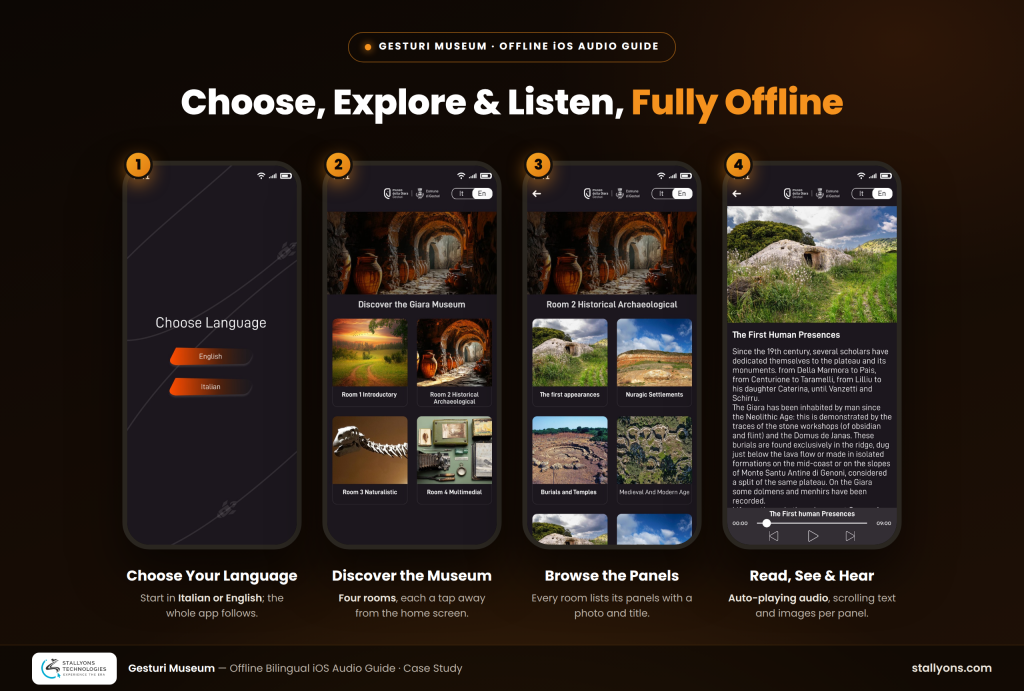
It opens on a home page where the visitor chooses Italian or English, and immediately sees the museum’s four rooms, each with a photo and a name. From there, tapping a room opens a room page listing the panels inside it, again each with a photo and a name, so it’s obvious at a glance what’s there. Tapping a panel opens the panel page, the heart of the app: a photo, a scrolling text of around nine hundred characters, and an audio reading of that text that begins on its own. Two buttons move to the previous or next panel, and each time, the new audio starts automatically. A visitor can walk a whole room and simply listen, with barely a tap.
Accessibility Designed In From the First Line, Not Bolted On
Most apps treat accessibility as a checklist at the end. Here it was the entire point, and four choices show it.
The app was built for blind and deaf visitors from the start: sound carries the museum to those who can’t see, while clear text and full-size images carry it to those who can’t hear, both served by the same screen. The audio plays on its own, the moment a panel opens and again whenever the visitor moves between panels, which matters most for a blind visitor who would otherwise be hunting for a play button on a screen they can’t see. The app is fully offline, with every word, image, and audio file bundled inside it in both languages, so it works in any corner of the building and the museum never has to worry about guest wifi. And it’s bilingual in one simple app, welcoming local and visiting guests without adding a single layer of complexity.
Under the Hood: The iOS Build
The Gesturi Museum app is built with Kotlin and ships on iOS and Android from a single-codebase iOS and Android build, which keeps a small museum’s app affordable to build and maintain. It’s designed to be simple and entirely self-contained: all of the content is packaged inside the app, so it runs on the visitor’s phone with no server and no connection. Getting an offline, accessibility-first iOS app to feel this effortless, auto-playing the right audio the instant a panel appears and staying fast even on older devices, is the kind of detail that separates a considered build from a rushed one, and it’s what careful iOS app development looks like.
A few things are worth calling out. Everything is bundled in, so the app never has to reach the internet. The audio is automatic, firing the right file as soon as a panel opens and whenever the visitor moves between panels. The content is a fixed, known set, one home page, four rooms, and twenty-one panels per language, which keeps the app small and reliable. And because it’s all local, the app stays light on the phone, fast even on older hardware.
The honest trade-off of bundling everything inside the app is that the content becomes fixed in place. Because every word, image, and audio file ships inside the build in both languages, the guide is rock-solid with no signal, but changing a single panel’s text or adding a new room means releasing an app update through the stores rather than editing anything live. For a settled exhibition of four rooms and twenty-one panels that is a fair bargain; for content that changed every week it would not be.
The Problems We Had to Solve
Serving blind and deaf visitors with a single app was the central challenge; the easy path would have been two apps or leaving one group out, and the better path was one clean design where sound and text carry the same story. Making audio effortless for people who can’t see meant starting it automatically, on open and on every move between panels, since a play button is useless to someone who can’t find it. Working with no internet at all meant bundling every text, image, and audio file inside the app in both languages, so it runs anywhere. And keeping it affordable for a small museum meant one Kotlin codebase for both stores, a simple fixed structure, and no server to run.
The Outcome
The result is a warm, simple audio guide that works on iOS and Android and includes everyone. A visitor chooses Italian or English, picks one of four rooms, and opens any of twenty-one panels to see a photo, read a scrolling text, and hear it read aloud automatically, moving from panel to panel with the audio always starting on its own. Blind visitors follow the museum by sound, deaf visitors follow it by text and images, and every visitor chooses their language. Because all the content lives inside the app, it works in every corner of the building with no connection needed. A small museum becomes a place that genuinely welcomes every visitor, using content it already had, shaped into something kind, simple, and complete. For a very different offline-first iOS brief from the same team, see how we built an offline-first iOS field app for transport surveys with no signal.
Planning an iOS App of Your Own?
Whether it’s an accessibility-first guide, an offline-capable tool, or a bilingual app for a specific audience, the difference between “works” and “works beautifully for everyone” is in the details, the auto-playing audio, the offline bundle, the flow that needs almost no tapping. If you’re planning something on iOS and want it done with that level of care, our iOS app development services cover the whole journey, from shaping the idea to shipping on the App Store. If that sounds like your project, book a discovery call and tell us who you need to reach.
Frequently Asked Questions
Can you build an iOS app that works completely offline?
Yes. The Gesturi Museum app bundles all of its text, images, and audio inside the app in two languages, so once installed it needs no connection at all, which is ideal for places with poor signal like museum basements.
Can you make an iOS app accessible for blind and deaf users?
Yes, and it can be the core of the design rather than an afterthought. Here, blind visitors are served by audio that reads each panel and starts on its own, and deaf visitors by clear text and images, all in the same simple app.
Can one iOS app support multiple languages?
Yes. This app ships with full Italian and English content chosen on the first screen, and the same clean design serves both without becoming any harder to use.
Do you build native Swift or cross-platform for iOS?
Both, depending on the goal. Gesturi Museum used a shared Kotlin codebase to serve iOS and Android affordably for a small museum; for products that need deep platform-specific features, native Swift can be the better choice, and we’ll recommend based on your needs.
Is a custom iOS app affordable for a small organization?
It can be. By keeping the structure simple, bundling content offline, and using one codebase for both stores with no server to run, a focused app like this stays affordable to build and easy to maintain.